

How to Receive Stripe Webhooks on Localhost (Stripe CLI vs Webhook Relay)
Receive Stripe webhooks on localhost two ways: stripe listen for solo development, or a permanent Webhook Relay URL when a team, a staging server or several providers need the same events. Includes a Go handler and test events.

There are two good ways to receive Stripe webhooks on localhost: the Stripe CLI, which forwards your account's events to a local port for as long as it runs, and Webhook Relay, which gives you a permanent public URL that Stripe posts to and an agent that delivers each event to your machine. Use the CLI when you are the only developer and only Stripe is involved. Use Webhook Relay when a team or a staging server needs the same events, when other providers post to the same endpoint, or when events must survive your laptop being closed. Both work with no public IP and no open ports.
Stripe CLI vs Webhook Relay: when stripe listen isn't enough
# Stripe CLI: solo development, one provider, while the CLI runs
stripe listen --forward-to localhost:4242/webhook

# Webhook Relay: permanent URL, team broadcast, stored and retried events
relay forward --bucket payments http://localhost:8080/stripe
| Stripe CLI | Webhook Relay | |
|---|---|---|
| Setup in Stripe dashboard | None (CLI subscribes to your account) | Paste the bucket URL once |
| Public URL stays the same | n/a | Yes, permanent |
| Several developers get the same events | No, each runs their own CLI | Yes, every agent on the bucket |
| Events kept while your machine is off | No | Yes, retried up to 30 days or replayed on reconnect |
| Other providers on the same endpoint | No | Yes |
| Deliver to a staging or on-prem server too | No | Yes, same bucket |
| Signature verification | Temporary secret printed by the CLI | Real endpoint secret, headers forwarded unchanged |
| Request history and replay | Console output only | Dashboard logs, resend any request |
| Trigger synthetic test events | stripe trigger | Stripe dashboard test events, or Webhook Bin samples |
Both are free to start. The rest of this guide builds a small Go handler and receives real Stripe test events on localhost with Webhook Relay; the same handler works unchanged behind the Stripe CLI.
In recent years Stripe has become a major payments provider. It is loved by managers and developers for a reason. Stripe has easy to use APIs, SDKs in multiple languages and outstanding documentation. Like other payment platforms, Stripe utilizes webhooks to inform about customer, subscription, card and many other changes in the state.
While this strategy works great in production, during development it can be tricky to receive these webhooks, especially when webhooks are critical for building subscription (or recurring payment) based systems where your backend system needs to track subscription status.
In this article, we will:
- Build a simple application to handle several Stripe webhooks that indicate subscription change.
- We will use
relay forwardcommand to receive webhooks on localhost. - We will use Stripe's webhooks testings dashboard to simulate subscription change events.
Prerequisites
This post/guide assumes that you have:
- Stripe account. You can register at https://dashboard.stripe.com/register.
- Webhook Relay account. You can register at https://my.webhookrelay.com/register.
- Relay CLI, installation instructions can be found here.
- Golang environment, installation instructions can be found here: https://golang.org/doc/install.
Building application
There are many libraries available for Stripe. You can find a maintained list on Stripe's documentation page here: https://stripe.com/docs/libraries.
Our sample app is written in Go. Application source is pretty straightforward. There is only one handler to receive webhooks (documentation on how to use webhooks is here: https://stripe.com/docs/webhooks), validate signature and print to the terminal customer ID and current subscription status.
If signature validation gives you trouble, our Stripe signature verifier recomputes the Stripe-Signature digest from a payload and secret so you can compare against what your code produces:
package main

import (
    "fmt"
    "io/ioutil"
    "log"
    "net/http"
    "os"

    stripe "github.com/stripe/stripe-go"
    "github.com/stripe/stripe-go/webhook"
)

// port - default port to start application on
const port = ":8090"

// webhook event types
const (
    stripeEventTypeSubscriptionUpdated string = "customer.subscription.updated"
    // canceled subscription
    stripeEventTypeSubscriptionDeleted string = "customer.subscription.deleted"
    // card deletion event
    stripeEventTypeSourceDeleted string = "customer.source.deleted"
)

func validateSignature(payload []byte, header, secret string) (stripe.Event, error) {
    return webhook.ConstructEvent(payload, header, secret)
}

func main() {
    secret := os.Getenv("SIGNING_SECRET")
    if secret == "" {
        fmt.Println("SIGNING_SECRET env variable is required")
        os.Exit(1)
    }

    // preparing HTTP server
    srv := &http.Server{Addr: port, Handler: http.DefaultServeMux}

    // incoming stripe webhook handler
    http.HandleFunc("/stripe", func(resp http.ResponseWriter, req *http.Request) {
        body, err := ioutil.ReadAll(req.Body)
        if err != nil {
            resp.WriteHeader(http.StatusBadRequest)
            return
        }

        // validating signature
        event, err := validateSignature(body, req.Header.Get("Stripe-Signature"), secret)
        if err != nil {
            resp.WriteHeader(http.StatusBadRequest)
            fmt.Printf("Failed to validate signature: %s", err)
            return
        }

        switch event.Type {
        case stripeEventTypeSubscriptionUpdated, stripeEventTypeSubscriptionDeleted:
            // subscription status change
            customerID, ok := event.Data.Obj["customer"].(string)
            if !ok {
                fmt.Println("customer key missing from event.Data.Obj")
                return
            }

            subStatus, ok := event.Data.Obj["status"].(string)
            if !ok {
                fmt.Println("status key missing from event.Data.Obj")
                return
            }

            fmt.Printf("customer %s subscription updated, current status: %s \n", customerID, subStatus)
        case stripeEventTypeSourceDeleted:
            customerID, ok := event.Data.Obj["customer"].(string)
            if !ok {
                fmt.Println("customer key missing from event.Data.Obj")
                return
            }
            fmt.Printf("card deleted for customer %s \n", customerID)
        }
    })

    fmt.Printf("Receiving Stripe webhooks on http://localhost%s/stripe \n", port)
    // starting server
    err := srv.ListenAndServe()

    if err != http.ErrServerClosed {
        log.Fatalf("listen: %s\n", err)
    }
}
Source code can be found here: https://github.com/webhookrelay/stripe-webhook-demo.
To install and run it, in your Go working environment you can just do:
go get github.com/webhookrelay/stripe-webhook-demo
cd $GOPATH/src/github.com/webhookrelay/stripe-webhook-demo/
go install
Our application will expect Stripe webhooks on http://localhost:8090/stripe.
Receiving webhooks on localhost
To start receiving webhooks on localhost, we will use relay CLI:
relay forward --bucket stripe http://localhost:8090/stripe
flag --bucket stripe is optional but helps a lot when we restart relay CLI as it reuses the same public endpoint.
Output of the command should display your my.webhookrelay.com/v1/webhooks/{id here} public endpoint:
relay forward --bucket stripe http://localhost:8090/stripe
Forwarding:
https://my.webhookrelay.com/v1/webhooks/d52caf28-d7ce-1e90-b9e3-36294f1dca74 -> http://localhost:8090/stripe
Testing webhooks via Stripe
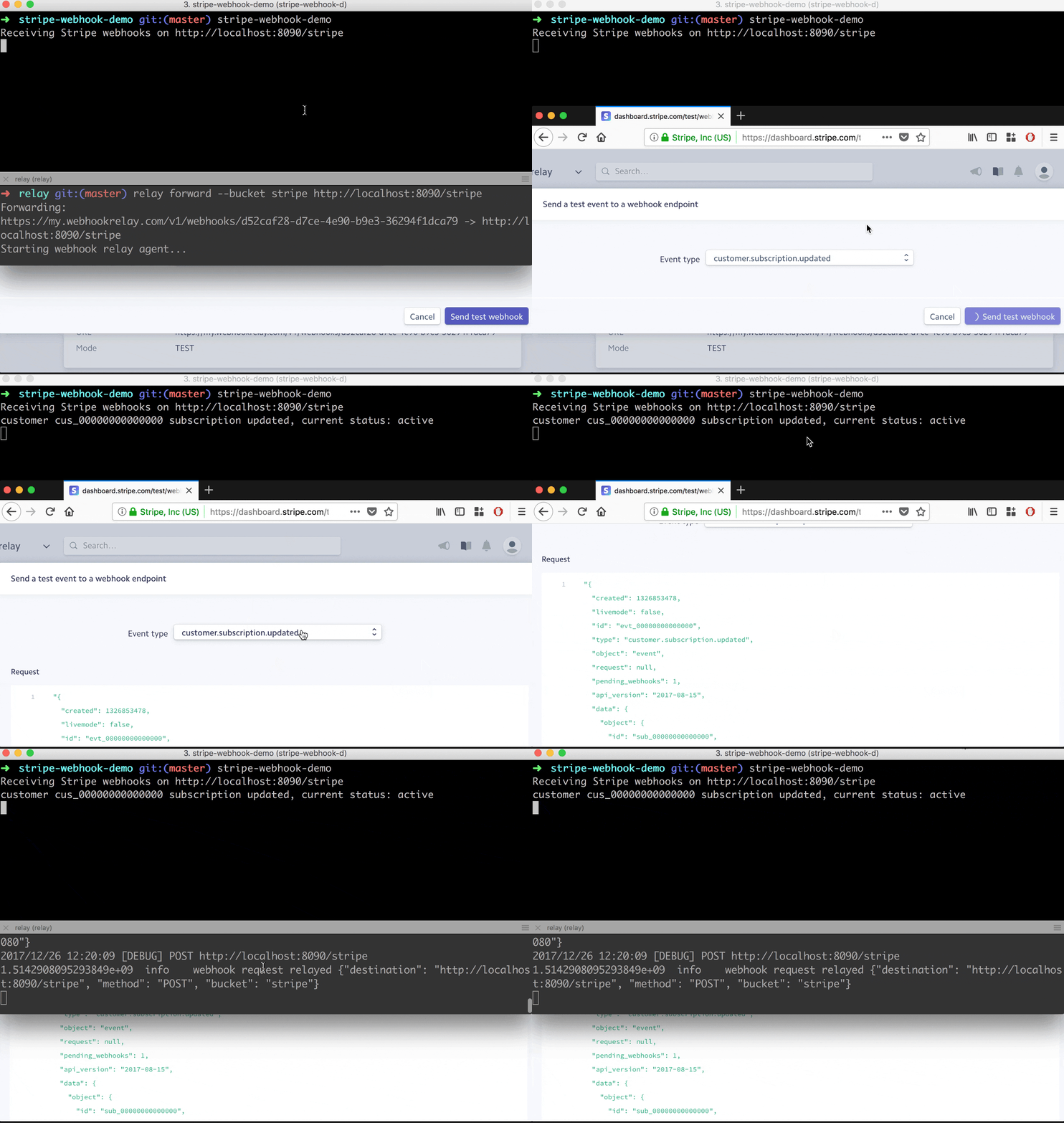
Let's go to our Stripe dashboard, API webhooks section (https://dashboard.stripe.com/account/webhooks) and:
- Add an endpoint with your unique Webhook Relay URL.
- Get a signing secret, set it for our stripe-webhook-demo application, and launch it:
$ export SIGNING_SECRET=whsec_******************************** $ stripe-webhook-demo Receiving Stripe webhooks on http://localhost:8090/stripe - Click on "Send test webhook", select
customer.subscription.updatedand send it. - View the stripe-webhook-demo output. It should display a customer ID and subscription status:
$ stripe-webhook-demo
Receiving Stripe webhooks on http://localhost:8090/stripe
customer cus_00000000000000 subscription updated, current status: active
Wrapping up
In this post we created a sample application that can receive webhooks from Stripe. We used relay forward command to receive webhooks on localhost and checked out Stripe's webhook testing dashboard to speed up development.