---
title: "WhatsApp Cloud API Webhooks: Setup & Tokens | WebhookRelay"
meta:
"og:description": "Set up WhatsApp Cloud API webhooks: the callback URL, the hub.challenge verify token handshake, payload examples and X-Hub-Signature-256 verification."
"og:title": "WhatsApp Cloud API Webhooks: Setup & Tokens"
description: "Set up WhatsApp Cloud API webhooks: the callback URL, the hub.challenge verify token handshake, payload examples and X-Hub-Signature-256 verification."
---
[Blog](https://webhookrelay.com/blog/)
# **WhatsApp Cloud API Webhooks: Setup, Verify Token and Payloads**
Set up WhatsApp Cloud API webhooks: the callback URL, the hub.challenge verify token handshake, payload examples and X-Hub-Signature-256 verification.
11 min read
Karolis RusenasJul 7, 2026
**On this page **
- [How Cloud API webhooks work](#how-cloud-api-webhooks-work)
- [Step 1: The verify token handshake](#step-1-the-verify-token-handshake)
- [Step 2: Read the payload](#step-2-read-the-payload)
- [Step 3: Verify the signature](#step-3-verify-the-signature)
- [Step 4: Respond fast and expect duplicates](#step-4-respond-fast-and-expect-duplicates)
- [Build it with an AI coding agent](#build-it-with-an-ai-coding-agent)
- [Troubleshooting: webhook not receiving messages](#troubleshooting-webhook-not-receiving-messages)
- [Local development without re-verifying](#local-development-without-re-verifying)
- [Twilio, WAHA, Evolution API and other gateways](#twilio-waha-evolution-api-and-other-gateways)
- [Next steps](#next-steps)
- [FAQ](#faq-heading)
Every incoming WhatsApp message, status update and delivery receipt reaches your code the same way: a **webhook from the WhatsApp Cloud API**. Setup trips people in one specific spot — the **verify token handshake** — and then again when the payloads arrive nested four levels deep. This guide walks the whole path: callback URL, verification, payload shapes, signatures, retries and a sane local dev loop.
**The short version**
1. Give Meta a public HTTPS **callback URL** and a **verify token** you invent.
2. Answer Meta's GET with the raw `hub.challenge` value (status 200, plain text).
3. Subscribe the app to the `messages` webhook field — verification alone delivers nothing.
4. On every POST, check `X-Hub-Signature-256` against your **app secret**, return 200 fast, and dedupe retries.
## [How Cloud API webhooks work](#how-cloud-api-webhooks-work)
You configure a single **callback URL** for your Meta app. Meta first _verifies_ it (a GET handshake, once), then delivers events (POSTs) for every **webhook field** you subscribe to — for WhatsApp, the one you almost always want is `messages`. Inbound customer messages and the status of messages you send (sent, delivered, read, failed) all arrive on that one URL. Replies go the other way, as normal API calls to the Graph API.
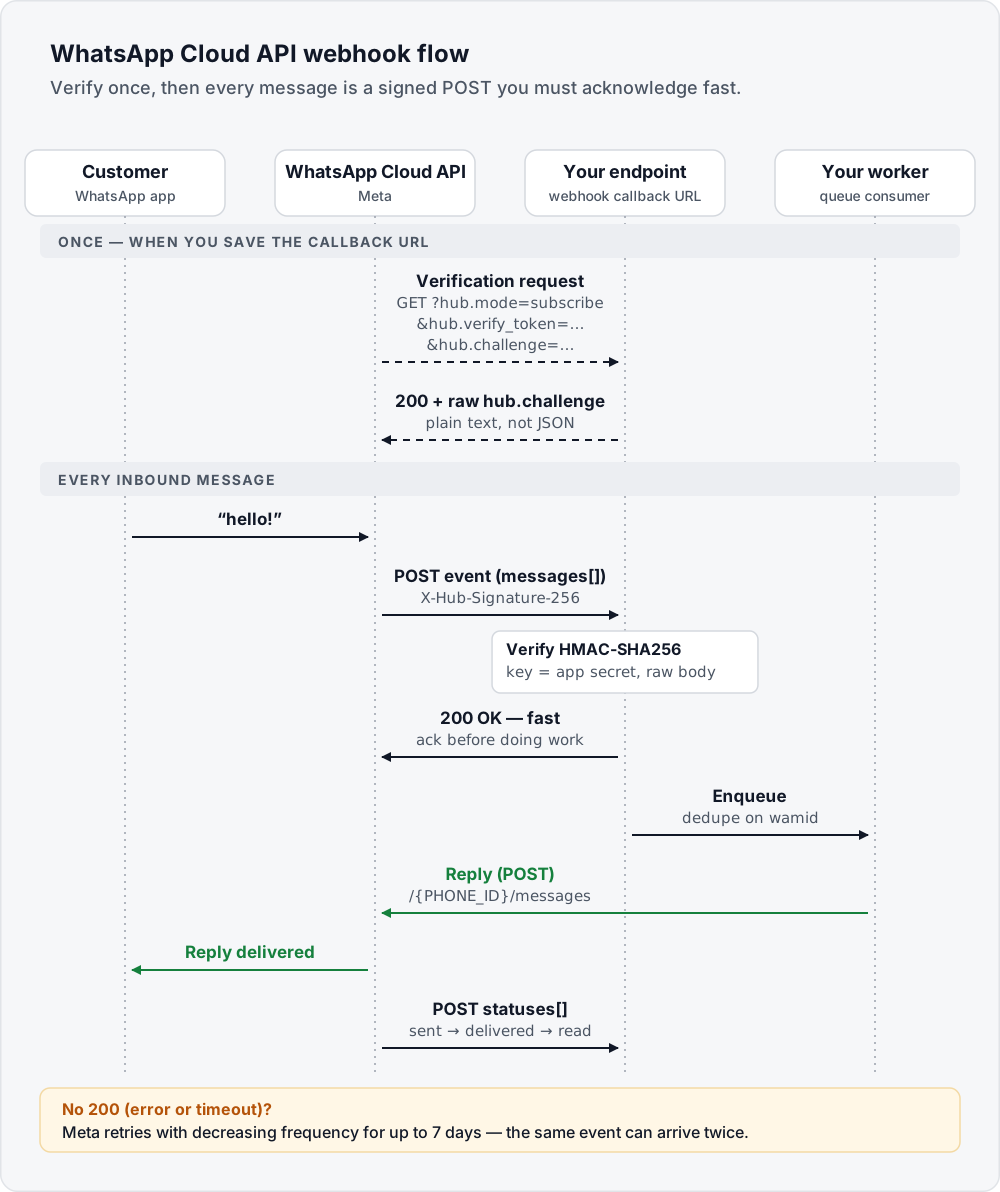
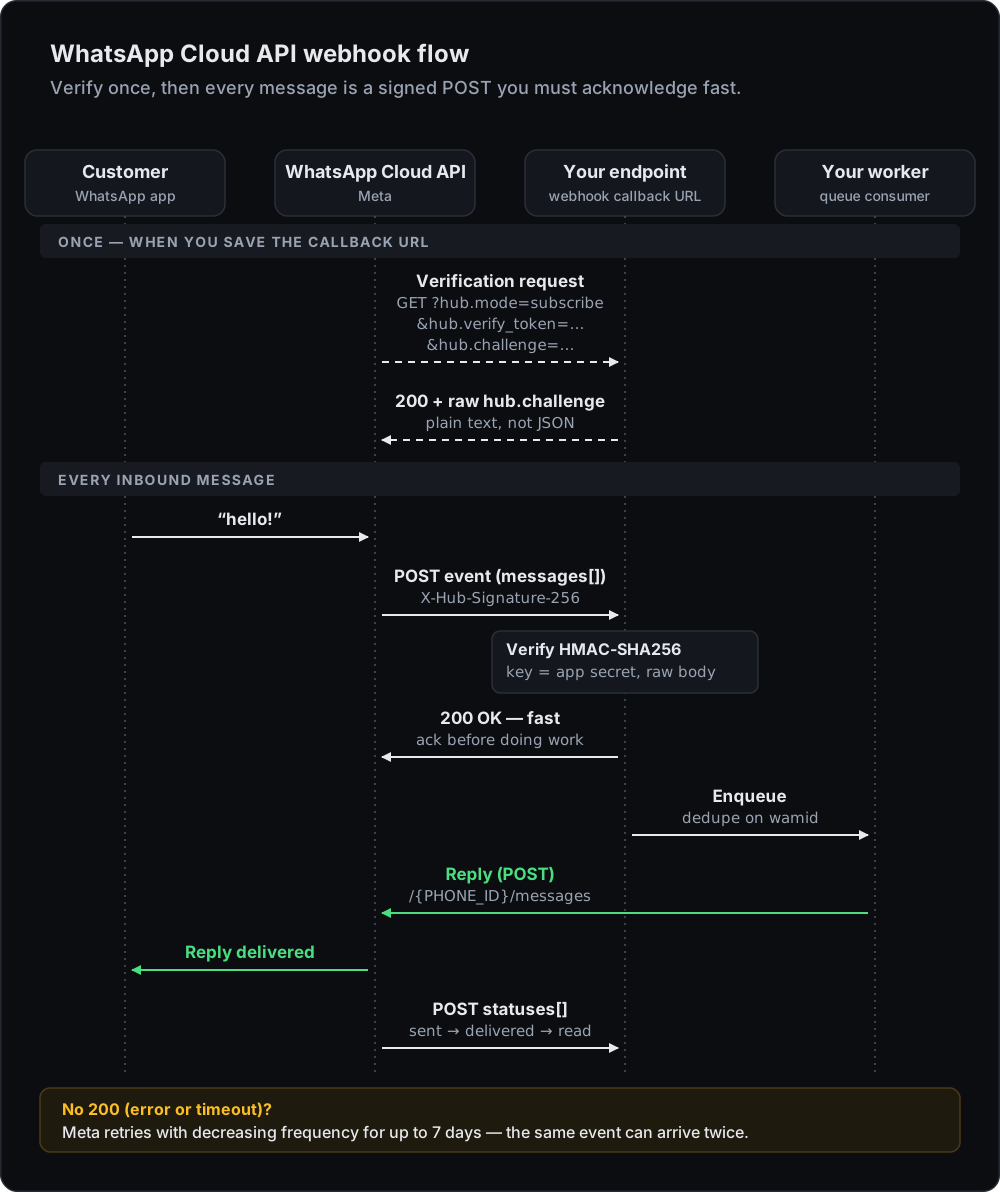
Requirements: a public **HTTPS** URL with a valid certificate that answers quickly. Payloads can be up to 3 MB. There is no way to point Meta directly at `localhost` — see [local development](#local-development-without-re-verifying) for the clean workaround, or [create a free Webhook Relay bucket](https://my.webhookrelay.com/register) for a stable HTTPS URL that survives restarts.
## [Step 1: The verify token handshake](#step-1-the-verify-token-handshake)
In the [Meta App Dashboard](https://developers.facebook.com/apps/) open your app → **WhatsApp → Configuration → Webhook**. You enter two things: the **callback URL** and a **verify token** — any string you choose.
When you hit save, Meta sends:
HTTP · Meta → your endpoint
```
GET /your/webhook
?hub.mode=subscribe
&hub.verify_token=YOUR_TOKEN
&hub.challenge=1158201444
```
Your endpoint must check the token and echo the challenge:
server.js · verify handshake
```
app.get('/webhook', (req, res) => {
const mode = req.query['hub.mode'];
const token = req.query['hub.verify_token'];
const challenge = req.query['hub.challenge'];
if (mode === 'subscribe' && token === process.env.VERIFY_TOKEN) {
// raw value as plain text, no JSON
return res.status(200).type('text/plain').send(challenge);
}
res.sendStatus(403);
});
```
The two classic mistakes: responding with JSON (`{"hub.challenge": …}` fails — Meta wants the raw value) and confusing the verify token with the app secret (they are unrelated; the token is only used in this handshake).
After verification succeeds, click **Manage** and subscribe to the `messages` field — without this second step you stay silent.
## [Step 2: Read the payload](#step-2-read-the-payload)
Deliveries are POSTs with a deeply nested envelope. An inbound text message:
JSON · inbound text message
```
{
"object": "whatsapp_business_account",
"entry": [{
"id": "WABA_ID",
"changes": [{
"field": "messages",
"value": {
"messaging_product": "whatsapp",
"metadata": {
"display_phone_number": "15550001111",
"phone_number_id": "PHONE_ID"
},
"contacts": [{
"profile": { "name": "Alex Doe" },
"wa_id": "15557770000"
}],
"messages": [{
"from": "15557770000",
"id": "wamid.HBgL...",
"timestamp": "1768472000",
"type": "text",
"text": { "body": "hello!" }
}]
}
}]
}]
}
```
Status updates for messages _you_ sent arrive on the same URL, in the same envelope, with a `statuses` array instead of `messages`:
JSON · status update
```
"value": {
"messaging_product": "whatsapp",
"metadata": {
"display_phone_number": "15550001111",
"phone_number_id": "PHONE_ID"
},
"statuses": [{
"id": "wamid.HBgL...",
"status": "delivered",
"timestamp": "1768472100",
"recipient_id": "15557770000"
}]
}
```
Real status events also carry `pricing` and `conversation` details whose shape varies by API version; a `failed` status carries an `errors` array — for example code `131047` when you message someone more than 24 hours after their last reply without a template. Your handler should switch on what is present, and remember `entry`, `changes`, `messages` and `statuses` are all arrays — batches happen.
The `type` field tells you which key holds the content:
| Type | Content lives in | Notes |
| --- | --- | --- |
| `text` | `text.body` | Plain message |
| `image`, `video`, `audio`, `document`, `sticker` | `.id` | A media id — download it with a separate Graph API call |
| `interactive` | `interactive.button_reply` / `interactive.list_reply` | Taps on reply buttons and list messages you sent |
| `button` | `button.text`, `button.payload` | Quick-reply button on a template message |
| `reaction` | `reaction.emoji`, `reaction.message_id` | Emoji reaction to an earlier message |
| `location`, `contacts` | `location` / `contacts` | Shared location or contact cards |
| `unsupported` | `errors` | Message types the API can't deliver yet |
**Tip — inspect real traffic first**
The fastest way to learn the shapes is to look at real traffic. A free [Webhook Bin](https://webhookrelay.com/webhook-bin/) captures every request, and with a small transform it can even pass Meta's handshake — no account needed. Open the bin, attach this transform, paste the bin URL into the Meta dashboard and message your test number:
Webhook Bin transform
```
// Answer Meta's verify handshake; capture everything else
if (r.method === "GET" && r.query["hub.mode"] === "subscribe") {
if (r.query["hub.verify_token"] === "my-verify-token") {
r.setResponseStatus(200)
r.setResponseHeader("Content-Type", "text/plain")
r.setResponseBody(r.query["hub.challenge"])
} else {
r.setResponseStatus(403)
}
}
```
Bins are public and expire after about 48 hours, so use a test number and point Meta at your real endpoint once you know the shapes.
## [Step 3: Verify the signature](#step-3-verify-the-signature)
Every POST carries `X-Hub-Signature-256: sha256=` — HMAC-SHA256 of the **raw body** keyed with your **app secret** (Dashboard → App settings → Basic). Hash the exact bytes Meta sent: if a JSON body parser runs first and you re-serialise the object, the bytes change and the signature never matches.
server.js · signature check
```
const crypto = require('crypto');
// express.raw() keeps the exact bytes Meta signed;
// don't mount express.json() in front of this route
const rawJson = express.raw({ type: 'application/json' });
app.post('/webhook', rawJson, (req, res) => {
const expected = 'sha256=' + crypto
.createHmac('sha256', process.env.META_APP_SECRET)
.update(req.body)
.digest('hex');
const received = req.get('x-hub-signature-256') || '';
const valid = received.length === expected.length &&
crypto.timingSafeEqual(Buffer.from(expected), Buffer.from(received));
if (!valid) return res.sendStatus(401);
res.sendStatus(200); // acknowledge first
queue.push(JSON.parse(req.body)); // then process asynchronously
});
```
Stuck on a mismatch? Paste the raw body, your app secret and the header into the free [WhatsApp webhook signature verifier](https://webhookrelay.com/verify-whatsapp-webhook-signature/) — it runs in your browser and shows the signature you should be getting. Python and other languages are covered in [Verify a webhook signature](https://webhookrelay.com/blog/verify-webhook-signature/); Meta uses the same `X-Hub-Signature-256` scheme for Messenger and Instagram webhooks too.
## [Step 4: Respond fast and expect duplicates](#step-4-respond-fast-and-expect-duplicates)
Meta treats anything other than an HTTP 200 as a failed delivery. It then retries with decreasing frequency **for up to 7 days**, which has two consequences:
- **Acknowledge before you work.** Verify the signature, return 200, and do the slow part (database writes, LLM calls, replying) from a queue. A handler that waits on a downstream API is how one slow dependency becomes a flood of retries.
- **Make processing idempotent.** The same message can arrive more than once. Dedupe on `messages[].id` (the `wamid`) for inbound messages, and on `statuses[].id` plus `status` for receipts, since one message legitimately produces `sent`, then `delivered`, then `read`. The pattern is covered in [webhook retries and idempotency](https://webhookrelay.com/blog/webhook-retries-and-idempotency/).
If your own service is the thing that's down, the retries only help while Meta keeps trying. A Webhook Relay bucket in front of your handler answers Meta immediately, stores every event, and keeps retrying delivery to your server with [durable retries](https://webhookrelay.com/features/durable-retries/) — for up to 30 days on the long schedule — so a deploy or outage on your side doesn't depend on Meta's retry window.
## [Build it with an AI coding agent](#build-it-with-an-ai-coding-agent)
If you use Claude Code, Cursor, Codex or another coding agent, paste this prompt into your repository. It covers the handshake, signatures, payload parsing and a local test loop:
**Add a WhatsApp Cloud API webhook endpoint**
Paste into Claude Code, Cursor, Codex or any agent with shell and web access.
Read [https://webhookrelay.com/blog/whatsapp-cloud-api-webhooks.md](https://webhookrelay.com/blog/whatsapp-cloud-api-webhooks.md), then add a WhatsApp Cloud API webhook endpoint to this codebase using its existing web framework.
Step 1: GET /webhook: if hub.mode is "subscribe" and hub.verify_token equals the WHATSAPP_VERIFY_TOKEN env var, respond 200 with the raw hub.challenge as text/plain; otherwise 403.
Step 2: POST /webhook: read the raw request body before any JSON parsing. Compute "sha256=" + hex HMAC-SHA256(raw body, META_APP_SECRET) and compare it to the X-Hub-Signature-256 header in constant time; respond 401 on mismatch.
Step 3: On success respond 200 immediately, then process asynchronously: iterate entry[].changes[].value, handle messages[] (switch on type) and statuses[] separately, and skip duplicates by messages[].id or statuses[].id + status.
Step 4: Add tests using a fixture payload signed with a test secret: valid signature, tampered body, wrong verify token.
Step 5: For local testing, document running relay forward --bucket whatsapp [http://localhost:PORT/webhook](http://localhost:PORT/webhook) so Meta can reach the endpoint through a stable Webhook Relay URL.
Read secrets only from environment variables. Never log or commit the app secret, the verify token or access tokens.
The agent can also drive Webhook Relay itself — creating the bucket, forwarding to localhost and inspecting deliveries — with the open-source [Agent Skills](https://webhookrelay.com/docs/skills/) or the [MCP server](https://webhookrelay.com/docs/mcp/).
## [Troubleshooting: webhook not receiving messages](#troubleshooting-webhook-not-receiving-messages)
| Symptom | Likely cause | Fix |
| --- | --- | --- |
| Dashboard says "The callback URL or verify token couldn't be validated" | Endpoint returned JSON, a non-200 status, or the wrong token | Return the raw `hub.challenge` as plain text with 200; check the token matches exactly |
| Verified, but no POSTs ever arrive | Not subscribed to the `messages` field | WhatsApp → Configuration → Webhook fields → subscribe to `messages` |
| Dashboard test events arrive, real messages don't | The app isn't subscribed to your WhatsApp Business Account, or the number isn't registered | Subscribe the app to the WABA (`POST /{WABA_ID}/subscribed_apps`) and check the number is registered |
| POSTs arrive but are rejected | Signature computed over parsed JSON, or with the verify token instead of the app secret | Hash the raw body with the app secret — check it in the [signature verifier](https://webhookrelay.com/verify-whatsapp-webhook-signature/) |
| The same message is processed twice | Meta retried after a slow or failed response | Return 200 before processing; dedupe on `wamid` |
| Works in production, nothing on localhost | Meta can't reach a private machine | Forward from a stable public URL — see the next section |
For other providers that run a similar challenge handshake, see [Microsoft Graph webhook validation](https://webhookrelay.com/blog/microsoft-graph-webhook-validation/) and the older [Facebook webhooks guide](https://webhookrelay.com/blog/ingesting-facebook-webhooks/).
## [Local development without re-verifying](#local-development-without-re-verifying)
Meta's URL verification makes tunnels painful: every time your tunnel URL changes, you re-run the handshake. The fix is a **stable** public endpoint that never changes, relayed to wherever your code currently runs:
1. Create a Webhook Relay bucket named `whatsapp` — its input URL is permanent.
2. Verify that URL with Meta **once**.
3. Forward to your machine:
shell · forward to localhost
```
relay forward --bucket whatsapp \
http://localhost:3000/webhook
```
Your laptop connects outbound, so no ports open, and restarting or moving your dev environment never touches the Meta configuration. The full walkthrough is in [Test WhatsApp webhooks locally](https://webhookrelay.com/blog/receive-whatsapp-webhooks-locally/). Building the automation in n8n instead of code? The [n8n WhatsApp Cloud API webhook tutorial](https://webhookrelay.com/docs/tutorials/n8n/whatsapp-cloud-api-webhook/) answers the handshake with a Function, so n8n never sees it.
## [Twilio, WAHA, Evolution API and other gateways](#twilio-waha-evolution-api-and-other-gateways)
Not every WhatsApp integration talks to Meta directly, and the webhook rules change with the gateway:
- **Twilio WhatsApp** posts form-encoded parameters (`From`, `Body`, `NumMedia`…) rather than Meta's JSON, has no verify-token handshake, and signs with `X-Twilio-Signature` over the full URL plus the sorted parameters. The same webhook mechanics as Twilio SMS apply — see the [Twilio webhooks guide](https://webhookrelay.com/blog/twilio-webhooks-guide/) — and you can check signatures with the [Twilio signature verifier](https://webhookrelay.com/verify-twilio-webhook-signature/).
- **Self-hosted gateways** — **WAHA**, **Evolution API**, **uazapi** and similar — run a WhatsApp Web session in a container and forward messages to _your_ webhook URL with much simpler payloads (we see plenty of WAHA traffic in our own [webhook bin](https://webhookrelay.com/webhook-bin/)). No handshake, but also no Meta signature: check which auth headers your gateway can send and require them.
The receiving patterns in this guide still apply: inspect the gateway's payload in a bin first, then point it at a stable endpoint and forward it wherever your code runs.
## [Next steps](#next-steps)
- **Debug a signature mismatch:** [WhatsApp webhook signature verifier](https://webhookrelay.com/verify-whatsapp-webhook-signature/) — free, runs in the browser.
- **Test on your machine:** [Test WhatsApp webhooks locally](https://webhookrelay.com/blog/receive-whatsapp-webhooks-locally/) — real handshake, real messages, `localhost`.
- **No-code automation:** [n8n WhatsApp Cloud API webhook trigger](https://webhookrelay.com/docs/tutorials/n8n/whatsapp-cloud-api-webhook/) — self-hosted n8n, no public IP.
- **Handle failures:** [Webhook retries and idempotency](https://webhookrelay.com/blog/webhook-retries-and-idempotency/) and [durable retries](https://webhookrelay.com/features/durable-retries/).
- **Inspect payloads first:** [Webhook Bin](https://webhookrelay.com/webhook-bin/) — free, no signup, captures every request.
## **Frequently asked questions**
### **What is the WhatsApp webhook verify token?**
A string you invent. When you save your callback URL in the Meta App Dashboard, Meta sends a GET request with hub.mode=subscribe, hub.verify_token and hub.challenge query parameters. Your endpoint must check the token matches the one you configured and respond with the raw hub.challenge value (HTTP 200). Until that handshake succeeds, no webhooks are delivered.
### **Why is my WhatsApp webhook not receiving messages?**
Most commonly: the verify handshake never completed, you did not subscribe to the messages field after verifying, the phone number is not registered against your app, or your endpoint is not publicly reachable over HTTPS with a valid certificate. Verify the GET handshake works first, then check the webhook fields subscription.
### **How do I verify a WhatsApp webhook signature?**
Meta signs each POST with HMAC-SHA256 of the raw body using your app secret, sent as sha256= in the X-Hub-Signature-256 header. Recompute over the exact raw bytes and compare in constant time. Note the key is the app secret, not the verify token.
### **Does Meta retry failed WhatsApp webhooks?**
Yes. If your endpoint returns anything other than HTTP 200, or cannot be reached, Meta keeps retrying with decreasing frequency for up to 7 days. Retries mean the same event can arrive more than once, so deduplicate on the message id (wamid) or on the status id plus status value.
### **Can I receive WhatsApp webhooks on localhost?**
Not directly — Meta requires a public HTTPS URL. Put a stable public endpoint in front (for example a Webhook Relay bucket) and forward events to localhost over an outbound connection, so you never expose your machine or re-verify the URL when you restart.