

Azure Functions vs Webhook Relay: Why I stopped overengineering webhooks
A practical comparison of Azure Functions and Webhook Relay for webhook processing, with code examples showing the difference in setup complexity.
Last month I spent 45 minutes setting up an Azure Function to forward GitHub webhooks to Discord. The actual logic was maybe 20 lines. The rest was fighting with resource groups, storage accounts, and deployment configs.
There has to be a better way, I thought. Turns out there is.
The problem: GitHub push notifications to Discord
Simple ask. When someone pushes code, post a message to our Discord channel. This should take five minutes, right?
Let me walk you through both approaches so you can decide for yourself.
The Azure Functions route
Here's what you need before writing a single line of code:
- An Azure account with billing set up
- Visual Studio Code with the Azure Functions extension
- Node.js or .NET SDK
- Azure Functions Core Tools installed locally
Already tired? Me too. But let's keep going.
Create the project
npm install -g azure-functions-core-tools@4
func init GitHubToDiscord --javascript
cd GitHubToDiscord
func new --name WebhookHandler --template "HTTP trigger"
Write the function
Here's the JavaScript for WebhookHandler/index.js:
const https = require('https');

module.exports = async function (context, req) {
    context.log('GitHub webhook received');

    const body = req.body;

    const pusher = body.pusher?.name || 'Unknown';
    const repo = body.repository?.full_name || 'Unknown repo';
    const branch = body.ref?.replace('refs/heads/', '') || 'unknown';
    const commitCount = body.commits?.length || 0;

    const discordPayload = JSON.stringify({
        content: `**${pusher}** pushed ${commitCount} commit(s) to **${repo}** on branch \`${branch}\``
    });

    const discordWebhookUrl = process.env.DISCORD_WEBHOOK_URL;

    await new Promise((resolve, reject) => {
        const url = new URL(discordWebhookUrl);
        const options = {
            hostname: url.hostname,
            path: url.pathname,
            method: 'POST',
            headers: {
                'Content-Type': 'application/json',
                'Content-Length': Buffer.byteLength(discordPayload)
            }
        };

        const request = https.request(options, (res) => {
            resolve();
        });

        request.on('error', reject);
        request.write(discordPayload);
        request.end();
    });

    context.res = {
        status: 200,
        body: "Webhook processed"
    };
};
Configure function.json
{
  "bindings": [
    {
      "authLevel": "function",
      "type": "httpTrigger",
      "direction": "in",
      "name": "req",
      "methods": ["post"]
    },
    {
      "type": "http",
      "direction": "out",
      "name": "res"
    }
  ]
}
Deploy it
This is where things get fun:
az login

az group create --name GitHubWebhookRG --location eastus

az storage account create --name githubwebhookstorage --location eastus \
    --resource-group GitHubWebhookRG --sku Standard_LRS

az functionapp create --resource-group GitHubWebhookRG \
    --consumption-plan-location eastus \
    --runtime node --runtime-version 18 \
    --functions-version 4 \
    --name github-webhook-handler \
    --storage-account githubwebhookstorage

az functionapp config appsettings set --name github-webhook-handler \
    --resource-group GitHubWebhookRG \
    --settings "DISCORD_WEBHOOK_URL=https://discord.com/api/webhooks/..."

func azure functionapp publish github-webhook-handler
That's a resource group, a storage account, and a function app just to transform one webhook. If everything works on the first try (it won't), you're looking at 15-30 minutes.
The Webhook Relay route
Same problem. Different approach.
Step 1: Create a bucket
Go to my.webhookrelay.com/buckets and click create. You get a public URL immediately. Something like https://xxx.hooks.webhookrelay.com.
Step 2: Write the function
Go to my.webhookrelay.com/functions, click "Create Function", paste this:
local json = require("json")
local http = require("http")

local payload, err = json.decode(r.RequestBody)
if err then error(err) end

local pusher = payload.pusher and payload.pusher.name or "Unknown"
local repo = payload.repository and payload.repository.full_name or "Unknown repo"
local branch = string.gsub(payload.ref or "", "refs/heads/", "")
local commit_count = payload.commits and #payload.commits or 0

local discord_payload = {
    content = "**" .. pusher .. "** pushed " .. commit_count .. " commit(s) to **" .. repo .. "** on branch `" .. branch .. "`"
}

local encoded, err = json.encode(discord_payload)
if err then error(err) end

local resp, err = http.post("https://discord.com/api/webhooks/YOUR_WEBHOOK_ID/YOUR_TOKEN", {
    body = encoded,
    headers = {
        ["Content-Type"] = "application/json"
    }
})
if err then error(err) end
Step 3: Attach it
Go back to your bucket, click the input, select your function.
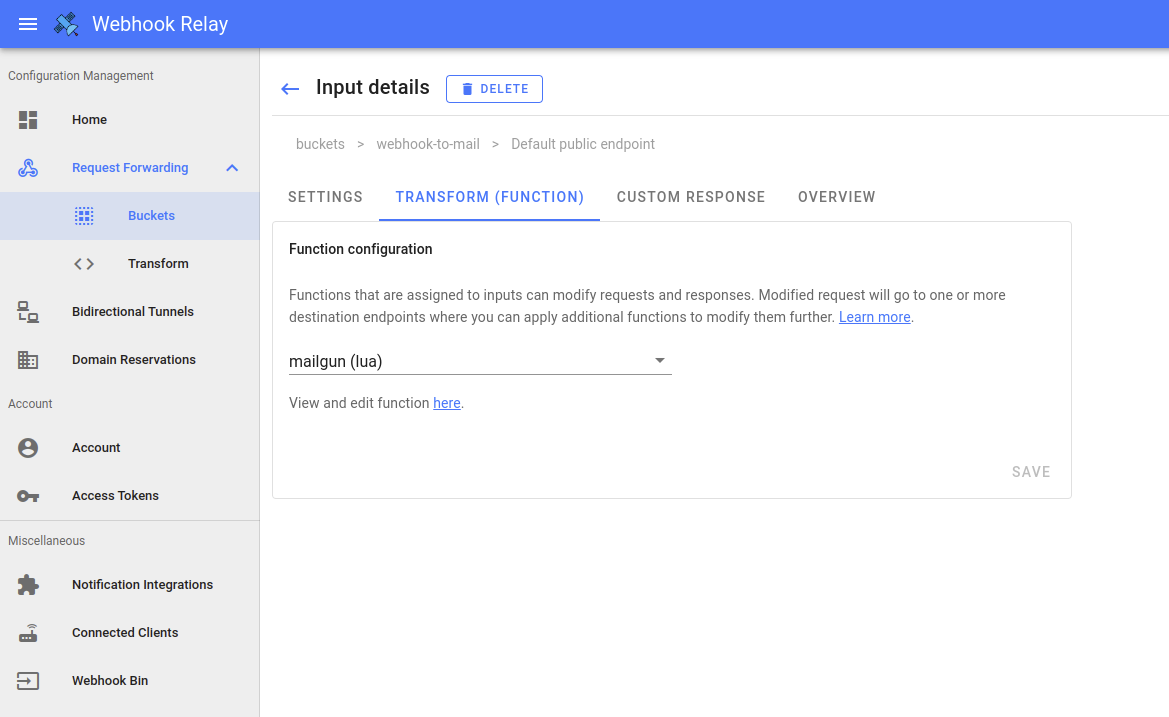
Done. Two, maybe three minutes.
The numbers
| Azure Functions | Webhook Relay | |
|---|---|---|
| Account setup | Azure subscription + billing | Email signup |
| Infrastructure to create | Resource group, storage account, function app | None |
| Files to manage | 3+ (index.js, function.json, host.json, package.json) | 1 code snippet |
| Deployment | CLI commands or CI/CD pipeline | Paste in browser |
| Time to working endpoint | 15-30 minutes | 2-3 minutes |
| Cold starts | Yes | No |
The Azure function is about 50 lines across multiple files. The Webhook Relay version is 25 lines in one place.
When Azure Functions makes sense
I'm not saying Azure Functions is bad. It's overkill for webhooks, but it's the right choice when:
- Your function needs to run for more than a few seconds
- You're building something that talks to Cosmos DB, Service Bus, or other Azure services
- You need a specific runtime version or language that Webhook Relay doesn't support
- Your team already lives in the Azure ecosystem and has the tooling set up
If you're building a real application backend, Azure Functions (or AWS Lambda, or Google Cloud Functions) is probably what you want.
When Webhook Relay makes sense
For webhooks specifically, Webhook Relay wins because:
- No infrastructure to manage or pay for separately
- No deployment pipeline to set up
- No cold starts (webhook providers time out after a few seconds)
- Built-in logging shows you exactly what came in and what went out
- You can forward the same webhook to multiple places
I use it for anything that's "receive webhook, maybe transform it, send it somewhere else." That covers most webhook use cases I run into.
The cold start problem
This one bit me. Azure Functions on the consumption plan can take several seconds to wake up if they haven't run recently. Stripe, GitHub, and most other webhook providers expect a response within 5-10 seconds. If your function is cold, you might miss webhooks or trigger retries.
You can pay for an always-on plan, but now you're spending real money on infrastructure for something that runs a few times a day.
Webhook Relay doesn't have this problem. The function runs immediately because there's no container to spin up.
Try it
If you're curious:
- Sign up at my.webhookrelay.com/register
- Create a bucket
- Write a function
- Point your webhook at the endpoint
You'll be done before you finish reading the Azure Functions quickstart guide.
Wrapping up
I still use Azure Functions for complex backend work. But for webhooks? I stopped overengineering it.
The right tool depends on the problem. For "receive webhook, transform, forward" the simpler option is usually the better one.