

Trigger a Self-Hosted AI Agent with Webhooks (No Public IP)
Run a local AI agent on a Raspberry Pi or Mac mini behind NAT and trigger it with GitHub or Stripe webhooks — no port forwarding and no public IP.

Self-hosted AI agents are having a moment. A Mac mini or Raspberry Pi is plenty to run an always-on agent — the model is an API call away, and everything that matters (your tools, your data, your state) stays on hardware you own.
But a local AI agent that can only be poked over the LAN misses the point of being always-on. The interesting work arrives as events from the outside world: a GitHub issue is opened, a Stripe payment fails, Grafana fires an alert. Those are webhooks — and GitHub can't POST to a box behind NAT with no public IP. Opening a port and pointing dynamic DNS at your home network is exactly the kind of thing you shouldn't do to the machine that runs an agent with shell access.
We built a small, fully working example that solves this properly: webhookrelay-eve-agent-example — an agent built with eve, Vercel's filesystem-first framework for durable agents, triggered by any webhook from anywhere, with zero inbound ports.
Using Hermes Agent instead? Install the open-source Hermes Webhook Relay plugin. It adds the same private webhook ingress plus delivery retries, provider signature verification, restart-safe deduplication, concurrency limits, and agent-run-aware delivery outcomes.
The architecture
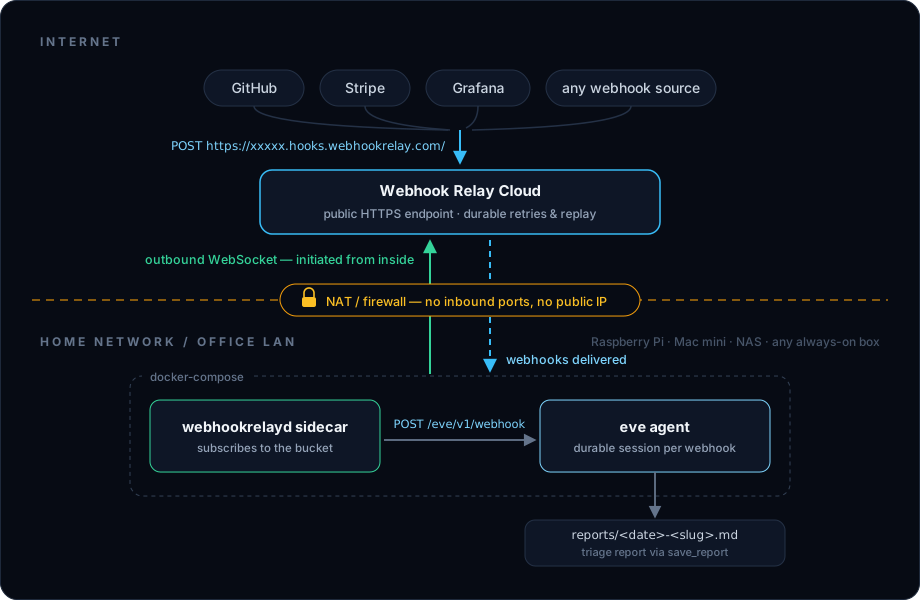
Webhook Relay provides the stable public HTTPS endpoint. The webhookrelayd sidecar runs next to the agent in docker-compose and keeps an outbound connection to it, so every webhook is pulled down to the agent over the internal compose network. The box stays invisible to the internet — this is the same webhook forwarding that powers local webhook development, used as permanent infrastructure.
The agent: three small files
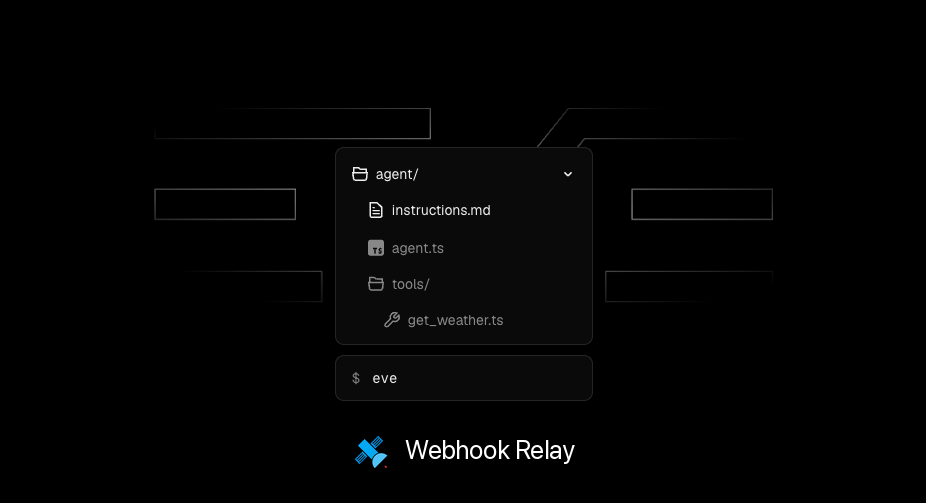
eve agents are just files. The model config points at any AI SDK provider — the example calls Claude through Lightning AI's Anthropic-compatible API:
// agent/agent.ts
const lightning = createAnthropic({
  baseURL: process.env.LIGHTNING_BASE_URL ?? "https://lightning.ai/v1",
  apiKey: process.env.LIGHTNING_API_KEY ?? "",
});

export default defineAgent({
  model: lightning(process.env.LIGHTNING_MODEL ?? "claude-sonnet-4-6"),
});
A custom channel gives the agent its webhook endpoint. Each delivery starts a fresh, durable agent session with the payload (and the provider headers Webhook Relay preserves, like x-github-event) as the message:
// agent/channels/webhook.ts
export default defineChannel({
  routes: [
    POST("/eve/v1/webhook", async (req, { send }) => {
      const body = await req.text();
      const session = await send(
        `A webhook just arrived. Triage it and save a report.\n\n${body}`,
        { auth: null, continuationToken: `webhook-${crypto.randomUUID()}` },
      );
      return Response.json({ ok: true, sessionId: session.id });
    }),
  ],
});
And a typed tool is what the model does about it — here, writing a triage report to disk. This is the part you'd swap for a Slack message, a database insert or a home-automation call:
// agent/tools/save_report.ts
export default defineTool({
  description: "Save a triage report for a webhook event as a markdown file.",
  inputSchema: z.object({ slug: z.string(), markdown: z.string() }),
  async execute({ slug, markdown }) { /* write reports/<date>-<slug>.md */ },
});
What it does
Send a test event to your bucket's public URL:
curl -X POST https://xxxxx.hooks.webhookrelay.com/ \
  -H 'content-type: application/json' \
  -H 'x-github-event: issues' \
  -d '{"action":"opened","issue":{"number":42,"title":"Payments webhook drops events during deploys", ...}}'
A few seconds later there's a report in reports/. This is real output from the example agent:
GitHub Issue Opened — acme/shop #42 · Severity: info
A new GitHub issue was opened on the
acme/shoprepository byoctocat. Although classified asinfo, the subject matter is noteworthy — dropped payment webhook events during deploys could indicate a reliability risk worth investigating proactively.Suggested next action: review and assign issue #42 to the payments team; investigate whether there is a known deploy-window gap in webhook event handling.
Point GitHub, Stripe, Shopify or your monitoring at the same URL and every event flows through — the agent reads the payload, decides a severity and writes up what happened and what to do next.
Running it on a Raspberry Pi or Mac mini
The whole stack is one docker compose up --build -d — the agent container plus the webhookrelayd sidecar. The image is built on multi-arch node:24-slim, so the same compose file works on a Raspberry Pi (arm64), a Mac mini acting as a quiet home AI server, a NAS or a VM behind a corporate firewall.
Two things worth turning on for hardware that lives at home:
- Durable retries on the bucket — if the machine sleeps, reboots or loses connectivity, events queue in the cloud and deliver when the sidecar reconnects, for up to 30 days.
- A
WEBHOOK_SECRET(supported by the example) so the agent's channel rejects anything that didn't come through your relay.
The README has the full quick start: create a bucket with an internal output pointing at http://agent:3000/eve/v1/webhook, drop your token into .env.local, and compose up. For local development you can skip Docker entirely and forward the bucket to eve dev with the relay CLI.
The example triages events because it's a useful default that needs no extra API keys — but the wiring is the point. Swap agent/instructions.md and the tools, and the same skeleton becomes a code-review agent, an on-call assistant or the brain of your home automation: any webhook in the world can now reach the agent in your drawer.
If the agent itself needs to test or diagnose webhook integrations, the next step is agentic webhook testing: connect Webhook Relay's MCP server so it can send representative events, wait for deliveries, inspect destination responses and read transformation execution logs without a human copying payloads between tools.