Custom Roles
Convert your Webhook Relay account into an organization, invite other accounts as members, and assign Admin, Billing, Member or Viewer roles to control access and billing.
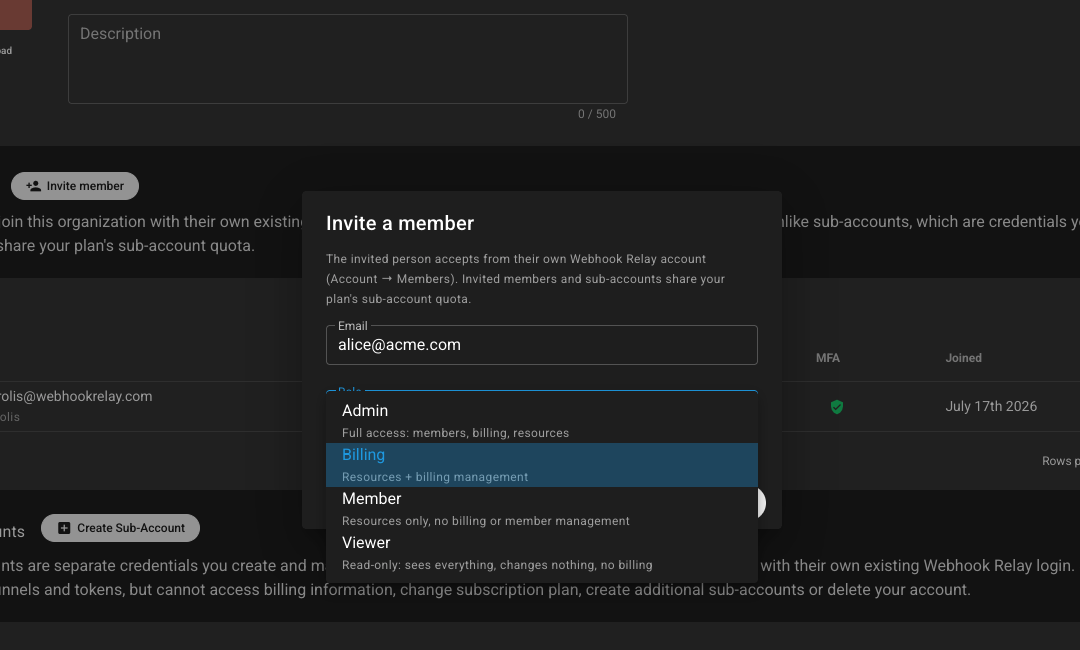
Convert your account into an organization, then invite other people into it with their own Webhook Relay login. Assign a role so each person only gets the access they need — resources, billing, membership, or read-only visibility.
Unlike sub-accounts (credentials you create and manage), invited members accept from their own existing account and share your plan’s member quota.
Roles you can assign
| Role | Access |
|---|---|
| Admin | Full access: members, billing, resources |
| Billing | Resources + billing management |
| Member | Resources only — no billing or member management |
| Viewer | Read-only — sees everything, changes nothing, no billing |
Why it matters
- Control billing — keep plan and payment changes limited to Admin or Billing roles
- Least privilege — engineers manage webhooks without touching membership or invoices
- Safe collaboration — viewers can inspect configuration and traffic without risking changes
- Clear ownership — every invite is tied to a real account; pair with audit logs to see who did what
Works alongside SSO, teams and audit logs for organization-ready access control.
Ready to invite your team? Create an account or talk to sales about Business and Enterprise plans.