Webhook Relay Kubernetes Integration
Seamlessly connect your Kubernetes services to external webhooks without exposing them directly to the internet using the Webhook Relay Operator.
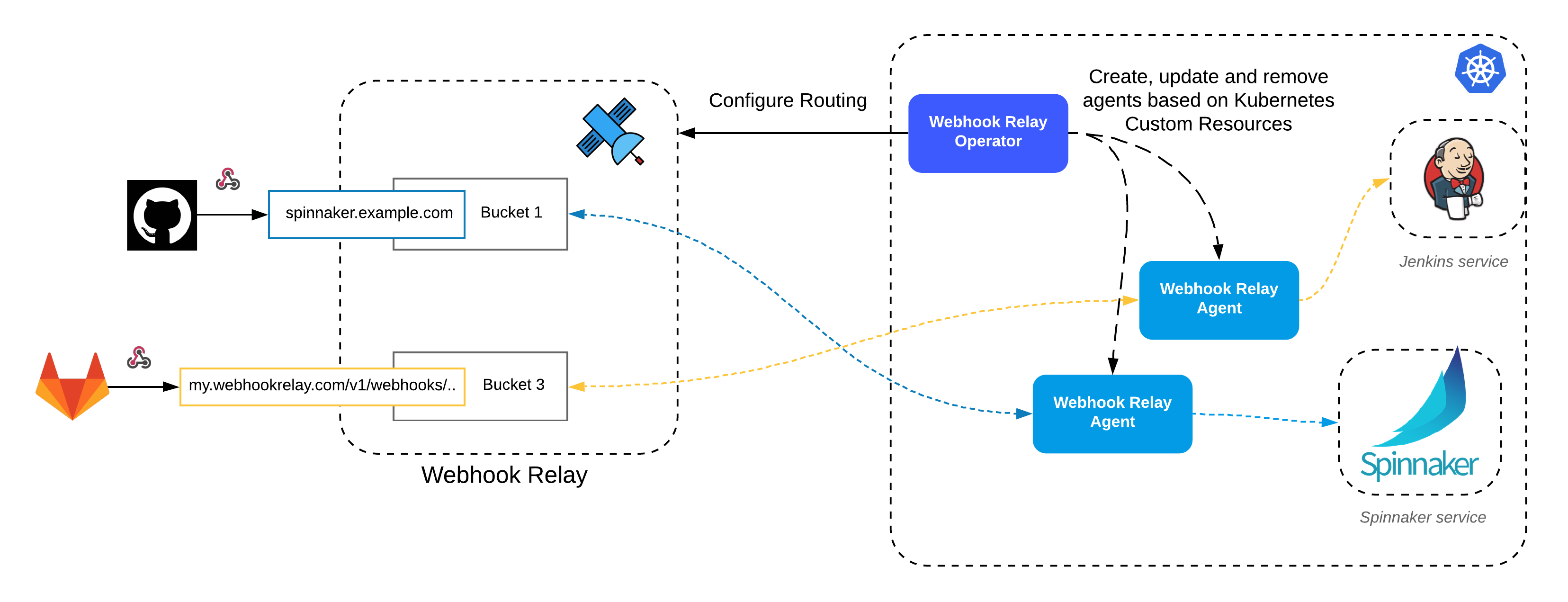
Webhook Relay delivers webhooks into Kubernetes clusters that have no public ingress. The operator runs inside the cluster, opens an outbound connection to Webhook Relay, and forwards each webhook that arrives at your bucket's public URL to a service inside the cluster. There is no LoadBalancer or Ingress to create, no TLS certificate to manage, and no inbound firewall port to open, which makes it the simplest way to get GitHub, GitLab, Stripe or Shopify webhooks to on-prem, edge and private clusters.
The Challenge: Exposing Kubernetes Services Securely
Connecting internal Kubernetes services to external webhook providers often requires complex network configurations. You might need to set up Load Balancers, configure Ingress controllers, manage TLS certificates, and potentially open firewall ports, exposing your cluster to the public internet. This increases the attack surface and operational overhead, especially for on-premise clusters or edge deployments lacking stable public IPs.
The Solution: Webhook Relay Operator
The Webhook Relay Operator simplifies and secures webhook integration for Kubernetes. It runs inside your cluster and establishes a secure, persistent tunnel to the Webhook Relay service. Incoming webhooks are received by Webhook Relay and securely forwarded through this tunnel directly to your target service within the cluster, without requiring any inbound ports to be opened on your firewall.
How it Works:
- Install the Webhook Relay Operator in your Kubernetes cluster.
- Create the CRD to enable forwarding:
apiVersion: forward.webhookrelay.com/v1
kind: WebhookRelayForward
metadata:
  name: example-forward
spec:
  buckets:
  - name: k8s-operator
    inputs:
    - name: public-endpoint
      description: "Public endpoint, supply this to the webhook producer"
      responseBody: "OK"
      responseStatusCode: 200
    outputs:
    - name: webhook-receiver
      destination: http://my-service:5050/webhooks
- Operator creates the desired configuration and starts forwarding the webhooks to your target service
When to use it
- Private and on-prem clusters behind a corporate firewall that must receive SaaS webhooks.
- Edge distributions such as k3s or MicroK8s on devices without a stable public IP.
- CI inside Kubernetes: Jenkins, Tekton or Argo receiving GitHub, GitLab or Bitbucket webhooks without a public endpoint (Jenkins guide).
- Internal services that should never be reachable from the internet but still need events from Stripe, Shopify, Twilio or your own systems.
Operator vs. Ingress vs. a tunnel
| Webhook Relay operator | Public Ingress + LoadBalancer | Cloudflare-style tunnel | |
|---|---|---|---|
| Inbound ports / public IP | None | Required | None |
| Setup | One custom resource | Ingress, DNS, certificate, firewall | Tunnel client per service |
| Events stored while the cluster is offline | Yes, retried up to 30 days | No | No |
| Filter or transform before delivery | Yes (rules, functions) | In your service | No |
| Delivery logs per webhook | Yes | Your ingress logs | Limited |
| Exposes the whole service | No, webhooks only | Yes | Yes |
Benefits:
- Eliminate Complex Setup: No need to create or manage Load Balancers or Ingress controllers just for receiving webhooks. The Operator handles the connection securely.
- Enhanced Security: Keep your Kubernetes services private. No need to expose services directly to the internet, significantly reducing the attack surface. This makes it the most secure way to integrate services like Jenkins CI running inside Kubernetes with external webhook sources (e.g., GitHub, GitLab).
- On-Premise & Private Clusters: Perfect for on-premise Kubernetes clusters that reside behind corporate firewalls or lack direct public internet access.
- Edge Kubernetes Ready: Ideal for edge Kubernetes distributions like k3s or MicroK8s, which often run on devices without stable public IP addresses.
- Simplified Management: Define your webhook forwarding rules declaratively using Kubernetes custom resources.
By using the Webhook Relay Kubernetes Operator, you gain a secure, simple, and reliable way to integrate your internal Kubernetes applications with the outside world via webhooks, regardless of your network topology. It is the same delivery model as webhooks to internal servers, packaged for Kubernetes.