

AWS SQS
Poll messages from Amazon SQS queues and send webhook data to SQS using Webhook Relay service connections.
Connect Webhook Relay to Amazon SQS to poll messages from queues (input) or send webhook data as SQS messages (output).
Prerequisites
- An AWS service connection with credentials that have SQS permissions
- An SQS queue in your AWS account
IAM Permissions
For SQS Input (poll messages):
sqs:ReceiveMessagesqs:DeleteMessagesqs:GetQueueAttributes
For SQS Output (send messages):
sqs:SendMessage
SQS Input — Poll Messages from a Queue
SQS inputs use long-polling (20-second wait, up to 10 messages per poll) to continuously receive messages from your queue. Messages are deleted from the queue after successful relay into your bucket.
Configuration
| Field | Required | Description |
|---|---|---|
queue_url | Yes | Full SQS queue URL (e.g. https://sqs.us-east-1.amazonaws.com/123456789/my-queue) |
region | No | AWS region — auto-extracted from the queue URL if not provided |
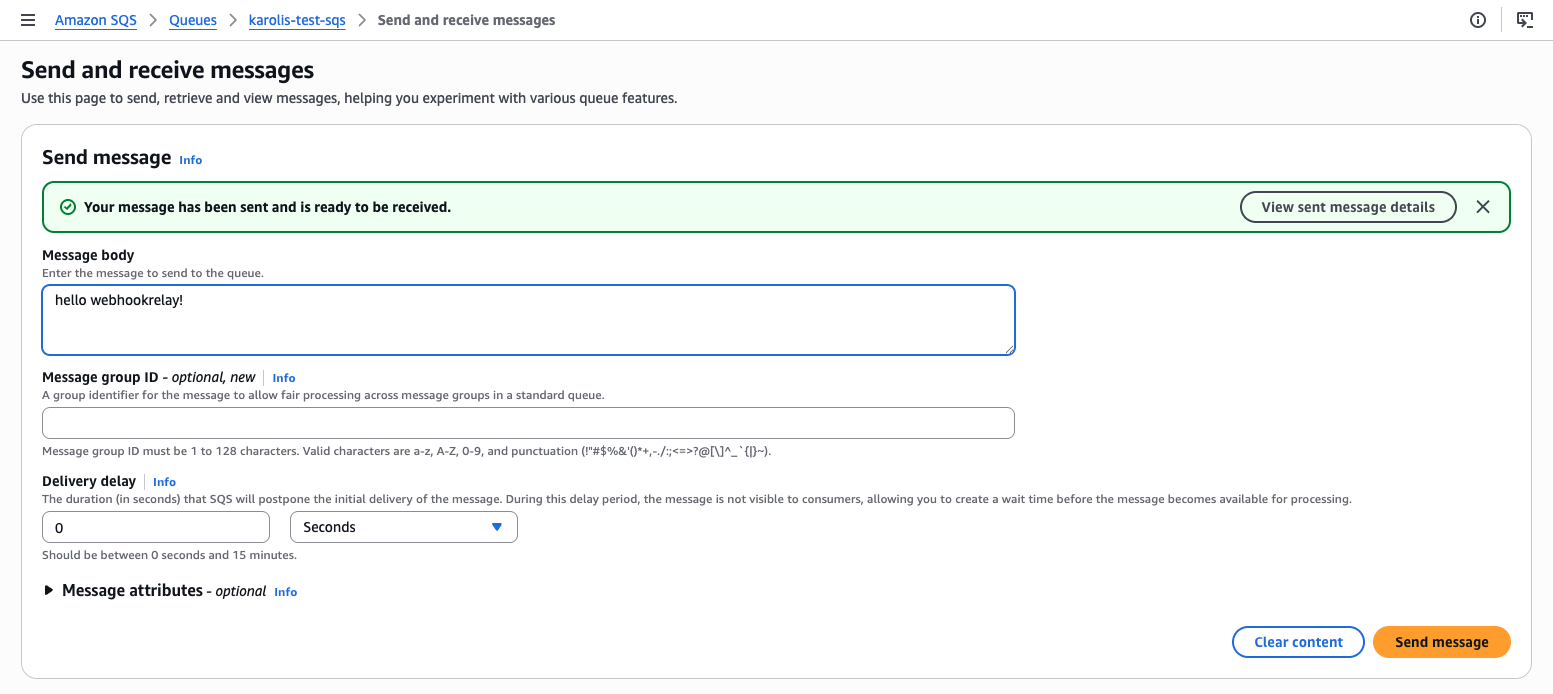
Once added, you can test it by using "Send and receive messages" button:
SQS Output — Send Webhooks to a Queue
SQS outputs forward incoming webhook data as messages to your SQS queue. Every webhook that arrives in the bucket is sent as an SQS message.
Configuration
| Field | Required | Description |
|---|---|---|
queue_url | Yes | Full SQS queue URL |
region | No | AWS region — auto-extracted from the URL |
Example: Bridge GCP Pub/Sub to AWS SQS
Route messages from a GCP Pub/Sub subscription into an AWS SQS queue. This is ideal for cross-cloud event processing where your consumers read from SQS:
- Create a GCP service connection with Pub/Sub subscriber permissions
- Create an AWS service connection with SQS send permissions
- Create a bucket in Webhook Relay
- Add a GCP Pub/Sub input on the bucket
- Add an AWS SQS output on the bucket
Messages published to the Pub/Sub topic are automatically delivered to your SQS queue.
Transform Between Formats
GCP Pub/Sub and AWS SQS use different message formats. Attach a Function to the bucket to reshape the payload. For example, convert a Pub/Sub message into a structured format for your SQS consumers:
const pubsubMessage = JSON.parse(r.body)

// Restructure for your SQS consumer
const sqsPayload = {
    source: "gcp-pubsub",
    topic: pubsubMessage.subscription,
    data: pubsubMessage.data,
    attributes: pubsubMessage.attributes,
    received_at: new Date().toISOString()
}

r.setBody(JSON.stringify(sqsPayload))
See the JSON encoding guide for more payload transformation examples.
Example: SQS to HTTPS Webhook Delivery
Poll messages from an SQS queue and forward them to any HTTPS endpoint — useful when you want to process SQS messages with a service that only accepts webhooks:
- Create an AWS service connection
- Create a bucket with an SQS input pointing to your queue
- Add a public destination as an output
You can also forward to localhost for local development, letting you consume SQS messages on your machine without deploying to AWS.
Example: Fan-Out from SQS to Multiple Destinations
A single SQS input can feed multiple outputs on the same bucket. For example, forward SQS messages simultaneously to:
- A GCP Pub/Sub topic (cross-cloud replication)
- An S3 bucket (archival)
- An HTTPS API (real-time processing)
This lets you fan out messages without configuring multiple SQS consumers or SNS subscriptions.