
Shopify Webhooks: Setup, HMAC Verification, Retries and Missed Events
How Shopify webhooks work in 2026: subscribe with shopify.app.toml or GraphQL, verify X-Shopify-Hmac-Sha256, answer within 5 seconds, survive 8 retries in 4 hours and recover missed events.
On this page
- How Shopify webhook delivery works
- Three ways to subscribe
- The headers Shopify sends
- What the payload looks like
- Topics you will actually use
- Verify the HMAC signature
- Respond within 5 seconds
- Retries, deleted subscriptions and missed events
- Keep every event with a durable buffer
- Duplicates and ordering
- Test Shopify webhooks locally
- Troubleshooting
- Build it with an AI coding agent
- Next steps
- FAQ
Shopify webhooks are HTTPS POST requests that Shopify sends to your app when something happens in a store: an order is created, a product changes, the app is uninstalled. Each one is signed with X-Shopify-Hmac-Sha256, must be answered with a 2xx within five seconds, and is retried only eight times over four hours before Shopify gives up. Most production problems with Shopify webhooks come from those last two numbers, so this guide covers setup and verification, then spends most of its time on timeouts, retries, deleted subscriptions and events that never arrive.
The short version
- Subscribe in
shopify.app.toml(app-specific) rather than with the Admin API: Shopify deletes failing Admin API subscriptions, not app-config ones. - Verify
X-Shopify-Hmac-Sha256against the raw body with your app's client secret (or the store's signing secret, for webhooks created in the admin). - Return
200within five seconds. Store the event, then process it in a background job. - Deduplicate on
X-Shopify-Webhook-Id, and never assume order. - Reconcile: a scheduled job that queries recently updated orders catches anything the webhooks missed.
How Shopify webhook delivery works
Shopify sends each webhook as a POST with a JSON body (Content-Type: application/json) and a set of X-Shopify-* headers. Delivery succeeds only if your endpoint answers with a 2xx status inside Shopify's time limits. Everything else, including a slow response, a 500 during a deploy and a 301 redirect, is a failed delivery that Shopify will retry, and then stop retrying.


These are the limits that matter, all from Shopify's webhook documentation, checked November 2026:
| Limit | Value |
|---|---|
| Connection timeout | 1 second |
| Total request timeout | 5 seconds |
| Success | Any 2xx status. A 3xx redirect is a failure, and Shopify does not follow it. |
| Retries | Up to 8, over 4 hours, with growing intervals (measured below) |
| After the last retry | Shopify stops. The event is not resent. |
| Failing subscriptions | Deleted if created in the admin or with the Admin API; kept if declared in shopify.app.toml |
| Ordering | Not guaranteed, within a topic or across topics |
| Duplicates | Possible. Deduplicate on X-Shopify-Webhook-Id. |
| Delivery log | Dev Dashboard, last 7 days; it flags failure rates above 0.5% |
What we measured in a test store
Shopify documents the number of retries but not when they happen, so we measured it. On 11 November 2026 we created webhooks in a development store pointing at three broken endpoints: one returning 500, one returning a 301 redirect, and one that took six seconds to answer. Then we placed orders and recorded every delivery attempt.
All three failed the same way and were retried on the same schedule, to within a second:
| Attempt | Time after the first attempt | Wait since the previous attempt |
|---|---|---|
| First delivery | 0 | – |
| Retry 1 | 1 second | 1 second |
| Retry 2 | 1 minute | 1 minute |
| Retry 3 | 3 minutes | 2 minutes |
| Retry 4 | 8 minutes | 5 minutes |
| Retry 5 | 30 minutes | 22 minutes |
| Retry 6 | 1 hour | 30 minutes |
| Retry 7 | 2 hours | 1 hour |
| Retry 8 | 4 hours | 2 hours |
What else the test showed:
- The redirect was not followed. The
301endpoint pointed at a second URL that never received a request. - A 6-second response timed out. Shopify gave up after about five seconds and retried a second later.
- Every retry kept the same
X-Shopify-Webhook-Id, which is why it is the right key for deduplication. - Half the retries happen in the first ten minutes. After the 8-minute retry, an endpoint gets only four more chances in the next four hours.
Three ways to subscribe
Where a subscription is created decides who can see it, which secret signs it and whether Shopify deletes it when it keeps failing.
| App configuration | Admin API (GraphQL) | Shopify admin | |
|---|---|---|---|
| Created in | shopify.app.toml | webhookSubscriptionCreate | Settings → Notifications → Webhooks |
| Scope | Every shop that installs the app | One shop | One shop, created by the merchant |
| Signed with | App client secret | App client secret | The store's signing secret |
| Deleted after repeated failures | No | Yes | Yes |
| Compliance topics | Yes | No | No |
| Best for | Public and custom apps | Per-shop topics or filters | Store owners wiring a no-code integration |
For an app, the configuration file is the right default. Shopify keeps failing app-config subscriptions, deploys them with shopify app deploy, and applies them to every shop. You need Shopify CLI 3.63.0 or later.
[webhooks]
api_version = "2026-10"

[[webhooks.subscriptions]]
topics = ["orders/create", "orders/updated"]
uri = "https://your-app.example.com/webhooks/shopify"

[[webhooks.subscriptions]]
topics = ["app/uninstalled"]
uri = "https://your-app.example.com/webhooks/shopify"

# Required for apps in the Shopify App Store
[[webhooks.subscriptions]]
compliance_topics = ["customers/data_request", "customers/redact", "shop/redact"]
uri = "https://your-app.example.com/webhooks/shopify/compliance"
Use the GraphQL Admin API when a subscription only makes sense for one shop, and remember that this kind is deleted if it keeps failing:
mutation {
  webhookSubscriptionCreate(
    topic: ORDERS_CREATE
    webhookSubscription: { uri: "https://your-app.example.com/webhooks/shopify" }
  ) {
    webhookSubscription { id topic uri }
    userErrors { field message }
  }
}
Store owners without an app go to Settings → Notifications → Webhooks and click + Webhook. The dialog asks for an event, a format (JSON or XML), a URL and a webhook API version.
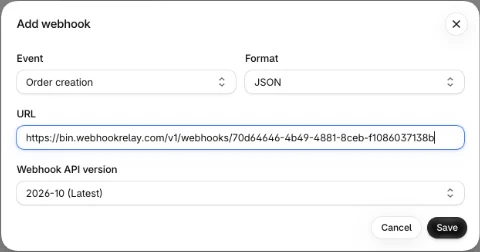
The API version defaults to unstable. Change it to the latest dated version (2026-10 at the time of writing), or the payload shape can change without warning.
The same page shows the store's signing secret. One secret signs every webhook on the page, including test sends. Use Create new secret to rotate it.
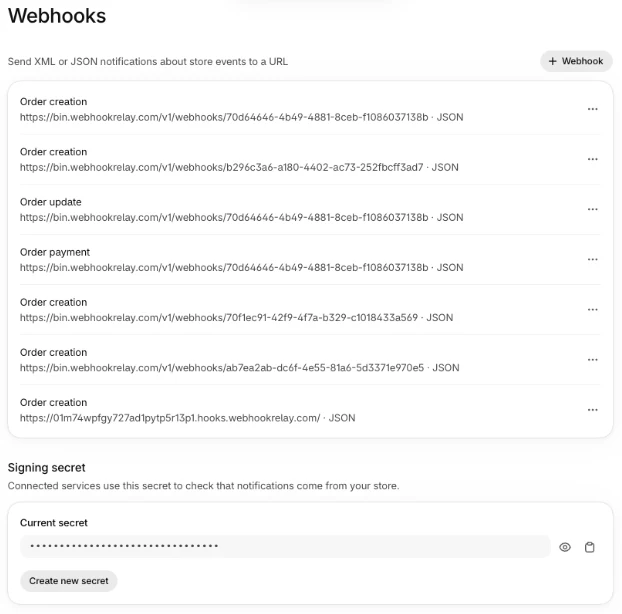
Shopify deletes these webhooks if the URL keeps returning errors. Merchants are not emailed when a webhook created this way fails. Shopify only sends those emails for webhooks created by an app.
The headers Shopify sends
| Header | What it carries | Use it for |
|---|---|---|
X-Shopify-Topic | The topic, such as orders/create | Routing to a handler |
X-Shopify-Hmac-Sha256 | Base64 HMAC-SHA256 of the raw body | Verifying the sender |
X-Shopify-Shop-Domain | The shop's myshopify.com domain | Picking the tenant and its token |
X-Shopify-API-Version | The API version that built the payload | Detecting version drift |
X-Shopify-Webhook-Id | One delivery; the same value on every retry of it | Deduplication |
X-Shopify-Event-Id | The merchant action; shared by all deliveries it caused | Linking deliveries from several subscriptions |
X-Shopify-Triggered-At | When Shopify triggered the delivery | Ordering and staleness checks |
X-Shopify-Name | The subscription's optional name | Telling subscriptions apart |
X-Shopify-Test | true on test sends, false on real events | Ignoring test deliveries in production |
Header names are case-insensitive, so read them through your framework's header API rather than matching an exact spelling. Every delivery in our test also carried User-Agent: Shopify-Captain-Hook. That is useful in access logs, but not proof of the sender: only the HMAC is.
What the payload looks like
The body is the resource itself, serialised by the API version in X-Shopify-API-Version, not an envelope with an event type. The topic lives only in the X-Shopify-Topic header, so log headers and body together. A trimmed orders/create:
{
  "id": 5814793224359,
  "admin_graphql_api_id": "gid://shopify/Order/5814793224359",
  "name": "#1042",
  "email": "[email protected]",
  "created_at": "2026-11-10T09:14:03-05:00",
  "updated_at": "2026-11-10T09:14:05-05:00",
  "financial_status": "paid",
  "fulfillment_status": null,
  "currency": "USD",
  "total_price": "199.00",
  "line_items": [
    {
      "id": 14012345678,
      "sku": "TEE-BLK-M",
      "title": "T-Shirt",
      "quantity": 1,
      "price": "199.00"
    }
  ],
  "customer": { "id": 7254381903, "email": "[email protected]" }
}
Three details matter in practice. Use updated_at to discard stale updates (see duplicates and ordering). Prices are strings, not numbers, so parse them as decimals. And webhooks a merchant creates in the Shopify admin can be set to XML instead of JSON, so check Content-Type if you accept those.
Order payloads also contain personal data you might not expect. client_details.browser_ip and client_details.user_agent hold the IP address and browser of whoever placed the order. For an order created in the admin, that is the staff member's. Treat stored and logged webhook bodies as personal data.
Topics you will actually use
| Topic | Fires when | Typical job |
|---|---|---|
orders/create | An order is placed | Fulfilment, ERP or warehouse sync, notifications |
orders/updated | Any change to an order | Keep an order mirror current |
orders/paid | Payment is captured | Start fulfilment only after payment |
orders/cancelled, refunds/create | An order is cancelled or refunded | Stop fulfilment, reverse revenue |
fulfillments/create | An order ships | Tracking emails, status sync |
customers/create, customers/update | A customer account changes | CRM sync |
products/update | A product or its variants change | Catalogue sync, search index |
inventory_levels/update | Stock at a location changes | Inventory sync across channels |
app/uninstalled | The merchant removes your app | Revoke tokens, stop jobs |
customers/data_request, customers/redact, shop/redact | GDPR requests | Mandatory for App Store apps |
That is the short list. Shopify publishes the full topic list, grouped by resource: carts, checkouts, collections, fulfillments, inventory, products (products/create, products/delete), orders (orders/fulfilled, orders/edited) and more.
To cut volume, add a filter (Shopify search syntax, API 2024-07 or later) or include_fields to a subscription. Every field the filter uses must also be listed in include_fields, and a filter that names an unknown field quietly suppresses every delivery, so test a filter with one real event before relying on it.
Verify the HMAC signature
Shopify signs every HTTPS delivery: the X-Shopify-Hmac-Sha256 header is the base64-encoded HMAC-SHA256 of the raw request body, keyed with your app's client secret. Read the body as bytes before any JSON parser touches it, and compare in constant time.
Which secret? For subscriptions created by an app (in shopify.app.toml or with the Admin API), it is the app's client secret. For webhooks created in the Shopify admin, it is the store's signing secret from the bottom of Settings → Notifications → Webhooks. The code below reads either from SHOPIFY_CLIENT_SECRET.
We ran this Express handler unchanged against our development store, behind relay forward. It accepted a real orders/create signed with the store's secret, and returned 401 for an unsigned request.
import crypto from 'node:crypto'
import express from 'express'

const app = express()

// Raw bytes for this route only: a JSON parser would change them.
const rawJson = express.raw({ type: 'application/json' })

app.post('/webhooks/shopify', rawJson, async (req, res) => {
  const digest = crypto
    .createHmac('sha256', process.env.SHOPIFY_CLIENT_SECRET)
    .update(req.body)
    .digest()
  const hmac = req.get('X-Shopify-Hmac-Sha256') || ''
  const header = Buffer.from(hmac, 'base64')

  const valid = header.length === digest.length
    && crypto.timingSafeEqual(digest, header)
  if (!valid) {
    return res.sendStatus(401)
  }

  await saveEvent({
    id: req.get('X-Shopify-Webhook-Id'),
    topic: req.get('X-Shopify-Topic'),
    shop: req.get('X-Shopify-Shop-Domain'),
    triggeredAt: req.get('X-Shopify-Triggered-At'),
    body: req.body.toString('utf8'),
  })
  res.sendStatus(200) // within 5 seconds; a worker does the rest
})
The same check in Python, with Flask:
import base64, hashlib, hmac, os
from flask import Flask, request, abort

app = Flask(__name__)
SECRET = os.environ["SHOPIFY_CLIENT_SECRET"].encode()

@app.post("/webhooks/shopify")
def shopify_webhook():
    raw = request.get_data()  # exact bytes, before any JSON parsing
    mac = hmac.new(SECRET, raw, hashlib.sha256).digest()
    digest = base64.b64encode(mac).decode()
    received = request.headers.get("X-Shopify-Hmac-Sha256", "")
    if not hmac.compare_digest(digest, received):
        abort(401)
    # Store and acknowledge; a worker processes it later.
    save_event(request.headers.get("X-Shopify-Webhook-Id"), raw)
    return "", 200
When you rotate the client secret, Shopify can take up to an hour to start signing with the new one, so accept both secrets during that hour. To check a real payload by hand, paste it into the Shopify webhook signature verifier.
Respond within 5 seconds
Five seconds sounds generous until a handler calls the Admin API, writes to three tables and posts to Slack. Every one of those can be slow on a bad day, and a slow day is when Shopify is also sending you a burst of orders. The pattern that holds up is verify, store, acknowledge, then process:
- Verify the HMAC.
- Write the raw event to durable storage (a table, a queue, an object store) keyed by
X-Shopify-Webhook-Id. - Return
200. - A background worker processes stored events, retries its own failures and calls the Admin API at its own pace.
This keeps the response time flat however long the business logic takes, and it means a bug in step 4 never turns into a failed delivery that Shopify counts against your subscription.
Retries, deleted subscriptions and missed events
Shopify's retry policy is short. If your endpoint fails a delivery, Shopify tries again up to eight times over four hours (the measured schedule is above). Then it stops. That has three consequences that catch teams out:
- An outage longer than four hours loses events. A Friday-night deploy that breaks the webhook route, noticed on Saturday morning, means every order webhook from that window is gone. Shopify will not resend them.
- Subscriptions can be deleted. If failures continue, Shopify deletes subscriptions created in the Shopify admin or with the Admin API. The app's emergency developer email gets warnings first, so make sure it reaches a person. After the endpoint is fixed, the subscription has to be created again. App-config subscriptions are kept.
- The delivery log is short. The Dev Dashboard shows the last 7 days of deliveries. Investigate quickly, or keep your own log.
Make missed events recoverable
There are three defences, and robust apps use more than one:
- Reconcile on a schedule. Shopify itself says delivery is not guaranteed and recommends reconciliation jobs. Every 15 minutes or every hour, query what changed and process anything you have not seen:
query RecentOrders($cursor: String) {
  orders(first: 100, after: $cursor, sortKey: UPDATED_AT,
         query: "updated_at:>'2026-11-10T09:00:00Z'") {
    edges { node { id name updatedAt displayFinancialStatus } }
    pageInfo { hasNextPage endCursor }
  }
}
- Deliver to a queue instead of a web server. Shopify can deliver to Google Cloud Pub/Sub (it recommends it) or Amazon EventBridge. Your consumer can then be down for hours without failing a delivery. The trade-off is running and monitoring that pipeline yourself.
- Put a durable buffer in front of your endpoint. Point the subscription at an endpoint that always answers fast and keeps the event until your app accepts it. That is what the second half of the diagram shows, and it is the next section.
Keep every event with a durable buffer
A Webhook Relay bucket gives Shopify a public HTTPS URL that answers 200 in milliseconds and stores each request before forwarding it. Delivery to your app then follows rules you choose instead of Shopify's:
- Durable retries with exponential backoff for up to 30 days, so an outage of hours or days costs no events. Shopify sees a successful delivery every time, so it never counts failures against the subscription.
- Alerts on the first failed delivery to your app, in Slack, email, Teams, Discord or PagerDuty via webhook, and an automatic resolve when deliveries recover.
- Request logs with headers, body and every attempt, and one-click resend or bulk recovery after a fix.
- Delivery to private networks and localhost through the relay agent, if the consumer sits behind a firewall.
- Fan-out: send the same order webhook to the app, the warehouse system and a data warehouse loader.
We ran this in the same test. Shopify sent an order to a bucket whose destination was returning 503:
- The bucket answered Shopify with
200straight away, so the subscription never recorded a failure. - It retried the destination 9 times in 9 minutes, then moved the event to the durable queue.
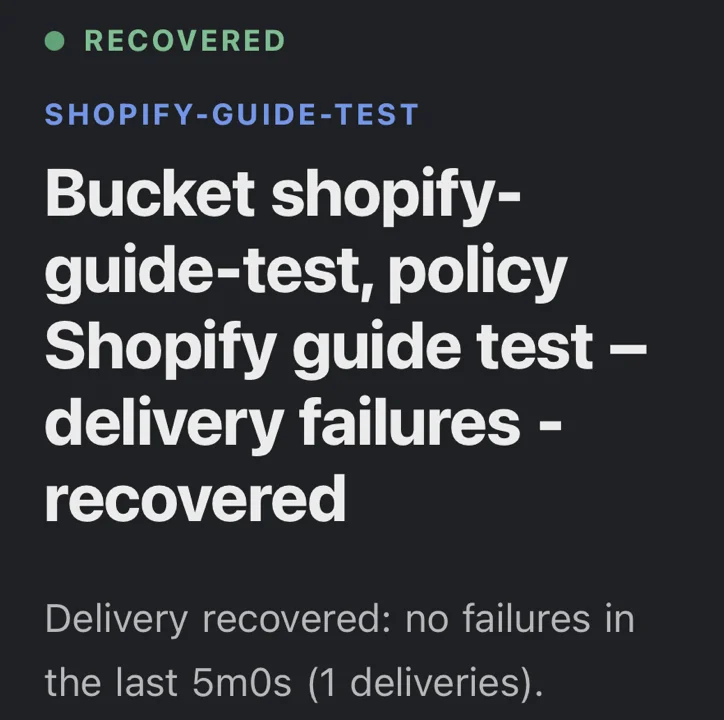
- The alert policy opened an incident 11 seconds after the first failure, and emailed us.
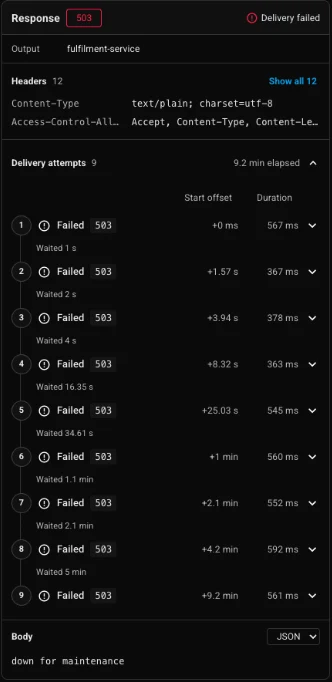
When the destination came back, Recover failed delivered the stored order. The incident resolved itself a second later and sent a recovery email.
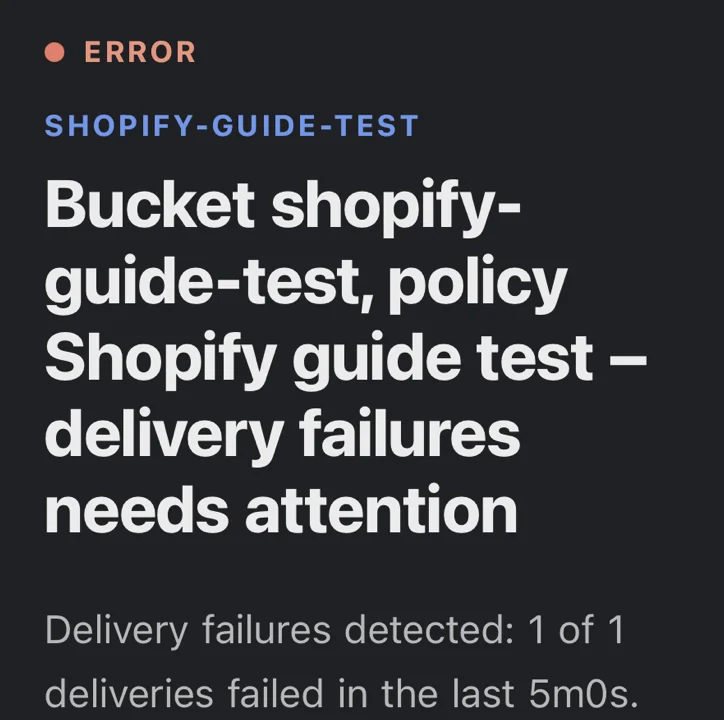
Webhook Relay forwards the body and headers unchanged, so your HMAC check keeps working against the original X-Shopify-Hmac-Sha256. Treat its retries like Shopify's: deliveries are at least once, so keep the X-Shopify-Webhook-Id deduplication.
Duplicates and ordering
Shopify warns that the same webhook can arrive more than once and that order is not guaranteed. Two rules cover both:
- Deduplicate on
X-Shopify-Webhook-Id. Store it with a unique constraint when you save the event; a second insert with the same id means a duplicate you can acknowledge and skip. Keep ids for at least a day, since the retry window is four hours. If you have two subscriptions on the same topic, each delivery has its own webhook id and they shareX-Shopify-Event-Id. We checked this with twoorders/createsubscriptions in a test store: one order, two webhook ids, one event id. - Never let an older update overwrite a newer one. Compare the payload's
updated_at(orX-Shopify-Triggered-At) with what you already stored, and ignore anything older. Anorders/updatedcan arrive before theorders/createfor the same order, so upsert rather than insert.
That last case is not rare. In our test store, the very first order sent orders/updated and orders/paid about 0.7 seconds before orders/create, and they arrived in that order. A handler that inserts on orders/create and updates on orders/updated would have tried to update an order it had not created yet.
For the general patterns behind both rules, see webhook retries and idempotency.
Test Shopify webhooks locally
You need to see real requests before you write the handler, and your handler needs real requests while you build it.
- Inspect. Open a free Webhook Bin, use its URL as the subscription
uri, and trigger an event in a development store. The bin shows every header and the exact body. The Shopify webhook tester guide walks through it. - Forward to localhost. Create a bucket, use its URL in the subscription, and run the agent:
relay forward --bucket shopify \
  http://localhost:3000/webhooks/shopify
The bucket URL never changes, so you set the subscription once and restart your dev server as often as you like. For a full Flask example, see receive Shopify webhooks on localhost.
For a webhook created in the Shopify admin, open Settings → Notifications → Webhooks, click the row's menu and choose Send test. Test sends are signed like real ones and carry X-Shopify-Test: true. For an app, send a test event with shopify app webhook trigger --topic orders/create --address <url>. Test events are sample payloads, not real store events, so confirm the payload against a real one from a development store before you rely on a field.
Troubleshooting
| Symptom | Likely cause | Fix |
|---|---|---|
401 from your own HMAC check | Body was parsed before hashing, or the wrong secret | Hash the raw bytes; use the client secret of the app that owns the subscription, or the store's signing secret for admin webhooks |
| Deliveries time out | Handler does work before answering | Store and return 200; process in a worker |
| Subscription vanished | Admin or Admin API subscription deleted after repeated failures | Fix the endpoint, recreate it, or move it to shopify.app.toml |
| Webhooks stopped after a redirect | A 301/302 counts as a failure | Use the final URL, including the trailing slash your server expects |
| Same order processed twice | Retry or duplicate delivery | Unique constraint on X-Shopify-Webhook-Id |
| Order data goes backwards | Out-of-order delivery | Compare updated_at before writing |
| Filtered subscription sends nothing | Filter uses a field missing from include_fields, or an unknown field | Add the field to include_fields; test with a real event |
| Events missing after an outage | Retries ran out after 4 hours | Run the reconciliation query for the outage window |
Build it with an AI coding agent
Add a Shopify webhook endpoint to this app.
Step 1: Declare subscriptions for orders/create, orders/updated and app/uninstalled in shopify.app.toml (api_version 2026-10), plus the three compliance topics, all pointing at /webhooks/shopify.
Step 2: In the route, read the raw request body before any JSON parsing. Verify X-Shopify-Hmac-Sha256 as base64 HMAC-SHA256 of the raw body with SHOPIFY_CLIENT_SECRET, compared in constant time. Return 401 if it fails.
Step 3: Insert the event into a webhook_events table with a unique constraint on X-Shopify-Webhook-Id, storing topic, shop domain, X-Shopify-Triggered-At and the raw body. On a duplicate key, return 200 without doing anything else. Then return 200. Do no other work in the request.
Step 4: Add a background worker that processes unprocessed events, upserts orders and ignores any payload whose updated_at is older than the stored row.
Step 5: Add a scheduled reconciliation job that queries orders updated since the last successful run with the GraphQL Admin API and processes any it has not seen.
Step 6: Add tests for a valid signature, a tampered body, a duplicate webhook id and an out-of-order update.
Next steps
- Check a signature by hand with the Shopify webhook signature verifier.
- Read reliable webhook delivery for the same pattern applied to every provider.
- Set up webhook monitoring so you hear about failures before a merchant does.
- Turn on durable retries for the destination that receives your Shopify webhooks.