
Pipedream Workflows Is Shutting Down: How to Migrate to Webhook Relay
Pipedream Workflows and String shut down on March 31, 2027. Export your workflows, and use Webhook Relay functions with KV and file stores to rebuild them — or let Claude or Codex do the port.
On this page
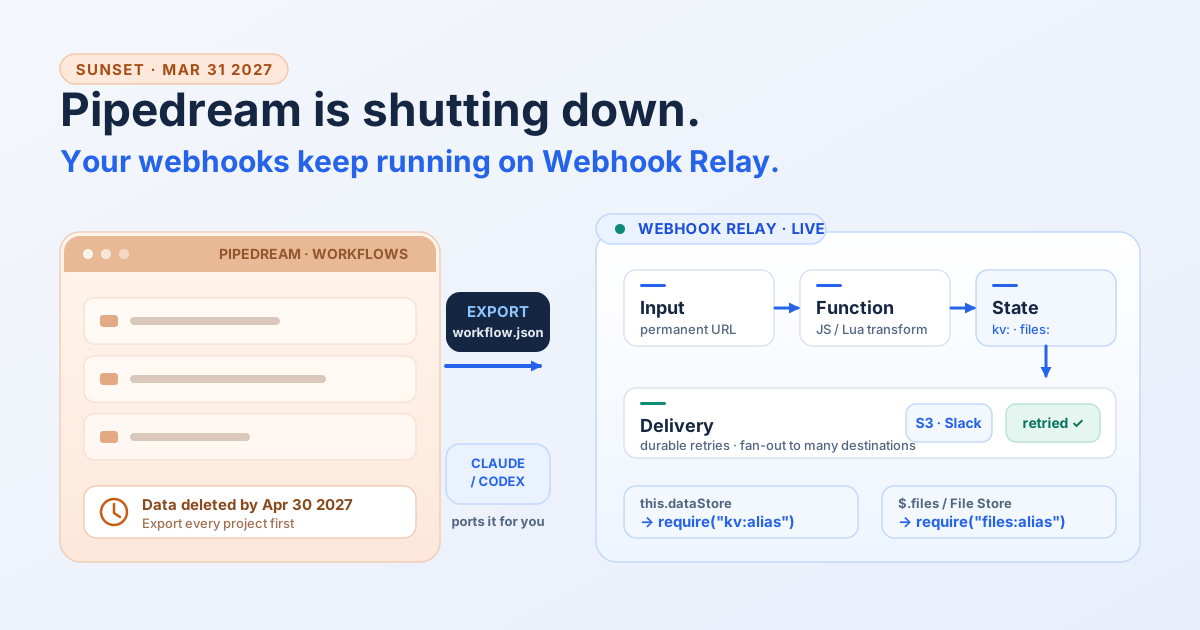
Pipedream announced that Workflows and String shut down on March 31, 2027, with all Workflows data deleted by April 30, 2027. If webhooks are a load-bearing part of your business and a Pipedream workflow is quietly keeping them running, you now have a deadline. This guide covers the facts, why Webhook Relay is a strong target for webhook-driven workflows, and — for the fast path — how to point Claude, Codex or another coding agent at your export and let it do the port.
TL;DR
- The deadline. Workflows and String shut down March 31, 2027; data is deleted by April 30, 2027. Workflows is in maintenance mode — no new signups, no new features. Pipedream Connect is not affected.
- Export first. Pipedream's export tool writes a
project_export-<project_id>.zip(one JSON file per workflow +manifest.json) to each project's File Store. Do it per project, before April 2027. - Webhook Relay fits webhook workflows. It receives webhooks, forwards them reliably, transforms them with JavaScript or Lua functions, and — new in 2026 — gives those functions a KV store (
require("kv:alias")) and file store (require("files:alias")) that map directly onto Pipedream Data Stores and File Stores. - Or let an agent port it. Give Claude Code or Codex the export JSON plus the Webhook Relay function docs and Agent Skills, and it rebuilds each workflow as a tested Webhook Relay function.
- Mostly SaaS orchestration? If a workflow shuffles data between apps with no webhook in the middle, Webhook Relay is not the natural home — but if you're struggling to reimplement it, reach out and we'll help you sort it out.
What Pipedream announced
Pipedream is focusing on being the integration layer between AI and the outside world, and Workflows falls outside that focus. From Pipedream's shutdown notice:
- Workflows and String shut down on March 31, 2027. Existing workflows keep running normally until then.
- Workflows is in maintenance mode. No new signups or subscriptions, and no new features.
- All Workflows data is permanently deleted by April 30, 2027, including credentials and OAuth tokens for connected accounts.
- Subscriptions stay active until March 31, 2027, then are cancelled automatically with a prorated refund.
- Pipedream Connect is not affected. If you use the Connect API, MCP servers or the API proxy, nothing changes.
The important nuance for migration planning: only data related to Workflows is deleted. Event history, data store contents and File Store files are not in the workflow export, so if you rely on stored state you need to pull that separately (more on this below).
Export your workflows before you do anything else
Pipedream built an export tool exactly for this. You export one project at a time:
- Open the project in the Pipedream dashboard and select Settings.
- Click Export Workflows. Pipedream builds the archive in the background.
- When it finishes, the archive appears in the project's File Store as
project_export-<project_id>.zip. Download it.
The archive keeps your project's folder structure and contains:
project_export-proj_abc123.zip
├── manifest.json
├── sync-leads-to-sheets-p_abc123.json
└── Marketing/
    └── weekly-digest-p_def456.json
Each workflow JSON includes its name, description, settings, triggers, steps (with the code for code steps), configured props, and the deployments (steps inside if/else and switch branches). manifest.json lists every workflow with a status and any warnings about props you must re-enter.
Two things the export deliberately leaves out, and both matter:
- Credentials and secrets. Secret props export as
<redacted>, connected accounts export only theirauthProvisionId, and environment variables are omitted. You re-enter these on the new platform. Thewarningsarray inmanifest.jsontells you exactly which step and prop needs it. - Data store contents and File Store files. These are not in the archive. If your workflows keep state in a Data Store, either download it from the Data Stores dashboard or export it with the Node.js chunked-export action Pipedream documents. You cannot migrate state you did not pull.
Limits: one export covers up to 500 workflows or 256 MB, whichever comes first, and each project allows one export at a time.
Why Webhook Relay is a strong migration target
Most Pipedream Workflows that matter operationally are webhook-driven: a Stripe charge, a GitHub push, a Shopify order, a CI event arrives, and the workflow transforms it and delivers it somewhere. That is exactly the shape Webhook Relay is built for — it is dedicated webhook infrastructure, not a general automation builder.
The mapping is close:
| Pipedream concept | Webhook Relay equivalent |
|---|---|
| HTTP / webhook trigger | A bucket input with a permanent public URL |
| Timer / schedule trigger | Scheduled (cron) webhooks |
| Code step (Node) | A JavaScript function |
| Code step (Python/Bash/Go) | Rewrite as JavaScript or Lua (only these two are supported) |
this.dataStore | require("kv:alias") — a KV store with TTL |
$.files / File Store | require("files:alias") — an object store with pre-signed URLs |
| Destination / HTTP step | An output (public URL, queue, S3, Pub/Sub, and more) |
| Control flow (if/else, switch) | Logic inside the function |
| Delayed / retried delivery | Durable outputs with retries |
The two capabilities that previously blocked a clean migration — a key-value store and a file store — now exist as first-class runtime bindings, backed by the same object storage that holds function code, so there is no extra infrastructure to stand up.
KV store: Pipedream Data Stores, mapped
A function requires a KV store by name and calls it synchronously. There is nothing to set up first: the store is created the first time a function requires it, and every function that uses the same name shares it. Full reference: KV store docs.
const kv = require("kv:sessions")

kv.set("cursor", 42)          // no expiry
kv.set("token", "abc", 3600)  // optional TTL, in seconds
kv.get("cursor")              // 42, or undefined if absent or expired
kv.has("cursor")              // boolean
kv.setTtl("token", 7200)      // change expiry without rewriting the value
kv.delete("cursor")           // true
const page = kv.keys("user:", 100)   // { keys: [...], cursor: "..." }
Values are JSON-serializable and capped at 256 KiB; keys are up to 512 bytes. TTL is supported per key. This covers the four things Pipedream Data Stores are most often used for — counters, dedupe, rate limiting and cursors — plus caching: store an access token with a TTL a little shorter than its lifetime and fetch a new one when it reads as missing. Stores are browsable and editable in the dashboard under Functions → KV, which replaces Pipedream's Data Stores UI.
Moving your data across is a one-off script: export the Data Store contents from Pipedream (see above), then write each key into the new store with a short throwaway function or the set_function_kv_entry tool on the Webhook Relay MCP server.
The method-by-method mapping from Pipedream's this.dataStore:
| Pipedream | Webhook Relay |
|---|---|
this.dataStore.set(k, v, { ttl }) | kv.set(k, v, ttl) |
this.dataStore.get(k) | kv.get(k) |
this.dataStore.has(k) | kv.has(k) |
this.dataStore.setTtl(k, s) | kv.setTtl(k, s) |
this.dataStore.delete(k) | kv.delete(k) |
(await this.dataStore.keys()) | kv.keys().keys |
for await (const [k,v] of this.dataStore) | kv.keys() paging |
Two honest differences to plan for. First, Webhook Relay's bindings are synchronous — kv.get(k) returns the value directly, so drop the await when you port. Second, Pipedream's Data Store operations are not atomic (their own docs warn about race conditions), and neither is a get+set pair here; if you have a true counter that must not race, keep that logic in a single serialized worker.
File store: Pipedream File Stores, mapped
Passing files between runs works the same way, and the store is also created on first use. Full reference: file store docs.
const files = require("files:exports")

files.put("reports/today.csv", csv, "text/csv")
files.get("reports/today.csv")        // contents as a string
files.getBuffer("logo.png")           // base64 string
files.exists("reports/today.csv")     // boolean
files.stat("reports/today.csv")       // { path, size, content_type, modified_at }
files.list("reports/", 100)           // { files: [...], cursor: "..." }
files.url("reports/today.csv")        // pre-signed download URL (30 min)
files.url("reports/today.csv", "PUT", 600) // pre-signed upload URL (10 min)
Reads are capped at 8 MiB and a single inline write at 32 MiB; larger objects go through a pre-signed URL. The one structural difference is that Pipedream stages files on a /tmp filesystem between steps, which Webhook Relay's sandbox does not have — so file.toFile('/tmp/x') becomes files.getBuffer(x) and you pass the bytes (or a files.url() link) forward.
The fast path: let Claude or Codex do the migration
Manually porting a folder of workflows is tedious, and it is exactly the kind of structured, repetitive task a coding agent is good at. The recipe:
- Export each project to JSON (above) and unzip it.
- Install the Webhook Relay Agent Skills. They are open source and teach an agent how to drive Webhook Relay correctly:
npx skills add webhookrelay/skills
Thewebhook-transformationsskill covers writing and testing JavaScript/Lua functions;webhook-forwarding-publicandrecurring-webhookscover the routing and scheduling triggers. - Hand the agent the material. Point Claude Code, Codex or another coding agent at the export folder and give it three references: the workflow JSON files, the Webhook Relay functions docs, and the skills above.
- Ask for a port, one workflow at a time. A prompt like:
Read every workflow JSON in this export. For each one, produce a Webhook Relay function in JavaScript that reproduces the transform and delivery behavior. Map
this.dataStore.*calls torequire("kv:alias")andfiles.*calls torequire("files:alias"). List every trigger as an input, scheduled webhook or output, and flag any step that relies on a Pipedream app integration or a Python/Bash/Go step, because those need manual work. For each function, write a sample request and the expected forwarded body so I can test it. - Test before you attach. Webhook Relay functions run against a real request you supply, and errors show up in the execution log. Have the agent (or yourself) verify each function forwards the body you expect before wiring it to a production input.
The agent handles the mechanical translation — the this.dataStore to kv, the $.files to files, the step-by-step reshuffling into a single function — and, just as usefully, flags the parts that need a human decision. Treat its output as a draft you test, not a finished migration.
If you would rather not do this yourself, the Webhook Relay team can help. Contact us with your use case and we will walk through the migration with you.
Worked example: deduplicating Stripe events
Take a common Pipedream workflow: receive a Stripe event, deduplicate by event ID in a Data Store, and forward new events to an internal API.
In Pipedream, that is a trigger, a code step that reads and writes this.dataStore, an if/else on the dedupe result, and an HTTP destination.
In Webhook Relay, it is one function on the input:
// Function on the Stripe input; the "events" KV store is created on first run
const kv = require("kv:events")

const event = JSON.parse(r.body)

// Dedupe: have we seen this event before? TTL 7 days.
if (kv.has(event.id)) {
  r.stopForwarding()                 // already processed, don't deliver again
  return
}
kv.set(event.id, true, 7 * 24 * 3600)

// Reshape for the internal API and forward.
r.setBody(JSON.stringify({
  type: event.type,
  amount: event.data.object.amount,
  customer: event.data.object.customer,
}))
r.setHeader("Content-Type", "application/json")
r.setPath("/v2/stripe-events")
The trigger becomes the input's URL, the Data Store becomes the kv:events store, the if/else becomes an early r.stopForwarding(), and the HTTP destination becomes an output. Fewer moving parts, one function, and the dedupe state persists across executions.
What Webhook Relay does not replace
Being honest about scope saves you a wasted migration:
- SaaS app integrations. Pipedream ships thousands of pre-built app actions and triggers. Webhook Relay does not — it is webhook infrastructure. If a workflow's core value is "connect app A to app B with no code," that part needs a different tool.
- Python, Bash and Go code steps. Webhook Relay functions are JavaScript or Lua only. Python/Bash/Go steps must be rewritten.
- Browser automation and general compute. Pipedream's browser automation and general-purpose long-running compute have no equivalent here.
- Pipedream Connect. If you rely on Connect, MCP servers or the API proxy, note that those are not shutting down. Migration is only about Workflows.
The clean rule: if a workflow is webhook-shaped — an event arrives, gets transformed, and is delivered — Webhook Relay is a strong fit. If it is mostly multi-app orchestration with webhooks incidental, it is not.
Need a hand?
That rule is a starting point, not a verdict. If you're looking at a workflow that orchestrates SaaS apps with no webhook in the middle and you're not sure how — or whether — to rebuild it, reach out and we'll help you sort it out. We can look at the export with you, work out which parts belong on Webhook Relay, suggest where the app-to-app glue should live, and turn the webhook-shaped pieces into tested functions. Contact us with your use case and the workflow names, and we'll take it from there.
Migration checklist
- Inventory every project that has Workflows you depend on.
- Export each project to JSON before April 2027, and download any Data Store contents and File Store files separately.
- Classify each workflow: webhook-shaped (port it) or app-orchestration (needs another tool).
- Re-create credentials as Webhook Relay secrets; the export's
warningslist names each one. - Port code steps to JavaScript functions, mapping
this.dataStoretokvand$.filestofiles. - Rebuild triggers: HTTP → input URL, timer → scheduled webhook, destination → output.
- Test each function against a sample request and check the forwarded body.
- Turn off the Pipedream workflow once the Webhook Relay path is verified.
Start here
If you want to move a webhook-driven Pipedream workflow, the pieces are all in place: functions for the transform, the KV store and file store for state, durable delivery with retries and fan-out to multiple destinations, and Agent Skills so Claude or Codex can do the porting.
- Create a free Webhook Relay account and try a function on a test input.
- Read the functions documentation.
- Point your coding agent at the export with
npx skills add webhookrelay/skills. - Or contact us and we will help you migrate.
For a broader comparison of the two products, see A Pipedream Alternative for Webhook Routing and Private Delivery.