

Jenkins Webhooks: The Complete Setup Guide (GitHub, Bitbucket, GitLab, Gitea)
Every Jenkins webhook URL in one place — /github-webhook/, /bitbucket-hook/, /project/NAME, /gitea-webhook/post — plus how to fix 403 no valid crumb and receive webhooks when Jenkins has no public IP.

Jenkins can start a build the instant someone pushes, instead of waking up every few minutes to poll. That is what webhooks are for. But almost every Jenkins webhook question comes down to one of three things: which URL do I point the provider at, why am I getting a 403, and how does any of this work when Jenkins sits on a private network with no public IP.
This guide answers all three, for GitHub, Bitbucket, GitLab and Gitea.
Jenkins webhook URLs, all in one place
Each Jenkins plugin registers its own endpoint. Point your provider at the matching one:
| Provider | Jenkins webhook URL | Plugin |
|---|---|---|
| GitHub | http://JENKINS_URL/github-webhook/ | GitHub plugin |
| Bitbucket | http://JENKINS_URL/bitbucket-hook/ | Bitbucket plugin |
| GitLab | http://JENKINS_URL/project/PROJECT_NAME | GitLab plugin |
| Gitea | http://JENKINS_URL/gitea-webhook/post | Gitea plugin |
| Anything else | http://JENKINS_URL/generic-webhook-trigger/invoke | Generic Webhook Trigger |
Three details cause most of the failures:
- The trailing slash on
/github-webhook/and/bitbucket-hook/is required. Drop it and you are no longer hitting the plugin's CSRF-exempt endpoint, which surfaces as a 403. - GitLab's URL contains the job name, not a fixed path —
/project/my-job, or/project/my-folder/my-jobfor a job inside a folder. Pointing GitLab at/job/PROJECT_NAME/buildskips the plugin and will not behave as documented. JENKINS_URLis whatever Jenkins is reachable at, including any context path. If Jenkins runs under/jenkins, the GitHub endpoint ishttp://host/jenkins/github-webhook/.
The problem: Jenkins usually is not on the public internet
Jenkins has broad access to your infrastructure, so it normally lives behind a firewall, inside a VPC, or on a NAT'd network. That is the right call for security — and it is exactly what breaks webhooks, because GitHub and friends can only POST to a public URL.
The usual workarounds are all bad: exposing Jenkins to the internet, maintaining IP allowlists that the provider keeps changing, or falling back to polling and accepting the delay plus the API rate limiting that comes with it.
Webhook Relay solves it from the other direction. You run a small agent next to Jenkins; it makes an outbound connection and streams incoming webhooks to your internal Jenkins URL. The provider only ever sees a public Webhook Relay endpoint.
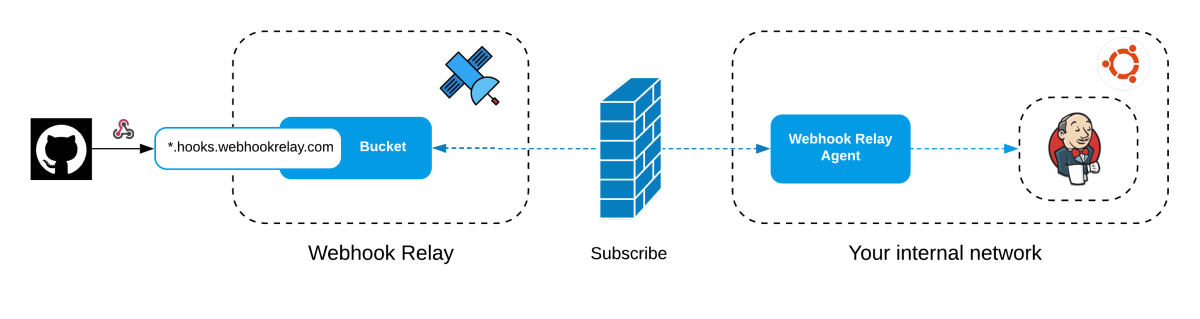
A few properties that matter for a team setup:
- No inbound ports. Nothing about your firewall changes.
- One agent, many Jenkins servers. A single agent can relay to any number of internal hosts it can reach.
- The public endpoint is stable. Reprovision the machine behind it and the provider configuration stays the same.
- Webhooks stay uni-directional. Responses are not returned to the sender, so Jenkins is not probeable through the endpoint.
Setting it up
Install the agent and create a forwarding rule pointing at the endpoint for your provider:
# install (Linux x86-64; see the docs for other platforms)
sudo wget -O /usr/local/bin/relay \
  https://storage.googleapis.com/webhookrelay/downloads/relay-linux-amd64
sudo chmod +wx /usr/local/bin/relay

# authenticate with a token key/secret from https://my.webhookrelay.com/tokens
relay login -k YOUR_TOKEN_KEY -s YOUR_TOKEN_SECRET

# create the public endpoint and start forwarding
relay forward --bucket jenkins http://localhost:8080/github-webhook/
That prints a public endpoint:
https://vlndyzsibcil98gdte7yp1.hooks.webhookrelay.com -> http://localhost:8080/github-webhook/
Put that URL into your provider's webhook settings. Swap the destination for /bitbucket-hook/, /project/my-job or /gitea-webhook/post depending on which provider you are wiring up.
For anything long-lived, run the agent as a service so it survives reboots — pass --no-agent to create the configuration without starting a foreground agent, then install it via Docker (--restart always) or as a background OS service. Both are covered step by step in the Jenkins and GitHub tutorial.
Per-provider walkthroughs
The full production setups, with screenshots and shared-secret configuration, live in the docs:
- Jenkins and GitHub — GitHub plugin, shared secret, Blue Ocean pipeline
- Jenkins and Bitbucket — Bitbucket plugin, including Bitbucket Server Post-Webhooks
- Jenkins plugin for Webhook Relay — subscribe to buckets from inside Jenkins, no separate agent
- Multibranch pipelines — branch and pull-request discovery
- Jenkins on Kubernetes — run the relay agent as a sidecar or standalone deployment
- Multibranch pipelines — build branches and pull requests through the Jenkins plugin
Trigger a specific job through the Remote Build API
A provider plugin is best when Jenkins should match repository events to jobs. For a generic webhook that must launch one known job, Jenkins also documents POST /job/JOB_NAME/build and /job/JOB_NAME/buildWithParameters in its Remote Access API.
Point the private output at:
http://localhost:8080/job/deploy-staging/buildWithParameters
Then attach a JavaScript function to allow only the intended event, add parameters and authenticate with a Jenkins API token:
const event = JSON.parse(r.body)

if (event.type !== "deployment.requested" || event.environment !== "staging") {
  r.stopForwarding()
  return
}

const user = cfg.get("JENKINS_USER")
const token = cfg.get("JENKINS_API_TOKEN")

r.setMethod("POST")
r.setRawQuery("VERSION=" + encodeURIComponent(event.version))
r.setHeader("Authorization", "Basic " + crypto.base64Encode(user + ":" + token))
r.setBody("")
Store both values in function configuration, not in source. Jenkins recommends API tokens for scripted clients and expects authentication on the first request. Test direct builds against a non-production job before enabling an action webhook.
Troubleshooting
403 No valid crumb was included in the request
The request landed on a Jenkins path that is not exempt from CSRF protection. Check, in order:
- Trailing slash.
/github-webhook/, not/github-webhook. - An extra path segment. Some integrations append a path (
/ghprbhook, for instance) to whatever destination you configured, producing a final URL Jenkins does not recognise. Look at the actual request path in your Webhook Relay logs and make sure it is exactly the endpoint you expect.
400 Signature was expected, but not provided
Jenkins is configured with a shared secret but the incoming request has no signature — the secret is missing on the provider side, or the two do not match. Set the same secret in both places. On GitHub that is the webhook's Secret field; in Jenkins it goes under the GitHub section → Advanced → Shared secrets.
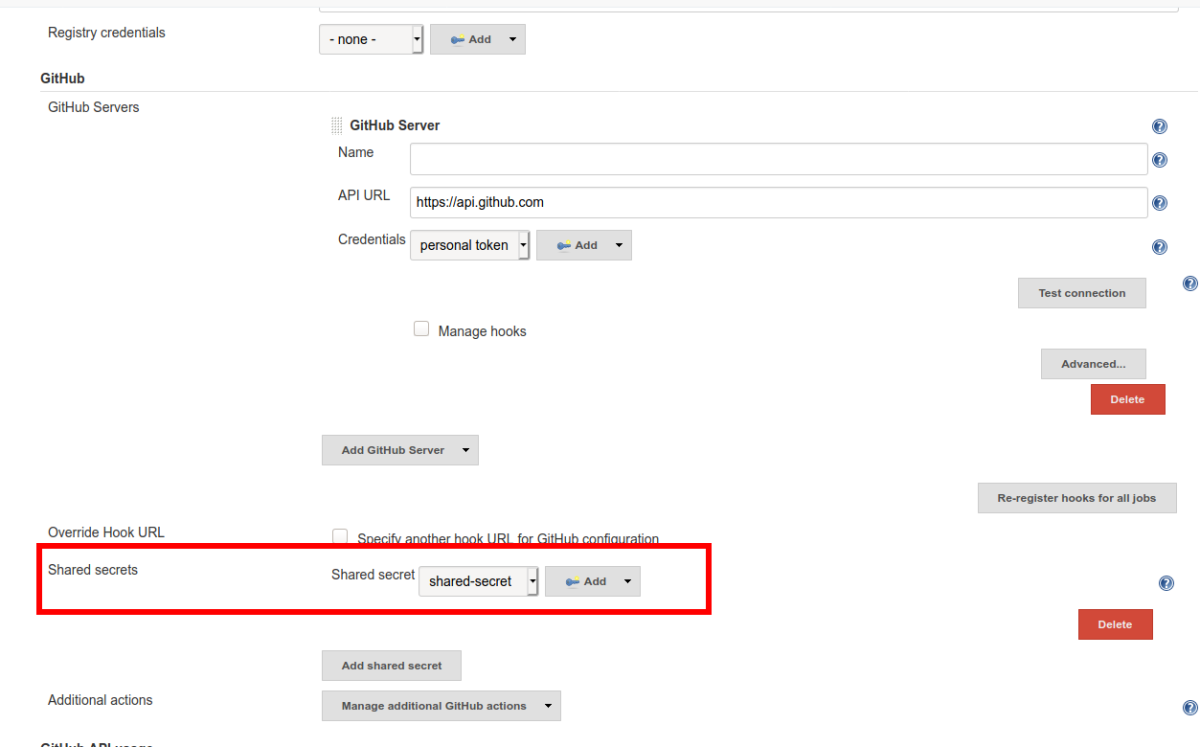
Generate one with openssl rand -base64 32.
Bitbucket Cloud signs the unmodified request body with HMAC-SHA256 in X-Hub-Signature. Configure the same secret at both ends and verify the raw body before any payload transformation. The webhook signature guide includes a Bitbucket-specific example.
Jenkins returns 200 but nothing builds
Jenkins accepted the webhook and could not match it to a job. It reads the repository URL out of the payload and looks for a job configured against that repository, so the URL in your job's Source Code Management section has to match exactly. Check the Jenkins system log for No SCM configuration was found!.
Everything shows as "received" but never "forwarded"
The agent is not running. Webhook Relay stored the request but had nothing to deliver it to. Start the agent — and if this happens intermittently, install it as a service rather than running it in a shell.
Which approach should you use?
| Situation | Use |
|---|---|
| Jenkins has a public IP and you are happy exposing it | Provider webhook straight to the Jenkins endpoint |
| Jenkins is behind a firewall, NAT or in a private network | Webhook Relay agent forwarding to the internal URL |
| You would rather not run a separate agent | Jenkins plugin subscribing to a bucket |
| Jenkins runs in Kubernetes | Agent as a sidecar or deployment |
| Provider has no Jenkins plugin | Generic Webhook Trigger at /generic-webhook-trigger/invoke |
Wrapping up
Most Jenkins webhook problems are URL problems. Get the endpoint exactly right — trailing slash included — make sure the repository in the job matches the repository in the payload, and set the shared secret on both sides.
The part that genuinely needs infrastructure is receiving webhooks at all when Jenkins is not publicly reachable, which is the normal case for a company CI server. An outbound agent handles that without opening a single port. Start forwarding for free.
If webhook delivery was the only reason your controller is exposed today, closing that port is the first item on a longer list — see securing Jenkins: a hardening checklist for the rest.