
Azure Relay Alternative: Receive Webhooks On-Prem Without Hybrid Connections
Azure Relay Hybrid Connections vs Webhook Relay for getting cloud events into a private network: SDK and protocol requirements, pricing, retries, and when each one fits.
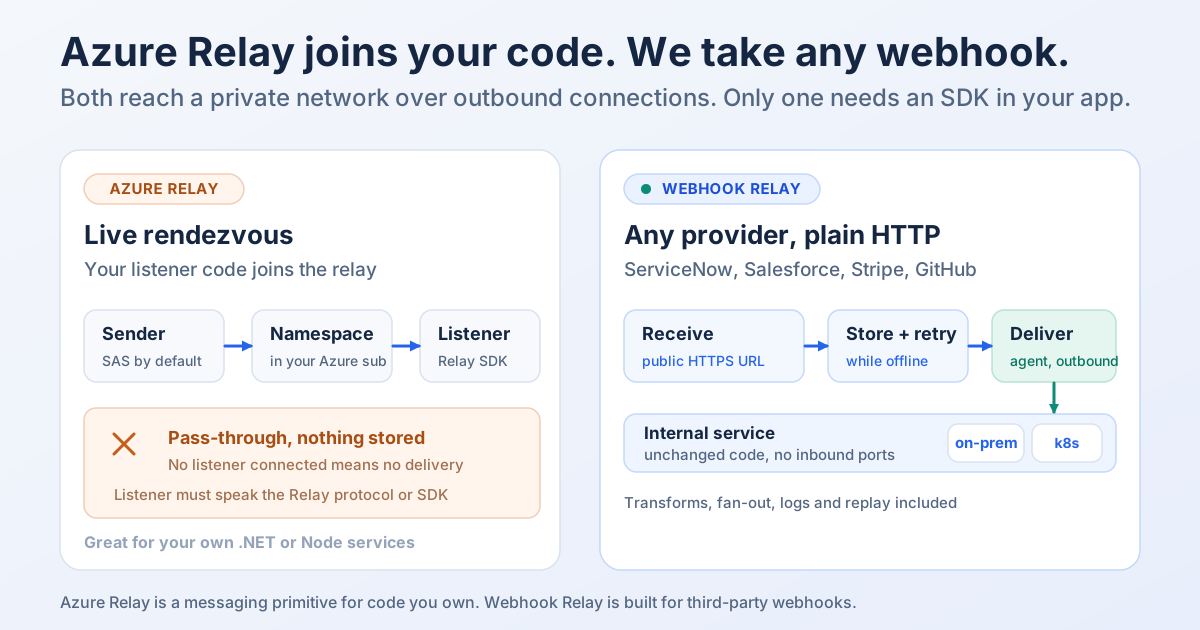
Short answer: Azure Relay is a good way to connect code you write on both sides, a client in the cloud and a listener inside your network. It isn't built for receiving webhooks from SaaS providers you don't control. For that you want a relay that accepts any provider's plain HTTPS POST, stores it, and delivers it to your internal service unchanged. Webhook Relay does this with an outbound-only agent, no SDK in your application, and retries.
Most people who search for an Azure Relay alternative are in the same position. An event happens in a cloud system (a ServiceNow incident, a Salesforce record change, a NetSuite sales order, a GitHub push) and it has to reach something on a private network: an ERP, an internal API, an on-prem Jenkins, a system in a regulated data centre. Security won't open an inbound port. Azure Relay comes up because it's literally designed to cross that firewall, and then the details get in the way.
What Azure Relay actually is
Azure Relay lets a service inside a corporate network be reached from the cloud "without opening a port on your firewall." The private service connects out to an Azure Relay namespace and registers as a listener. Senders connect to the same namespace, and Azure passes the traffic through. Microsoft describes it as bi-directional and unbuffered.
There are two flavours:
- Hybrid Connections: built on HTTP and WebSockets, with an open protocol, so it works from any platform and language. Microsoft ships SDKs and samples for .NET, Node.js and Java.
- WCF Relay: the legacy option, tied to Windows Communication Foundation on the full .NET Framework. Microsoft's FAQ says both are still supported.
Since the protocol is open, you could write your own listener with any WebSocket library. In practice teams use the SDK (Microsoft.Azure.Relay for .NET, hyco-https / hyco-ws for Node).
Where Azure Relay is the right choice
To be fair to it, Azure Relay is a strong fit when:
- You own both ends. Your cloud app calls your on-prem service, and you can add the Relay SDK (or protocol code) to both.
- You need a live, two-way channel. Hybrid Connections can carry WebSocket streams and request/response traffic with low latency. It isn't limited to one-way event delivery.
- You're standardised on Azure. The namespace sits in your subscription, uses Azure RBAC and SAS policies, and shows up on your Azure bill.
- Cost per listener matters more than features. One listener is roughly $10 a month in list price (details below), with no per-message charge on Hybrid Connections.
If that describes your project, Azure Relay is a sound piece of infrastructure and you don't need anything else.
Why it gets awkward for webhooks
Webhooks are a different shape of problem. The sender is someone else's platform and you can't change its code. Here's what you run into.
1. The receiving side has to be a Relay listener. An HTTP request sent to a hybrid connection goes to a listener that has opened a control channel to the namespace with a Listen-rights SAS token (protocol guide). Your existing internal service, say a Java app on http://10.0.4.12:8080/events, can't be that listener as it stands. You either add the SDK to it or write and run a small bridge process that listens on the relay and re-posts to the real service. That bridge is now code you own, deploy and monitor.
2. Senders need a SAS token by default. Sender authorization is on by default. A webhook provider that only lets you type in a URL can't sign a SAS token per request. You can turn on anonymous senders (requiresClientAuthorization: false), but then anyone who learns the URL can reach your listener, and you'll want to verify signatures yourself.
3. Nothing is stored and nothing is retried. If no listener is connected, the sender gets a 502. If the listener doesn't answer within 60 seconds, the sender gets a 504. Nothing is queued. Whether the event survives depends entirely on the provider's retry policy, and those vary a lot: Salesforce outbound messages retry for up to 24 hours, many providers give up after a few attempts, and some don't retry at all.
4. Large bodies take a second hop. On the control channel, request and response bodies are limited to 64 kB and headers to 32 kB. Bigger requests move to a separate per-request "rendezvous" WebSocket. It works, but your listener has to handle both paths.
5. There's no webhook tooling. No request log to inspect what a provider actually sent, no replay, no payload transforms, no fan-out to several internal systems. Those are left to your bridge code.
None of this makes Azure Relay bad. It's a messaging primitive, and webhooks need a few layers on top of it.
The App Service Hybrid Connection Manager detour
Searches for "hybrid connection manager" often end up here too, so it's worth separating. App Service Hybrid Connections are built on Azure Relay, but they point the other way. They let an app running in Azure App Service reach a single TCP host:port inside your network. You install the Hybrid Connection Manager (HCM) on-prem; it calls out to Azure Relay over port 443 and forwards the app's connections.
Microsoft's docs are explicit that this "doesn't enable a new way to access your app." It's outbound from App Service to on-prem only. It also doesn't support UDP or dynamic-port protocols such as passive FTP or LDAP. The current HCM runs on Windows (GUI and CLI) and Linux (CLI only); the legacy Windows-only HCM is no longer updated. If your goal is "SaaS sends us a webhook and it reaches an internal server," HCM isn't the tool.
Azure Relay vs Webhook Relay at a glance
| Azure Relay (Hybrid Connections) | Webhook Relay | |
|---|---|---|
| Crosses the firewall with outbound-only connections | Yes (listener connects to the namespace) | Yes (relay agent connects out) |
| Receives a plain HTTPS POST from any SaaS provider | Only with HTTP enabled, and a SAS token or anonymous senders allowed | Yes, every input is a public HTTPS URL |
| Code change in your internal service | Listener SDK or protocol code, or a bridge you run | None, the agent posts plain HTTP to your existing URL |
| Stores requests if your side is down | No (502 with no listener) | Yes, stored, with retries and replay |
| Request log and replay | No | Yes, every request and response |
| Transform payloads before delivery | No | JavaScript or Lua functions |
| One event to several internal systems | Build it yourself | Multiple outputs and agents |
| Two-way, live WebSocket streams | Yes | Not the goal; use tunnels for live traffic |
| Runs where | Azure namespace in your subscription | Hosted service; agent as CLI, Docker image or Kubernetes operator |
| Pricing model | Per listener-hour plus data over 5 GB | Plans by webhook volume, free plan available |
Azure details are from Microsoft's documentation and the Azure retail prices API as of November 2026. Check current terms for your region before you decide.
How Webhook Relay handles the same job
The setup for "cloud events into a private network" looks like this:
- Create a bucket. It gets a permanent public HTTPS input URL. Give that URL to ServiceNow, Salesforce, NetSuite, GitHub or any other sender. No SAS token, no SDK on their side.
- Run the relay agent inside your network, next to the service that should receive the events:
relay forward --bucket erp-events http://10.0.4.12:8080/events
The agent opens an outbound connection to Webhook Relay. There's no inbound firewall rule and no public IP, and it works through an HTTP proxy if your network requires one. It also ships as a Docker image and a Kubernetes operator. - Your service receives a normal HTTP request with the provider's original method, headers and body. Nothing in its code knows a relay exists.
Then the parts Azure Relay leaves to you:
- Storage and retries. Every webhook is stored before delivery. If the agent or your service is down, requests wait in the bucket, and with durable retries delivery is retried with backoff for up to 30 days. You can also replay any request from the log.
- Sender checks at the edge. Verify the provider's signature before anything is forwarded, or restrict an input to the provider's published source IP ranges, so unexpected traffic is rejected before it reaches your network.
- Transforms. A function can reshape the payload, add an auth header your internal API expects, or drop events you don't need.
- Fan-out. One ServiceNow event can go to an internal API in one data centre and a logging system in another.
- Custom responses. Some senders expect a specific reply. For example, Salesforce outbound messages need a SOAP acknowledgement. An input can return a static or dynamic response.
When to pick which
Pick Azure Relay if:
- you write both the sender and the receiver and can embed the Relay SDK,
- you need a live, two-way channel such as WebSocket streams or synchronous RPC,
- you want everything inside your Azure subscription and billing.
Pick Webhook Relay if:
- the events come from SaaS platforms you don't control,
- the receiving service should stay as it is: plain HTTP, no SDK, no bridge process,
- you can't lose events when your side restarts, and you need logs and replay to prove what arrived,
- you're running on-prem, in another cloud, or in Kubernetes, not only in Azure.
Plenty of teams use both: Azure Relay for their own service-to-service traffic, and Webhook Relay for third-party webhooks coming in.
Guides for specific systems
If you're here because of one particular sender, these walk through its real outbound mechanism and how to land it on an internal server:
- ServiceNow webhooks to an internal server: outbound REST messages, business rules and where the MID Server fits.
- NetSuite webhooks to an on-prem endpoint: SuiteScript User Event scripts with
N/https. - Salesforce Outbound Messages behind a firewall: the SOAP payload, the acknowledgement and retries.
For the product side, see webhooks to internal servers. If you're buying for a company, the enterprise page covers SOC 2 Type II, SSO, security reviews and annual billing by invoice and purchase order.