
n8n Webhook Deduplication: Stop Duplicate Retries Without Redis
How to dedupe webhook retries in n8n: Data Tables vs the Remove Duplicates node vs Redis, why lookups race, and how to drop duplicates before n8n with a KV store.
On this page
To dedupe webhook retries in n8n, key every event on the provider's event ID and drop any ID you have already seen within the provider's retry window. The hard part is not storing IDs, it is making the check-and-store happen before a second copy of the same event gets through. A Sheet or Data Table lookup is two separate steps, so two retries a second apart can both pass. Redis fixes that with an atomic operation but is one more service to host. A third option is to drop duplicates before they reach n8n at all, using a function and a built-in KV store on the webhook endpoint.
This guide compares the options people actually use, explains where each breaks, and shows the KV-store setup end to end.
Why n8n gets the same webhook two or three times
Webhook providers deliver at least once, not exactly once. When a delivery looks failed to them, they send it again with the same event ID. A delivery looks failed when:
- Your response is slow. Shopify allows one second to connect and five seconds for the whole request. If your n8n Webhook node is set to Respond: When Last Node Finishes, the provider waits for the entire workflow, including every API call in it. A slow CRM call is enough to trigger a retry.
- You return a non-2xx. A failing node that bubbles up as a 500 tells the provider to try again.
- The connection drops after you processed the event. n8n did the work, but the provider never saw the
200. From its side, nothing happened.
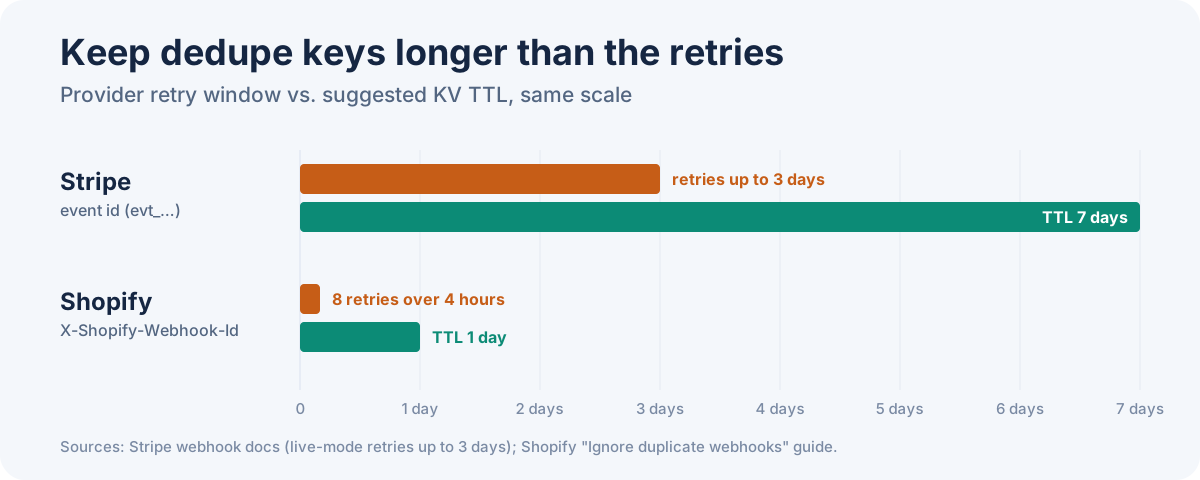
Stripe retries for up to three days in live mode. Shopify retries eight times over four hours. Form tools vary, and many don't document it. If your workflow creates an order, sends an email or charges a card, every retry that gets through does it again. For the general theory, see webhook retries and idempotency.
The options, compared
| Approach | Where the check runs | Race-safe for retries 1s apart? | Expiry | Extra infra |
|---|---|---|---|---|
| Google Sheet lookup | Inside the workflow, 2 nodes | No | Manual cleanup | Google API quota |
| n8n Data Table (If Row Does Not Exist, then Insert) | Inside the workflow, 2 nodes | No | Manual cleanup | None |
| Remove Duplicates node (previous executions) | Inside the workflow, 1 node | Not documented | History size (10,000 by default) | None |
| Redis Increment | Inside the workflow | Yes, Increment is atomic | Key TTL | Redis |
| Respond immediately | Webhook node setting | Doesn't dedupe | n/a | None |
| KV store on the webhook endpoint | Before n8n, in a Webhook Relay function | Near-simultaneous only (see limits) | Per-key TTL | None |
Respond immediately is not really a dedupe method, but you should do it regardless. It's covered below.
Google Sheets: slow and racy
A Sheet lookup works for a handful of events a day. It fails in exactly the case you care about. Execution A reads the sheet and finds no row. Execution B, a retry that arrived 800 ms later, reads the sheet before A has appended its row, and also finds nothing. Both carry on. On top of that, every webhook costs a Sheets API read and write, and Google rate-limits both.
n8n Data Tables: fast enough, same race
Data Tables are the obvious upgrade. They live inside n8n, so there's no external API call, and the Data Table node has If Row Does Not Exist and Insert operations that map neatly onto a dedupe check.
Speed is not the problem. The check and the insert are still two separate nodes, and nothing makes them atomic. n8n's Data Tables documentation doesn't mention unique constraints, so you can't rely on a duplicate insert failing either. Two retries that land close together can both see "row does not exist".
Two smaller costs:
- No TTL. Old event IDs stay until you delete them, which means a second scheduled workflow to prune them.
- A storage cap. All Data Tables in an instance share 200 MiB by default (
N8N_DATA_TABLES_MAX_SIZE_BYTESon self-hosted). When you hit it, inserts fail, and a failed insert in a webhook workflow becomes a 500, which becomes another retry.
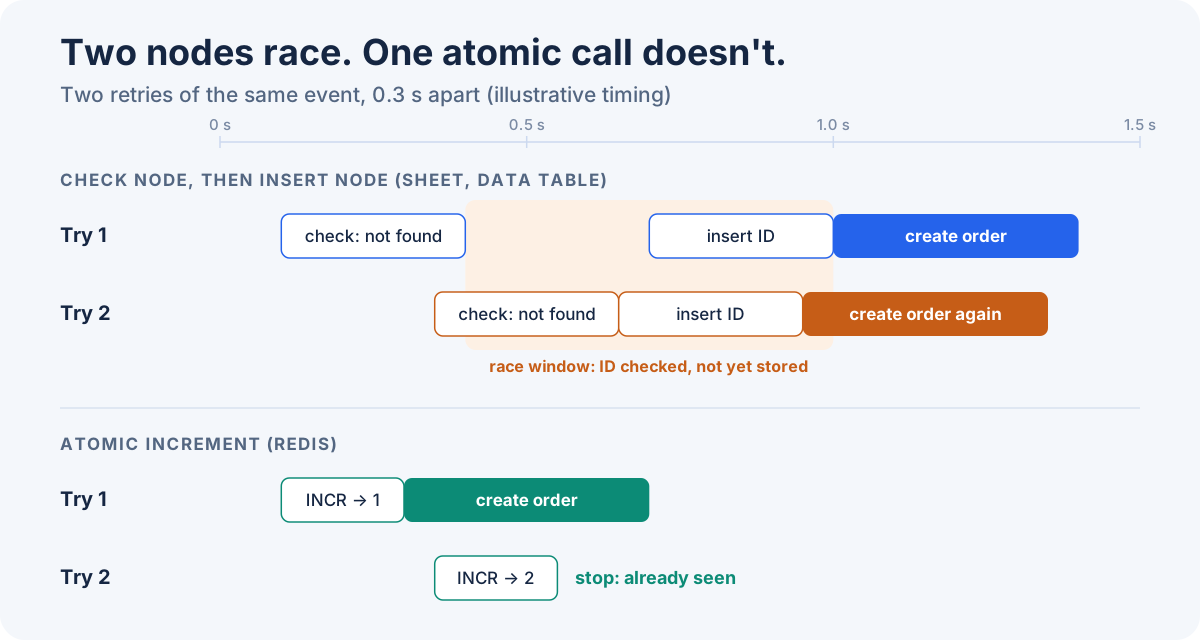
Verdict: Data Tables are fine when retries arrive minutes apart, which is the normal Stripe and Shopify backoff. They are not a guarantee when two copies arrive at nearly the same moment.
The Remove Duplicates node
The Remove Duplicates node has a Remove Items Processed in Previous Executions operation. Set Keep Items Where to Value Is New and Value to Dedupe On to the event ID, and it drops anything it has seen before. It keeps the last 10,000 values by default (the History Size option), scoped to the node or the whole workflow.
It's the least-effort option and it's built in. n8n's docs don't describe how it behaves when two executions run at the same time, so treat it like a Data Table: good for sequential retries, unproven for concurrent ones.
Redis: correct, if you already run it
Redis is the right primitive. The Redis node's Increment operation is atomic: increment dedupe:<event id>, give the key an expiry, and continue only when the result is 1. Two concurrent retries can't both get 1.
If you run n8n in queue mode, you already have Redis, and this is a good answer. If you run a single n8n container, adding Redis just for dedupe is a fair thing to resist, which is where the original question started.
Respond immediately: do it anyway
Set the Webhook node to Respond: Immediately, or put a Respond to Webhook node straight after the trigger, and do the slow work afterwards. That removes the biggest cause of retries: providers timing out while your workflow runs.
It doesn't remove duplicates. Network drops and provider-side redelivery still happen, and once you return 200 early, a failure later in the workflow is invisible to the provider, so it won't retry the events you actually lost. You still want a dedupe check, and ideally the event persisted somewhere before you acknowledge it.
Dedupe before n8n with a KV store
The other approach is to stop duplicates before n8n runs at all. Webhook Relay sits in front of n8n as the public webhook URL. Each incoming request can run a short JavaScript function, and functions have a built-in KV store with per-key TTL. The function checks the event ID, and if it has already seen it, drops the request. n8n never starts an execution for the duplicate.
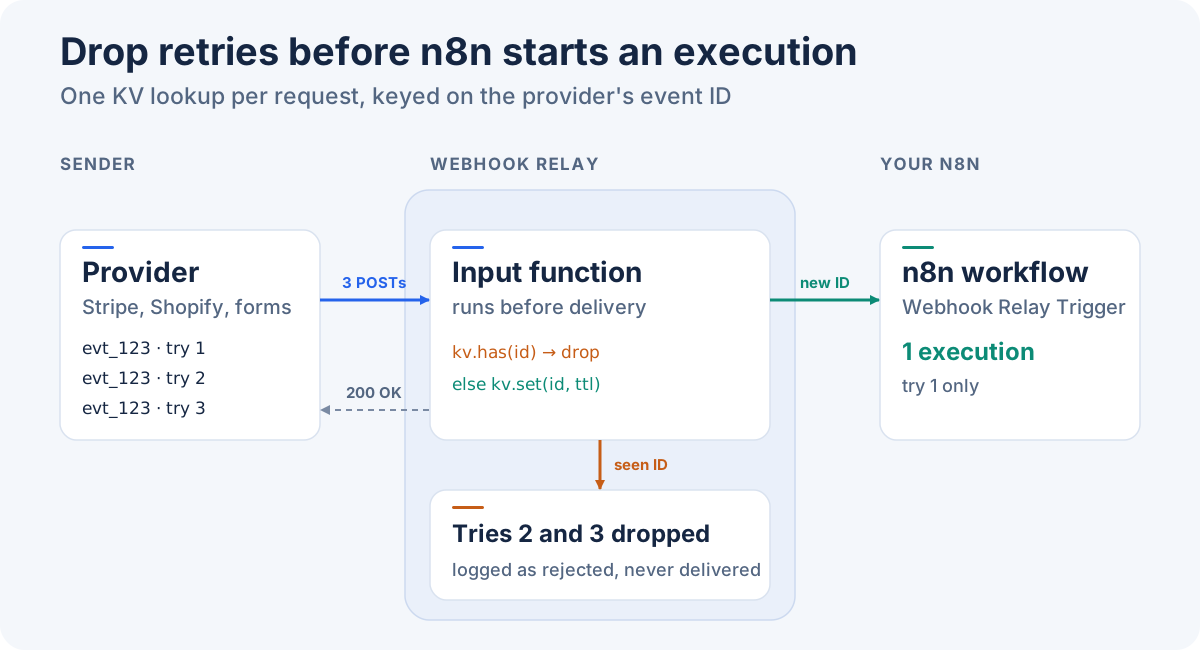
What this gets you:
- No Redis, no table, no cleanup job. Keys expire on their own TTL.
- The sender gets a fast
200. Webhook Relay answers the provider with the input's configured response and doesn't wait for your workflow, which removes the timeout cause of retries as well. - Duplicates stay auditable. Dropped requests still appear in the bucket's logs, marked as rejected, so you can see how often a provider retried.
- n8n stays private. With the Webhook Relay Trigger node, n8n receives events over an outbound WebSocket and exposes nothing to the internet. See n8n security after CVE-2025-68613 for why that matters.
1. Point the provider at Webhook Relay
Install the n8n-nodes-webhookrelay community node and add a Webhook Relay Trigger to your workflow, as in the n8n webhook trigger tutorial. It creates a bucket and gives you a public URL. Give that URL to Stripe, Shopify or your form tool.
If you'd rather keep n8n's own Webhook node, create a bucket in the dashboard and add an output that forwards to your n8n /webhook/... URL instead.
2. Attach a dedupe function to the input
In the dashboard, open Functions, create a function, and attach it to the bucket's input. A function on the input runs once per incoming request, before anything is delivered to n8n. If it stops forwarding, nothing is delivered.
For Stripe, the event ID is the id field in the body:
const kv = require("kv:webhook_dedupe")
const event = JSON.parse(r.body)
const key = "stripe:" + event.id

if (kv.has(key)) {
  r.stopForwarding()   // logged as rejected, never reaches n8n
  return
}

// Stripe retries for up to 3 days in live mode; keep IDs for 7
kv.set(key, true, 7 * 24 * 3600)
The store called webhook_dedupe is created automatically the first time the function runs. You can browse the stored IDs under Functions → KV in the dashboard.
3. Pick the right ID for each sender
Dedupe on the ID the provider repeats on every retry, not on anything that changes per attempt (timestamps, signatures).
| Sender | Dedupe on | TTL |
|---|---|---|
| Stripe | id in the event body (evt_...) | 7 days (retries up to 3 days) |
| Shopify | X-Shopify-Webhook-Id header | 1 day (8 retries over 4 hours) |
| Form tools and others with an ID | Their submission or event ID field | 1–2 days |
| Senders with no ID at all | SHA-256 of the raw body | Short, e.g. 10 minutes |
Shopify sends two IDs, and the choice matters. Shopify's duplicate webhook guide says to use X-Shopify-Webhook-Id to dedupe deliveries. X-Shopify-Event-Id is shared by several deliveries that come from one merchant action, so deduping on it can drop deliveries you need.
One function can handle several senders on the same bucket:
const kv = require("kv:webhook_dedupe")
const DAY = 24 * 3600

let key, ttl
const shopifyId = r.headers["X-Shopify-Webhook-Id"]

if (shopifyId) {
  key = "shopify:" + shopifyId
  ttl = DAY
} else {
  const body = JSON.parse(r.body || "{}")
  if (body.object === "event" && body.id) {
    key = "stripe:" + body.id
    ttl = 7 * DAY
  } else {
    // No stable ID: identical bodies within 10 minutes count as duplicates
    key = "body:" + crypto.sha256(r.body)
    ttl = 600
  }
}

if (kv.has(key)) {
  r.stopForwarding()
  return
}
kv.set(key, true, ttl)
Use the body-hash fallback carefully. Two genuinely separate submissions with byte-identical bodies inside the window will be treated as one. Keep the TTL short, and prefer a real ID whenever the sender has one.
4. Test it
Send the same payload twice to the public URL:
curl -X POST https://<id>.hooks.webhookrelay.com \
  -H 'Content-Type: application/json' \
  -d '{"object":"event","id":"evt_test_123","type":"invoice.paid"}'
# run it again
The first request starts an n8n execution. The second appears in the bucket's logs as rejected, and n8n stays idle. To reset during testing, clear the store from Functions → KV, or delete the key there.
Honest limits
hasthensetis not atomic. They are two calls, run back to back in the same function, so the gap is milliseconds rather than the seconds between n8n nodes. Two copies that arrive within that gap can both pass. Real retries are spread out by backoff, so in practice this is rare, but it isn't zero. If a duplicate must never get through, make the side effect itself idempotent too (next point).- Edge dedupe doesn't replace idempotent writes. Where you can, make the final step an upsert keyed on the order or customer ID rather than a blind insert. The KV check stops repeated executions. The upsert makes a stray one harmless.
- A function error returns a 500. If the function throws (for example,
JSON.parseon a non-JSON body), Webhook Relay answers the sender with a 500, and the sender retries. That fails safe, but it's worth guarding the parse if a sender posts form-encoded data. - The function sees deliveries, not outcomes. It records that an event was received. If n8n later fails while processing it, the ID is already stored, so a provider retry would be dropped. For workflows where that matters, expire the key from n8n's error branch through the REST API, so the next retry gets through, or forward to an HTTP endpoint with durable retries.
What to run in production
- You already run Redis (queue mode): Redis Increment with a TTL inside the workflow. It's atomic and you're not adding anything.
- Single n8n instance, low volume, retries minutes apart: the Remove Duplicates node or a Data Table check is fine. Add a cleanup schedule for the table.
- You want duplicates gone before n8n runs, with no extra service: a KV dedupe function on the Webhook Relay input, keyed on the provider's event ID with a TTL that covers its retry window.
In all three cases, respond quickly and make the final write an upsert. Deduping cuts down repeat executions. An idempotent final write makes any duplicate that still gets through harmless.
Create a free Webhook Relay account, install the n8n node, and paste the dedupe function above onto your bucket's input. The KV store docs cover the full API, limits and the other things it's good for, such as caching tokens and keeping cursors.