

Sender filtering & policy
Harden an email input: restrict inbound mail to an allowlist of From addresses, cap or drop attachments, and rely on SPF/DKIM/DMARC and rate limiting.
An inbound email address can receive mail from anyone, so each email input has policy controls to keep it safe and quiet.
Restrict senders (From allowlist)
By default an email input accepts mail from any sender. Add one or more allowed From addresses to restrict it: when the allowlist is non-empty, only those senders are accepted and everything else is silently dropped (the sender does not get a bounce, and nothing is relayed to your endpoint).
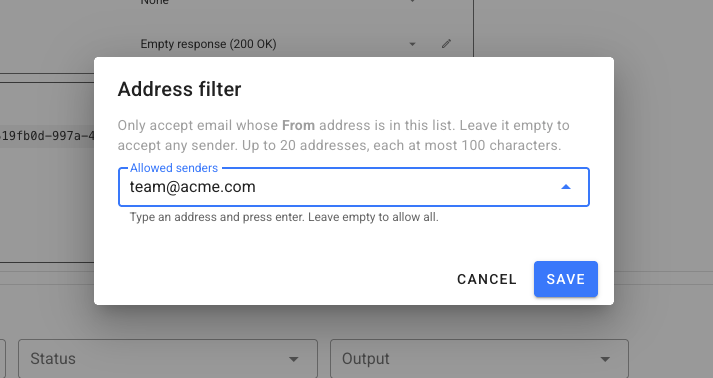
- Matching is exact and case-insensitive on the message's
Fromaddress (e.g.[email protected]). - Leave the allowlist empty to accept any sender.
- This is a hardening control, not authentication — combine it with the SPF/DKIM/DMARC results below if you need to trust the sender's domain.
Enable / disable the address
Each email input has an enabled switch. Disable it to stop accepting mail without deleting the input or losing the address; mail sent while disabled is rejected. Delete the input to free the address entirely.
Attachments
Attachments are inlined into the JSON as base64 (attachments[].content). Two controls keep payloads manageable:
- Drop attachments — skip attachment parsing and storage entirely. The
attachmentsmetadata may still be present withtruncated: true, but nocontentis delivered. Use this when you only care about the email body. - Attachment size cap — a per-message total cap on attachment bytes. When exceeded, attachments are truncated:
name,content_typeandsizeare kept,contentis omitted, andtruncatedis set totrue. A server-wide default applies unless you set a lower per-input cap.
See the payload reference for the attachment fields.
Authentication results
Every parsed message includes the receiving mail server's spf, dkim and dmarc results (e.g. pass, fail, none). Check these in a transform function or at your endpoint before trusting a message — for example, drop anything where dmarc isn't pass for a domain you expect.
const email = JSON.parse(r.body);
if (email.dmarc !== "pass") {
  r.setResponseStatus(202); // accept but ignore
  return;
}
Rate limiting & abuse controls
- Per-input rate limit — each address is rate limited to absorb bursts and abuse; excess mail is rejected (the sending server may retry).
- Message size cap — oversized messages are rejected.
- Unknown / disabled addresses — mail to an address that doesn't resolve is bounced; mail to a disabled input is rejected.
Related
- Receive emails as webhooks — set up an email input.
- Create & poll email addresses from the CLI — set the sender allowlist with
--filter-from. - Email webhook payload — every field.
- Transform functions — filter or reshape messages in flight.