

Fix TLS/SSL handshake errors: unsupported protocol, wrong version number, handshake failure
What each common TLS/SSL handshake error means — handshake failure, protocol version, unsupported protocol, certificate verify failed — and how to fix it.
Almost every TLS/SSL handshake error means the same thing underneath: the client and the server could not agree on a protocol version or cipher suite. One side offered only modern TLS 1.2/1.3; the other offered only legacy TLS 1.0/1.1 (or a weak cipher) — and there was no overlap, so the handshake was aborted.
This happens constantly when webhooks cross a boundary between modern and legacy infrastructure: a new SaaS sender that speaks only TLS 1.3 trying to reach an old on-prem appliance, or a hardened endpoint that has disabled TLS 1.0/1.1 rejecting an older client that can't go higher.
This page is a reference for the exact error strings different tools print, what each one means, and how to fix it — including how Webhook Relay's TLS compatibility lets a legacy sender deliver webhooks that a modern endpoint would refuse, and lets you deliver to destinations with non-standard certificates.
Quick diagnosis
| What you see | What it usually means |
|---|---|
unsupported protocol / protocol_version / ERR_SSL_VERSION_OR_CIPHER_MISMATCH | One side requires a TLS version the other has disabled (e.g. server only allows TLS 1.2+, client only offers TLS 1.0/1.1, or vice-versa). |
sslv3 alert handshake failure / handshake_failure | No shared cipher suite, a missing client certificate, or a rejected protocol version. |
wrong version number | One side is speaking plain HTTP to an HTTPS port (or TLS to a plaintext port) — often not a version problem at all. |
dh key too small / no cipher overlap | The server's certificate or DH parameters use a cipher the modern client refuses. |
certificate verify failed / self-signed certificate / unable to verify the first certificate | The version is fine, but the endpoint's certificate isn't trusted by a public CA (self-signed, internal CA, or incomplete chain). |
error:0A000102:SSL routines::unsupported protocol
The OpenSSL 3.x "no common protocol version" error. You'll also see it wrapped by curl and Node.js:
curl: (35) error:0A000102:SSL routines::unsupported protocol

# OpenSSL 1.1.x phrased it as:
error:1425F102:SSL routines:ssl_choose_client_version:unsupported protocol

# Node.js:
Error: write EPROTO ... error:0A000102:SSL routines::unsupported protocol
What it means: the client and server share no enabled TLS protocol version. The most common cause today is a modern client (OpenSSL 3, which disables TLS 1.0/1.1 by default) connecting to a server that only speaks those old versions.
Fix on your side: upgrade the server to TLS 1.2/1.3, or — if you genuinely must talk to a legacy box — explicitly re-enable an older protocol on the client (curl --tlsv1.0, or an OpenSSL config with MinProtocol = TLSv1). If the legacy system is the one sending you webhooks, point it at a Webhook Relay input with legacy TLS enabled instead of lowering TLS on everything else.
error:14094410:SSL routines:ssl3_read_bytes:sslv3 alert handshake failure
Despite the sslv3 label, this rarely involves SSLv3 — it's a generic handshake failure alert (alert number 40) from the peer.
# OpenSSL / curl
curl: (35) error:14094410:SSL routines:ssl3_read_bytes:sslv3 alert handshake failure

# Python
ssl.SSLError: [SSL: SSLV3_ALERT_HANDSHAKE_FAILURE] sslv3 alert handshake failure (_ssl.c:1007)

# OpenSSL 3.x
error:0A000410:SSL routines::sslv3 alert handshake failure
What it means: the server rejected the handshake. Common causes are no shared cipher suite, the server requiring a client certificate you didn't present, or the server refusing the protocol version the client offered.
Fix on your side: confirm the client and server share at least one cipher suite and TLS version, and supply a client certificate if the endpoint requires mutual TLS.
error:1409442E:SSL routines:ssl3_read_bytes:tlsv1 alert protocol version
The peer sent a protocol_version alert (alert number 70) — it explicitly rejected the TLS version you offered.
curl: (35) error:1409442E:SSL routines:ssl3_read_bytes:tlsv1 alert protocol version
What it means: you offered a TLS version the other side has disabled. Typically an older client (TLS 1.0/1.1 only) hitting a server that now requires TLS 1.2+.
Fix on your side: upgrade the client's TLS library, or route the request through something that can negotiate the version the server expects.
error:1408F10B:SSL routines:ssl3_get_record:wrong version number
This one is a common red herring — it's usually not a TLS version mismatch.
curl: (35) error:1408F10B:SSL routines:ssl3_get_record:wrong version number

# OpenSSL 3.x
error:0A00010B:SSL routines::wrong version number
What it means: the bytes received don't look like a TLS record at all. Almost always one of:
- You sent
https://to a port that's serving plain HTTP (or vice-versa). - A proxy or load balancer terminated TLS and is forwarding cleartext.
- The wrong port entirely.
Fix: check the scheme and port before anything else — match https:// to the TLS port and http:// to the plaintext one.
received fatal alert: protocol_version (Java)
The Java/JSSE wording for the same protocol-version rejection above.
javax.net.ssl.SSLHandshakeException: Received fatal alert: protocol_version

# A related JSSE message when the JVM has disabled the only protocol on offer:
javax.net.ssl.SSLHandshakeException: No appropriate protocol
  (protocol is disabled or cipher suites are inappropriate)
What it means: the JVM and the peer have no enabled TLS version in common. Modern JDKs disable TLS 1.0/1.1 in jdk.tls.disabledAlgorithms, so a JVM talking to a legacy endpoint (or an old JVM talking to a hardened one) fails here.
Fix on your side: align the protocol versions (-Dhttps.protocols=TLSv1.2), or update java.security. If a legacy Java service is posting webhooks and can't reach a modern endpoint, give it a Webhook Relay input that accepts its TLS version instead of relaxing JVM-wide security policy.
[SSL: NO_PROTOCOLS_AVAILABLE] no protocols available (Python)
ssl.SSLError: [SSL: NO_PROTOCOLS_AVAILABLE] no protocols available (_ssl.c:997)

# Often surfaced through requests as:
requests.exceptions.SSLError: HTTPSConnectionPool(host='...', port=443):
  Max retries exceeded ... [SSL: NO_PROTOCOLS_AVAILABLE] no protocols available
What it means: every protocol version Python's ssl module would offer has been disabled (commonly because the OpenSSL build disabled TLS 1.0/1.1 and the target supports nothing newer).
Fix on your side: target an endpoint that supports TLS 1.2+, or — only when you control and trust the legacy endpoint — lower ssl.SSLContext.minimum_version.
ERR_SSL_VERSION_OR_CIPHER_MISMATCH (Chrome / Edge)
The browser equivalent, and by far the most-searched of this family.
This site can't provide a secure connection
example.com uses an unsupported protocol.
ERR_SSL_VERSION_OR_CIPHER_MISMATCH

# In the console / network log:
net::ERR_SSL_VERSION_OR_CIPHER_MISMATCH

# Firefox phrases it as:
Secure Connection Failed — SSL_ERROR_UNSUPPORTED_VERSION
SSL_ERROR_NO_CYPHER_OVERLAP
What it means: the browser (which has dropped TLS 1.0/1.1 and weak ciphers) and the server share no protocol version or cipher. The server is usually too old or misconfigured.
Fix on your side: enable TLS 1.2/1.3 and a modern cipher suite on the server, and make sure the certificate isn't using a deprecated signature.
Error 525: SSL handshake failed (Cloudflare)
Error 525: SSL handshake failed
What it means: Cloudflare (a modern TLS client) couldn't complete the handshake with your origin server — typically the origin requires an older protocol, presents an incomplete certificate chain, or isn't listening on 443.
Fix on your side: ensure the origin supports the TLS version Cloudflare offers and serves a complete, valid certificate chain.
remote error: tls: protocol version not supported (Go)
remote error: tls: protocol version not supported
tls: server selected unsupported protocol version 301
What it means: Go's crypto/tls sets MinVersion to TLS 1.2 by default, so it refuses an endpoint that offers only TLS 1.0 (version 301) or 1.1.
Fix on your side: only if you control the endpoint, set a lower tls.Config{MinVersion: tls.VersionTLS10} — but prefer upgrading the endpoint or bridging it.
certificate verify failed / self-signed certificate / unable to verify the first certificate
A different failure mode: the protocol version is fine, but the client can't verify the endpoint's certificate against a trusted CA.
# curl
curl: (60) SSL certificate problem: self-signed certificate
curl: (60) SSL certificate problem: unable to get local issuer certificate

# Node.js
Error: unable to verify the first certificate (UNABLE_TO_VERIFY_LEAF_SIGNATURE)
Error: self-signed certificate in certificate chain

# Python
ssl.SSLCertVerificationError: [SSL: CERTIFICATE_VERIFY_FAILED]
  certificate verify failed: self signed certificate (_ssl.c:1007)

# Go
x509: certificate signed by unknown authority

# Chrome
NET::ERR_CERT_AUTHORITY_INVALID
What it means: the endpoint presents a certificate that isn't signed by a publicly trusted CA — a self-signed cert, a private/internal CA, an incomplete chain, or an expired certificate.
Fix on your side: install a publicly trusted certificate, or send the full chain (including intermediates). When the destination is an internal or legacy box you control and trust, Webhook Relay can skip verification for that one destination.
How Webhook Relay bridges the gap
Webhook Relay terminates TLS independently on the way in (the input that receives webhooks) and on the way out (delivery to your destination), so the two legs don't have to share the same TLS settings. The controls live in two places.
Accept legacy senders — TLS compatibility on the input
The version and cipher errors above happen when a legacy sender can't complete a modern handshake. If that sender is delivering webhooks to you, you don't have to weaken anything else — just relax TLS on the input it posts to.
Each input has a TLS compatibility setting with two controls:
- TLS version — the minimum version the input accepts. The default is TLS 1.3; lower it to TLS 1.2 for senders that still require it (PayPal webhooks, for example), or further when you must.
- Legacy TLS compatibility (TLS 1.0 + wide ciphers) — a toggle that makes the input accept TLS versions down to 1.0 and a wider legacy cipher set, for the oldest systems that would otherwise fail with
sslv3 alert handshake failure,unsupported protocolorERR_SSL_VERSION_OR_CIPHER_MISMATCH.
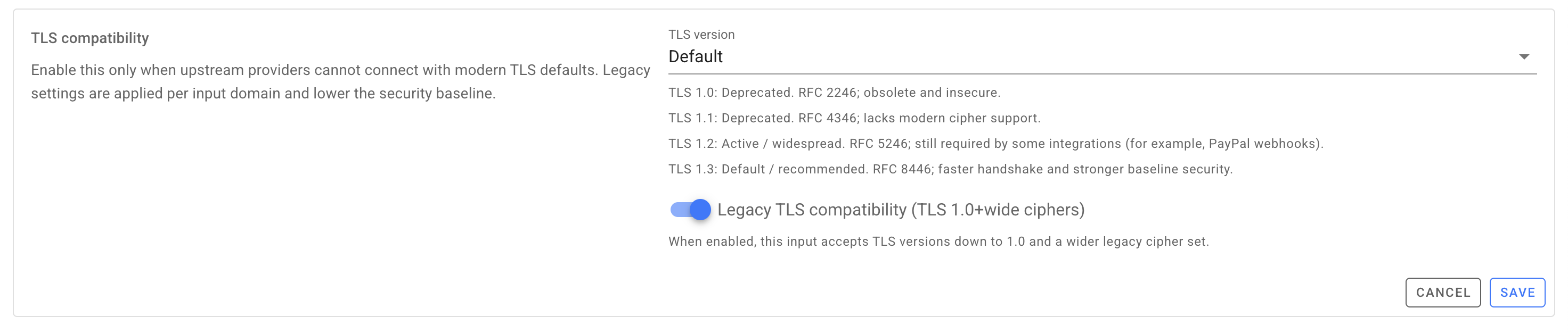
Webhook Relay accepts the old handshake on that input and forwards the event onward over modern TLS — so one legacy sender no longer forces you to lower TLS across your whole stack.
Deliver to non-standard certificates — TLS verification on the output
On the delivery side the relevant control is TLS verification, found per destination under Delivery controls. Leave it on for normal endpoints; switch it off to deliver to a destination whose certificate can't be verified against public CAs — a self-signed cert, an internal CA or a legacy box — instead of failing with certificate verify failed or unable to verify the first certificate.
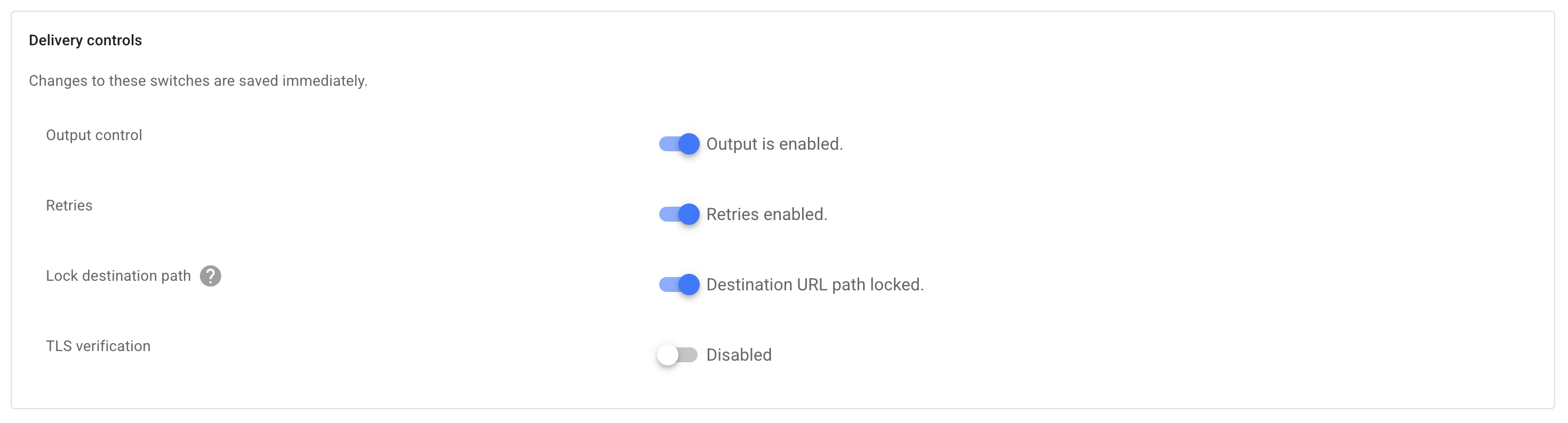
Only disable verification for destinations you control and trust, typically on a private or internal network.
Turn it on
To accept a legacy sender (input):
- Open the input the sender delivers to and find TLS compatibility.
- Set the TLS version to the lowest version that sender needs, and/or turn on Legacy TLS compatibility (TLS 1.0 + wide ciphers).
- Save, then have the sender retry — the handshake now succeeds and the webhook is relayed onward.
To deliver to a self-signed or internal certificate (output):
- Open the output destination and find Delivery controls.
- Turn TLS verification off.
- Re-send a webhook and confirm it's delivered in the request log.
Frequently asked questions
Why do I get "unsupported protocol" even though both sides support TLS?
They support TLS, but not the same version. Modern clients disable TLS 1.0/1.1; if the server only offers those, there is no version in common and the handshake fails with unsupported protocol or a protocol_version alert. One side has to meet the other — which is what a Webhook Relay input does when you lower its minimum TLS version or enable legacy TLS compatibility for a legacy sender.
Is "wrong version number" a TLS version problem?
Usually not. wrong version number almost always means a scheme/port mismatch — https:// pointed at a plaintext HTTP port (or a proxy terminating TLS early). Check the URL scheme and port first.
Is enabling legacy TLS 1.0/1.1 safe?
TLS 1.0 and 1.1 are deprecated and shouldn't be used on the public internet. Webhook Relay applies legacy TLS settings per input domain, so the safe pattern is to enable them only on the one input a legacy sender needs and leave every other input on the modern TLS 1.3 default.
Can I force a minimum TLS version for compliance?
Yes. Set a custom minimum TLS version on an input (Business or Pro) and Webhook Relay refuses handshakes below it. To deliver to an endpoint whose certificate can't be verified, use the per-output TLS verification toggle instead.