

Response (post-delivery) functions
Run a JavaScript or Lua function after a webhook is delivered to alert on failures, push metrics, or flag bad responses.
A response function is a JavaScript or Lua function attached to an output that runs after a webhook has been delivered — once the destination's response, or the final delivery error after all retries are exhausted, is known.
It is the counterpart to the regular request function (also called a transform function), which runs before delivery and reshapes the outgoing request. A response function runs at the other end of the pipeline, on the delivery outcome.
Use it to add custom logic when a delivery succeeds or fails:
- Alert on failures — send a Slack message or email when a delivery returns a 5xx, times out, hits a connection error, or returns an unexpected status.
- Catch silent failures — treat a
200with an empty body (or a{"ok": false}payload) as a failure. - Push metrics or open tickets — react to the outcome of every delivery.
- Flag the recorded response — override the status/body/headers saved to the webhook log so the dashboard and failure alerts reflect what really happened.
A response function cannot change what was already returned to the sender — the webhook is already delivered. It can rewrite the response that gets recorded to the log (see Rewriting the recorded response).
Configuring
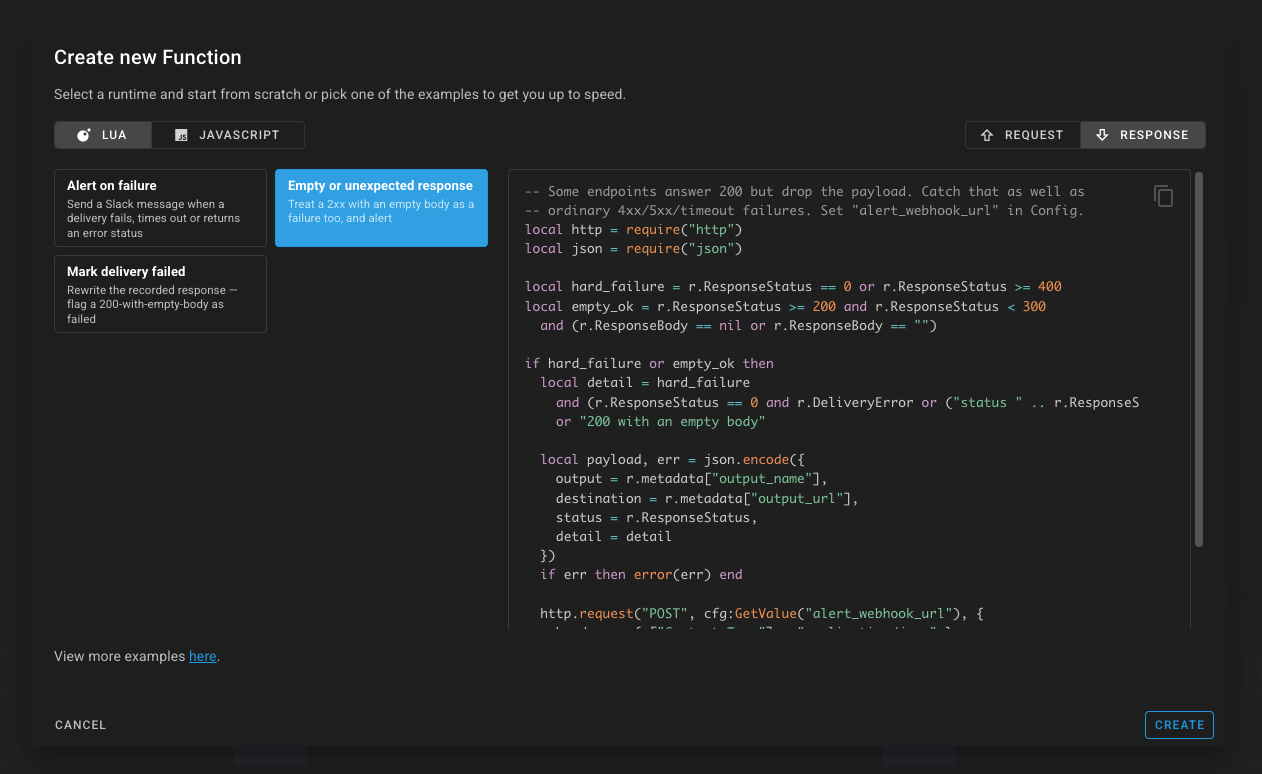
A response function is an ordinary function — create it the same way as any other, but select the RESPONSE tab in the editor. That tab exposes the response examples (alert on failure, mark delivery failed, empty/unexpected response) and the delivery-outcome fields described below.
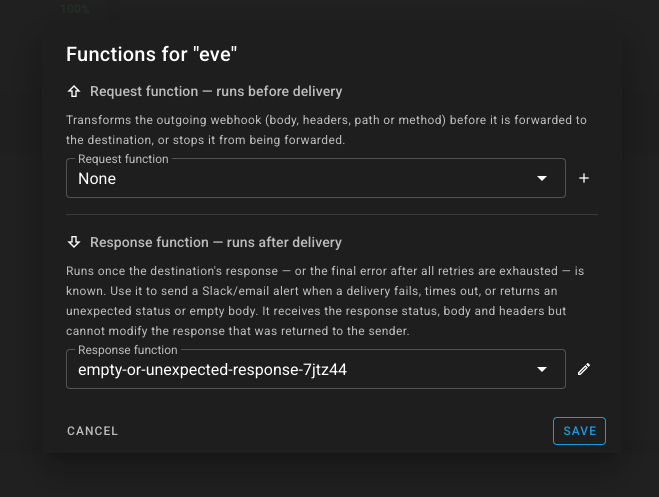
An output then has two independent function slots:
| Slot | Field | When it runs |
|---|---|---|
| Request function | function_id | before delivery — can transform the outgoing request |
| Response function | response_function_id | after delivery — reads the outcome, can flag the recorded response |
Both are optional. In the dashboard, open the output and use the Functions row — a dialog with two dropdowns, clearly marked "runs before delivery" and "runs after delivery". Pick your response function from the second dropdown.
You can also set them over the API:
PUT /v1/buckets/{bucketId}/outputs/{outputId}
{
  "name": "my-endpoint",
  "destination": "https://api.example.com/hook",
  "function_id": "<request function id>",          // runs before delivery (optional)
  "response_function_id": "<response function id>"  // runs after delivery  (optional)
}
The referenced function must belong to your account; it is validated on create/update exactly like function_id. The create_output / update_output MCP tools accept response_function_id too.
The r object
In addition to the usual request fields (r.body, r.headers, r.method, r.metadata, …), a response function reads the delivery outcome:
| JavaScript | Lua | Description |
|---|---|---|
r.responseStatus | r.ResponseStatus | HTTP status code. 0 means no HTTP response — a connection error, timeout, or TLS failure. |
r.responseBody | r.ResponseBody | Response body (string). |
r.responseHeaders | r.ResponseHeader | Response headers (object/table). |
r.error | r.DeliveryError | Transport error string when the status is 0; empty when an HTTP response was received (even a 5xx). |
r.metadata carries output_name, output_url, bucket_name, bucket_id, output_id (and input_name / input_id when available), so an alert can name the output that failed. See Accessing metadata.
The function always runs for every terminal outcome — success and failure — so the function itself decides what to act on (for example, only alert when responseStatus >= 400).
Example: alert on a failed delivery
This is the simplest, alert-only pattern: when a delivery fails (no response, or a 4xx/5xx), post a message to Slack. Set slack_webhook_url as a config variable on the function.
// Runs AFTER the webhook is delivered. Read-only alert on failure.
var failed = r.responseStatus === 0 || r.responseStatus >= 400;

if (failed) {
  var reason = r.responseStatus === 0
    ? ("delivery error: " + r.error)        // 0 == timeout / connection / TLS error
    : ("HTTP " + r.responseStatus);

  console.log("delivery to " + r.metadata["output_name"] + " failed: " + reason);

  var url = cfg.get("slack_webhook_url");
  if (url) {
    http.post(url, JSON.stringify({
      text: "⚠️ Webhook delivery to *" + r.metadata["output_name"] + "* failed: " + reason
    }), { headers: { "Content-Type": "application/json" } });
  }
}
Example: treat an empty 200 as a failure
Some endpoints answer 200 OK but silently drop the payload. This catches that case in addition to ordinary 4xx/5xx/timeout failures, then alerts with structured detail. Set alert_webhook_url as a config variable.
var hardFailure = r.responseStatus === 0 || r.responseStatus >= 400;
var emptyOk = r.responseStatus >= 200 && r.responseStatus < 300 &&
  (!r.responseBody || r.responseBody.trim() === "");

if (hardFailure || emptyOk) {
  var detail = hardFailure
    ? (r.responseStatus === 0 ? r.error : ("status " + r.responseStatus))
    : "200 with an empty body";

  console.error("suspicious delivery to " + r.metadata["output_name"] + ": " + detail);

  var url = cfg.get("alert_webhook_url");
  if (url) {
    http.post(url, JSON.stringify({
      output: r.metadata["output_name"],
      destination: r.metadata["output_url"],
      status: r.responseStatus,
      detail: detail
    }), { headers: { "Content-Type": "application/json" } });
  }
}
Rewriting the recorded response
A response function can override the status code, body, and headers that get recorded to the webhook log. This does not change what was already returned to the sender — the webhook is already delivered — but the recorded delivery status is recomputed from the (possibly overridden) status code. Use it to mark a delivery failed when the destination answered 2xx but the payload says otherwise, so the log and dashboard show it as failed and your failure alerts fire.
It uses the same mutators the request/transform functions use:
| JavaScript | Lua | Effect |
|---|---|---|
r.setResponseStatus(code) | r:SetResponseStatusCode(code) | overrides the recorded status code (a 5xx marks the delivery failed) |
r.setResponseBody(s) | r:SetResponseBody(s) | overrides the recorded response body |
r.setResponseHeader(k, v) | r:SetResponseHeader(k, v) | overrides/adds a recorded response header |
Only the fields you set change; the rest of the destination's response is preserved.
This example flags a 200-with-empty-body delivery (and, in JS, a {"ok": false} payload) as a 502 failure:
var ok2xx = r.responseStatus >= 200 && r.responseStatus < 300;
var emptyBody = !r.responseBody || r.responseBody.trim() === "";

// Also catch endpoints that always answer 200 but embed {"ok": false}.
var appError = false;
if (ok2xx && !emptyBody) {
  try {
    var parsed = JSON.parse(r.responseBody);
    appError = parsed && parsed.ok === false;
  } catch (e) {
    // not JSON — leave appError false
  }
}

if (ok2xx && (emptyBody || appError)) {
  // Override the recorded response: mark it failed. Only the fields we set
  // change; the rest of the response is preserved.
  r.setResponseStatus(502);
  r.setResponseHeader("X-Webhookrelay-Flagged", "response-function");
  if (emptyBody) {
    r.setResponseBody("empty body from destination (flagged by response function)");
  }
}
When it runs (exactly once)
A response function runs once per delivery, on the terminal outcome, regardless of which delivery path the webhook takes:
| Output / path | When it runs |
|---|---|
| Public HTTP, no durability | on the terminal outcome (sent/failed) |
| Public HTTP, durable retry | when durable retry reaches a terminal outcome — success, terminal 4xx, or give-up after the deadline |
| Throttled output | on the terminal outcome (a failure handed to durable retry fires when retries finish) |
| Internal (relay agent) output | when the agent reports the delivery result back |
| Manual retry / redeliver | on the re-delivery's terminal outcome |
A webhook handed off to durable retry is recorded as stalled (not terminal) on the immediate path, so the function does not fire early — it runs once durable retry finishes.
Internal (relay-agent) outputs run the response function on the gRPC agent path, where the agent reports its delivery result back. The legacy websocket agent stream is fire-and-forget (it carries no response), so for full-fidelity response functions on internal outputs, use a gRPC-based relay agent.
Observability
- Each run increments
relay_response_function_runs_total{result="ok|function_error|exec_error"}. - Reactor execute logs (under the function's Logs) capture every run, attributed to the
responsestep. The webhook log stores the run's execution id, so the log-details view renders a Response function diff showing what the function recorded. - A function that throws emits a
function errornotification withstep = "response".
Next steps
- Alerting from functions — short recipes: alert when the request is not valid JSON, or when the response body is empty.
- Read, write request & response data — the request-side mutators and config variables.
- Make HTTP requests — call external APIs (used here to send alerts).
- Accessing metadata —
output_name,output_url, and the rest ofr.metadata. - Send emails — alert by email instead of an HTTP call.