
Embed the customer portal
Give each of your customers a branded webhook portal inside your SaaS app: mint a single-use portal session on your server (Node.js, Go, Python or curl), embed it in an iframe or redirect to it, and configure branding and allowed origins.
The customer portal lets each of your customers manage its own webhook endpoints and debug its own deliveries, without you building a settings page. Your server asks Webhook Relay for a single-use portal link for the signed-in customer (an outbound consumer). Your app shows that link in an iframe or redirects to it. The portal carries your name, logo and colours, and it acts only on that one customer's endpoints and messages. It is included on every plan, Free included.
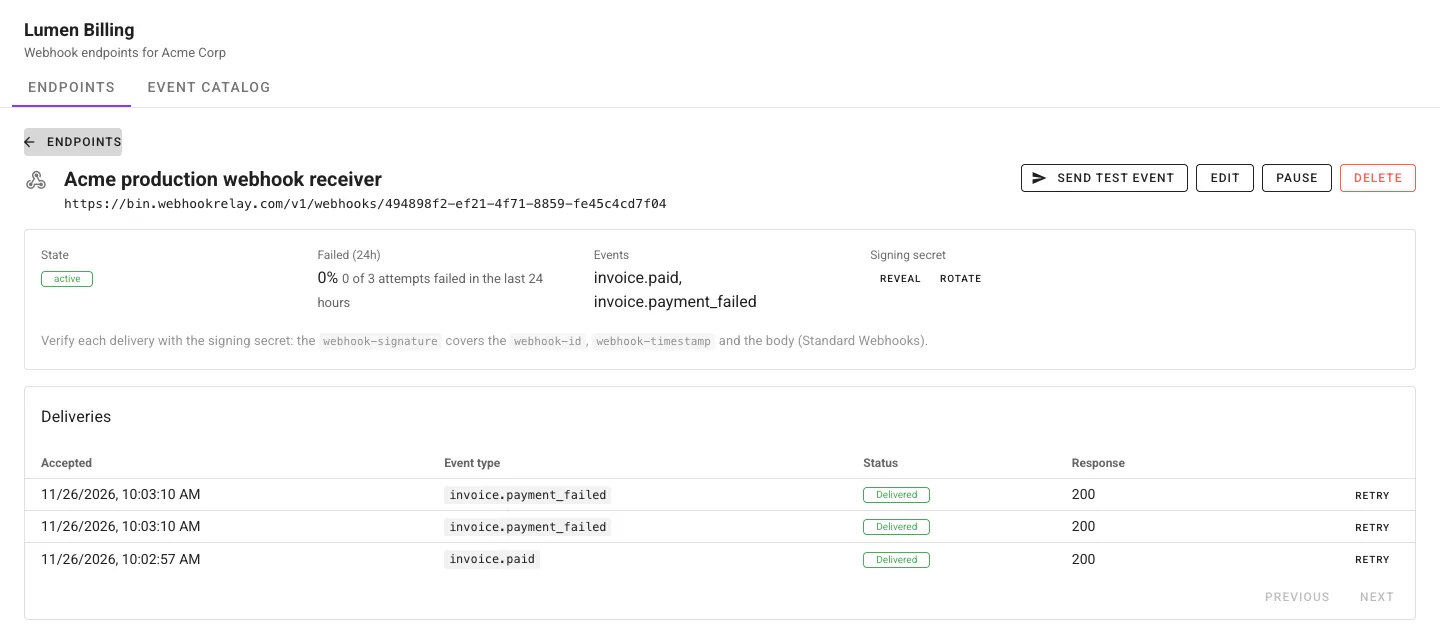
What your customers can do
| In the portal | manage session (default) | read session |
|---|---|---|
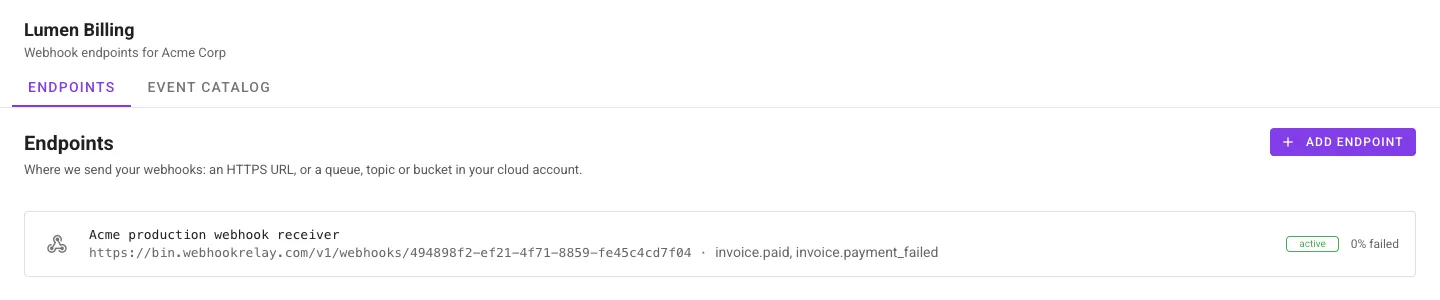
| See endpoints, their state and failure rate | ✓ | ✓ |
| Browse your event catalog with example payloads | ✓ | ✓ |
| Read deliveries, attempts and responses for each message | ✓ | ✓ |
| Add, edit, pause, resume and delete endpoints | ✓ | |
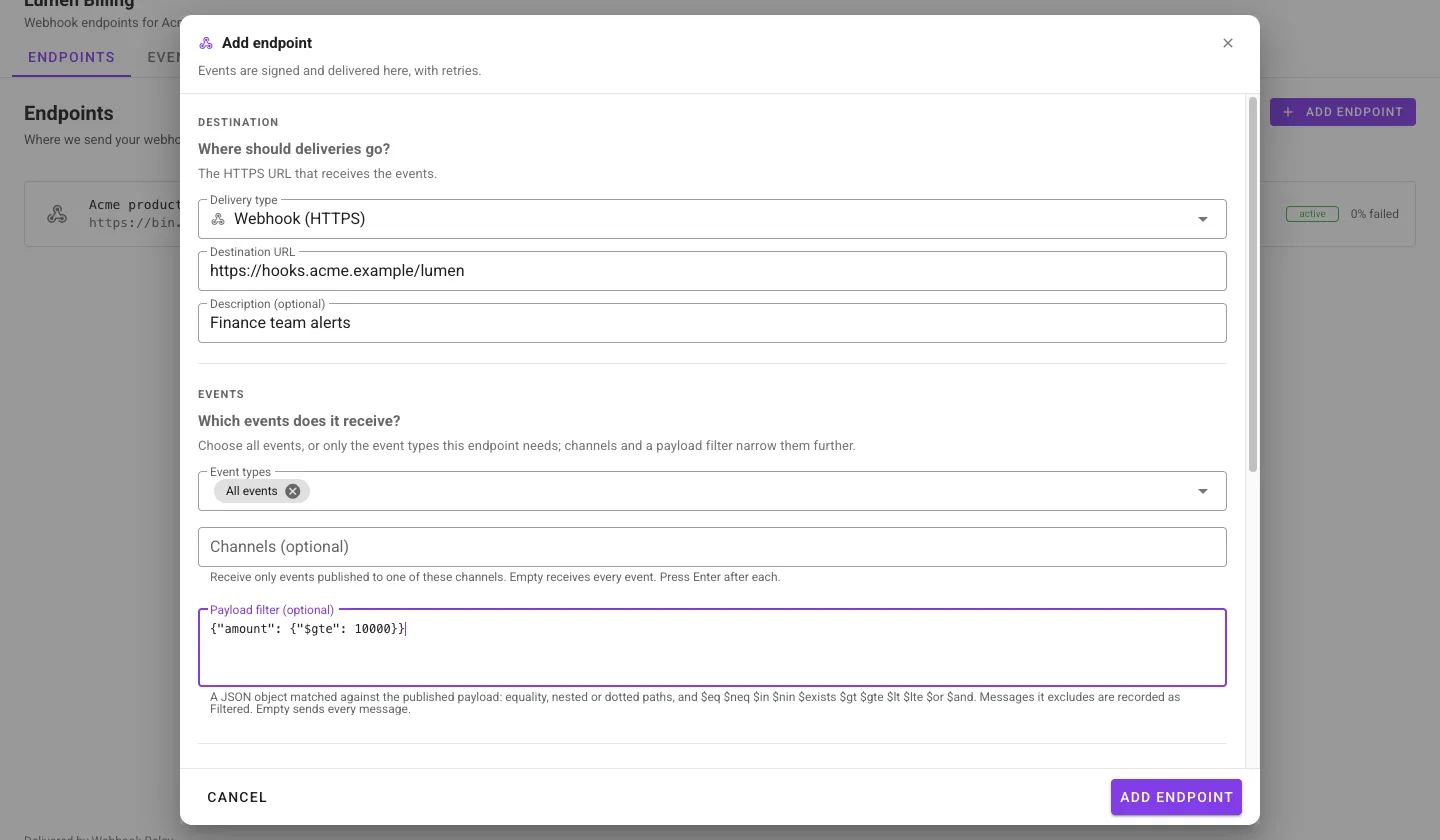
| Choose event types, channels and a payload filter per endpoint | ✓ | |
| Deliver to an HTTPS URL, or to their own AWS SQS, SNS, S3, Google Pub/Sub or Cloud Storage | ✓ | |
| Reveal and rotate the signing secret, or import an existing one | ✓ | |
| Send a test event, retry a delivery, recover failures, replay skipped messages | ✓ |
A customer can't attach your Functions or do anything your own API would refuse: portal changes go through the same validation and plan limits. Every portal change is recorded in your account's audit log with the source portal, the consumer and who created the link. Writes are rate-limited per consumer. Test sends and recoveries are limited more tightly, because they use your account's daily test-event allowance and its recovery slots.
How it works
- Your server mints a link. When a signed-in user opens your "Webhooks" settings page, your backend calls
POST /v1/outbound/consumers/{id}/portal-sessionswith your Webhook Relay credentials and gets back aurl. - The browser opens it. Your page puts the
urlin an iframe (or redirects to it). The link carries a one-time token in its#fragment, so the token never reaches a server log or aRefererheader. - The portal exchanges the token. The portal page swaps the one-time token for a session that only works on the
/v1/portalAPI and only for that consumer. A used or expired link can't be opened again, so mint a fresh one on every page load.
Your Webhook Relay credentials never reach the browser. Only the single-use link does.
Configure the portal
Open Outbound webhooks → Portal in the dashboard and set:
| Setting | What it does |
|---|---|
| Name | Shown in the portal header, for example your product name. |
| Logo URL | An https image shown next to the name. |
| Accent colour | #RRGGBB used for buttons, links and the active tab. |
| Theme | Follow the visitor's system setting (auto, the default), or force light or dark. |
| Sites allowed to embed the portal | The https origins that may show the portal in an iframe, one per line, for example https://app.example.com or https://*.example.com (up to 20). Leave it empty if you only redirect. |
| Refresh URL | An https page in your app that mints a new link. An expired session shows a button that opens it. |
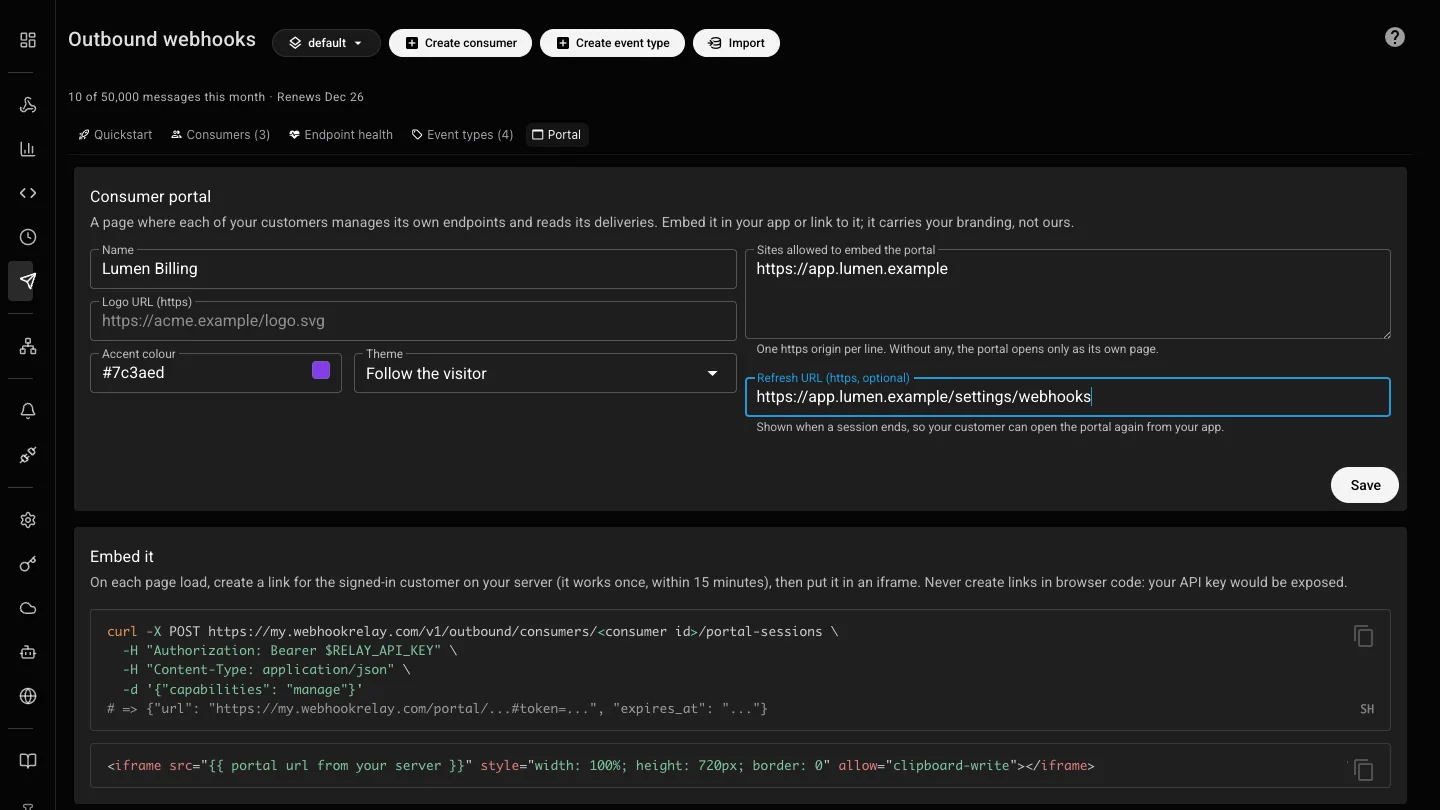
Settings belong to the account and apply to every environment. From code, PUT /v1/outbound/portal-settings replaces all of them, so send every field you want to keep:
curl --user "$RELAY_KEY:$RELAY_SECRET" \
  -H 'Content-Type: application/json' \
  -X PUT https://my.webhookrelay.com/v1/outbound/portal-settings \
  -d '{
    "name": "Lumen Billing",
    "logo_url": "https://app.lumen.example/logo.svg",
    "accent_color": "#7c3aed",
    "theme": "auto",
    "allowed_origins": ["https://app.lumen.example", "https://*.lumen.example"],
    "refresh_url": "https://app.lumen.example/settings/webhooks"
  }'
GET /v1/outbound/portal-settings returns them, together with your portal_id. The portal ID is public: it picks the branding and framing policy and grants no access. An origin that isn't https is refused with 400. For local development, open the portal as its own page (see Redirect instead of embedding), or put your dev server behind an https tunnel and allow that origin.
Create a portal session on your server
Mint a link each time a signed-in user opens the page. Use the consumer ID you registered for that user's organization. The examples authenticate with an access token restricted to Outbound: manage (RELAY_KEY and RELAY_SECRET). A restricted token can only reach outbound routes, so a leak exposes less.
// portal.ts — Node.js 18+ (built-in fetch)
const RELAY_API = "https://my.webhookrelay.com/v1/outbound";
const RELAY_AUTH =
  "Basic " + Buffer.from(`${process.env.RELAY_KEY}:${process.env.RELAY_SECRET}`).toString("base64");

type PortalLink = { url: string; expires_at: string; token_expires_at: string };

// Mint a single-use portal link for one of your customers (an outbound consumer).
export async function createPortalSession(
  consumerId: string,
  options: { capabilities?: "manage" | "read"; ttl?: number; next?: string; session_id?: string } = {},
): Promise<PortalLink> {
  const res = await fetch(`${RELAY_API}/consumers/${encodeURIComponent(consumerId)}/portal-sessions`, {
    method: "POST",
    headers: { Authorization: RELAY_AUTH, "Content-Type": "application/json" },
    body: JSON.stringify(options),
  });
  if (!res.ok) throw new Error(`portal session failed: ${res.status} ${await res.text()}`);
  return (await res.json()) as PortalLink;
}

// End a customer's open portal sessions (all of them, or one session_id), e.g. on sign-out.
export async function endPortalSessions(consumerId: string, sessionId?: string): Promise<number> {
  const res = await fetch(`${RELAY_API}/consumers/${encodeURIComponent(consumerId)}/portal-sessions/expire`, {
    method: "POST",
    headers: { Authorization: RELAY_AUTH, "Content-Type": "application/json" },
    body: JSON.stringify(sessionId ? { session_id: sessionId } : {}),
  });
  if (!res.ok) throw new Error(`end portal sessions failed: ${res.status} ${await res.text()}`);
  return ((await res.json()) as { ended: number }).ended;
}
The response is 201 Created:
{
  "url": "https://my.webhookrelay.com/portal/8e003056-845f-492b-8701-6cd9c9108611#token=wrpt_…",
  "expires_at": "2026-11-26T18:11:00Z",
  "token_expires_at": "2026-11-26T06:26:00Z"
}
token_expires_at is the deadline for opening the link (15 minutes). expires_at is when the session ends once it's open. Treat url like a password until it's used: return it only to the signed-in user, never log it, and don't cache the response.
| Option | Default | Notes |
|---|---|---|
capabilities | manage | manage lets the customer change endpoints, send tests and recover deliveries; read only browses. Pick per user role. |
ttl | 43200 (12 hours) | Session lifetime in seconds after the link is opened, from 3600 (1 hour) to 604800 (7 days). Out of range is 400. |
next | endpoints | The page to open: endpoints, endpoints/new, endpoints/<id>, event-types or messages/<id>. Useful for deep links such as "Add your first endpoint". |
session_id | none | Your own tag, up to 128 characters, such as user-123. Use it to end that user's sessions later. |
| Response | Meaning |
|---|---|
201 | The link was created. |
400 | An invalid option, such as ttl out of range. |
401 / 403 | Missing or wrong credentials, or a token without outbound access, or bound to another environment. |
404 | No consumer with that ID in this environment, or an unknown environment. |
SDK support
The TypeScript and Go SDKs add portal helpers in their next releases: relay.outbound.portalSessions.create() / .expire() and a React <WebhookRelayPortal url={url} /> component in @webhookrelay/sdk, and CreateOutboundPortalSession / ExpireOutboundPortalSessions in webhookrelay-go. Until those versions are published, call the REST endpoint as shown above. It's the same request.
Embed it in your app
Expose a small authenticated route that mints a link for the signed-in user. Your settings page calls it and puts the URL in an iframe. Use POST so that browsers, link previews and prefetchers never trigger it, because each link works only once.
// Express 5. requireUser is your own auth middleware.
import express from "express";
import { createPortalSession } from "./portal";

const app = express();

app.post("/api/webhooks/portal", requireUser, async (req, res) => {
  const user = req.user;
  const { url } = await createPortalSession(user.organizationId, {
    capabilities: user.isAdmin ? "manage" : "read",
    session_id: `user-${user.id}`,
  });
  res.set("Cache-Control", "no-store").json({ url });
});
Then the page that hosts the portal:
<iframe
  id="webhooks-portal"
  title="Webhooks"
  allow="clipboard-write"
  referrerpolicy="no-referrer"
  style="width: 100%; height: 720px; border: 0"
></iframe>
<script>
  fetch("/api/webhooks/portal", { method: "POST", credentials: "same-origin" })
    .then((res) => res.json())
    .then(({ url }) => {
      document.getElementById("webhooks-portal").src = url;
    });
</script>
allow="clipboard-write" lets customers copy their signing secret from inside the frame. The iframe only loads on origins listed in the portal settings, because the portal page is served with Content-Security-Policy: frame-ancestors 'self' <your origins>. Elsewhere the browser refuses to frame it. In React development mode, Strict Mode runs effects twice and mints two links. Only the one that loads is used, and the other expires unused after 15 minutes.
Redirect instead of embedding
If you'd rather not frame the portal, send the user to it. Use a 303 redirect from a route that requires sign-in. No allowed origin is needed for this, and it is also the easiest way to try the portal on localhost.
app.get("/settings/webhooks/open", requireUser, async (req, res) => {
  const { url } = await createPortalSession(req.user.organizationId, { session_id: `user-${req.user.id}` });
  res.set("Cache-Control", "no-store").redirect(303, url);
});
Point the Refresh URL setting at this route. When a session expires, the portal shows a button that opens it, and the user lands in a fresh session.
End sessions on sign-out
Sessions end on their own after ttl. To end them sooner, for example when the user signs out of your app or loses access to the organization, call the expire endpoint with the same session_id you minted with, or without one to end every open session of that customer:
await endPortalSessions(user.organizationId, `user-${user.id}`);
An open portal page shows that the session ended on its next request, with the refresh button if you configured one.
What your customer sees
The customer adds its own endpoint with the same form you use in the dashboard: destination, event types, optional channels and a payload filter, rate and timeout, and an optional existing signing secret to import.
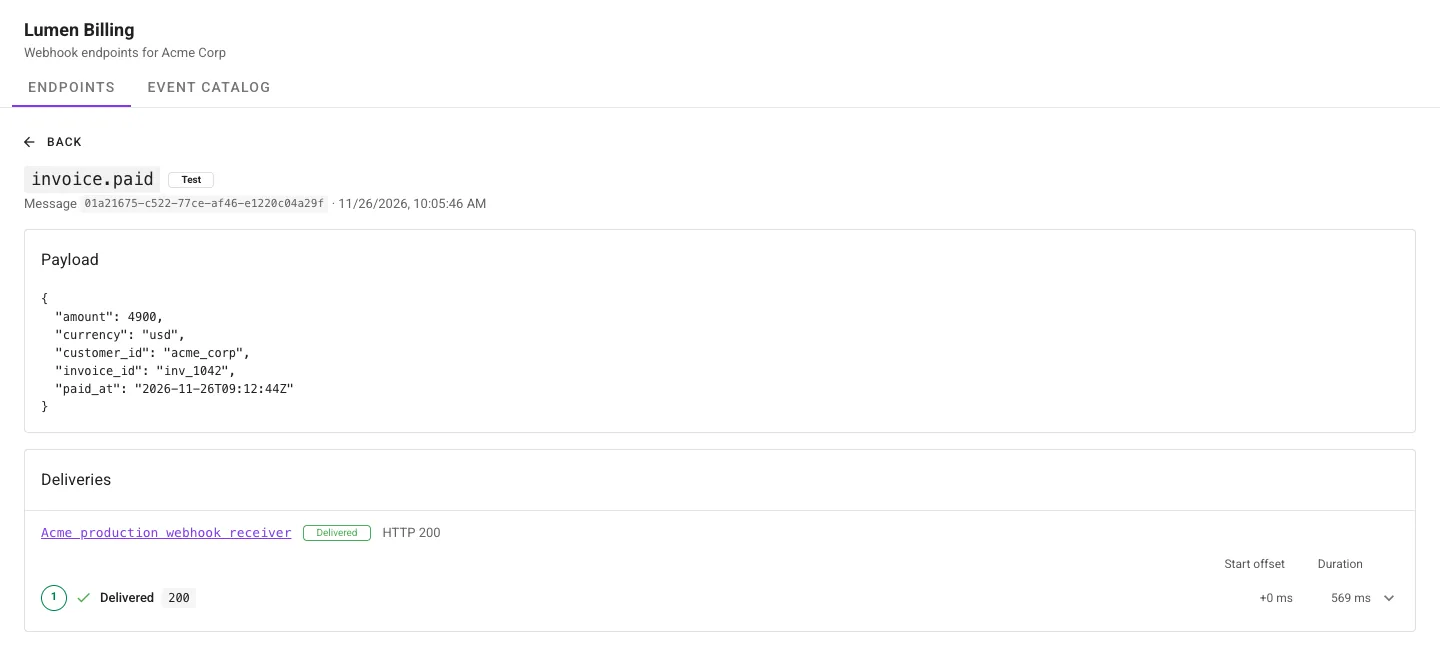
Send test event delivers a signed test straight away, and the customer sees the attempt and the response its server returned. Test events count toward your account's 100 test events per 24 hours, not toward the monthly message quota.
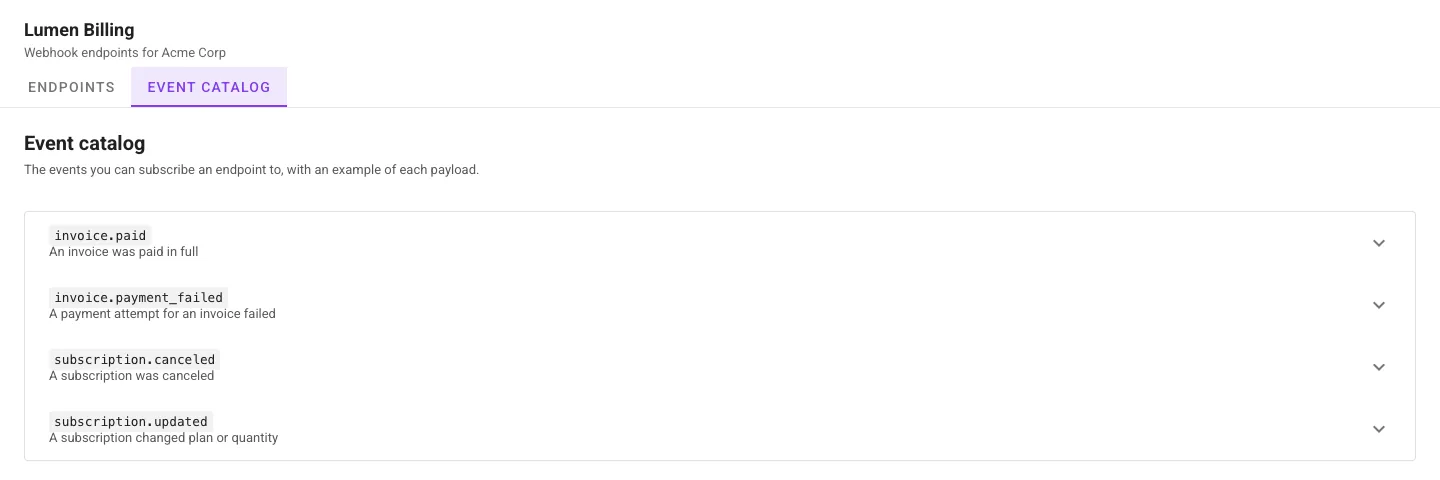
The Event catalog tab lists your non-deprecated event types with their descriptions and example payloads, so customers know what to subscribe to. Write good description and example values when you create event types.
Open a customer's portal from the dashboard
Support teams can see exactly what a customer sees. On a consumer's page in Outbound webhooks, Open portal opens a manage session for that consumer in a new tab. Changes made there are audited under your name.
Environments
A portal session belongs to the environment it was created in, and the portal acts only there. To give a customer the portal for your staging environment, send the environment header when you mint the link:
curl --user "$RELAY_KEY:$RELAY_SECRET" \
  -H 'Content-Type: application/json' \
  -H 'X-Outbound-Environment: staging' \
  -X POST https://my.webhookrelay.com/v1/outbound/consumers/acme_corp/portal-sessions \
  -d '{}'
An access token bound to one environment always mints sessions there. Branding and allowed origins are shared by all environments.
Security checklist
Before you ship
- Mint links on your server only. Your Webhook Relay credentials must never reach browser code.
- Map the signed-in user to their own consumer ID on the server. Never take the consumer ID from the request.
- Use
readsessions for users who shouldn't change webhook settings. - Return the link with
Cache-Control: no-store, never log it, and mint a new one on every page load. - List only your own app's origins in Sites allowed to embed the portal.
- End sessions with the expire endpoint when a user signs out or leaves the organization.
API and MCP reference
| Action | REST | MCP tool |
|---|---|---|
| Create a portal link | POST /v1/outbound/consumers/{id}/portal-sessions | create_outbound_portal_session |
| End sessions | POST /v1/outbound/consumers/{id}/portal-sessions/expire | end_outbound_portal_sessions |
| Read settings | GET /v1/outbound/portal-settings | get_outbound_portal_settings |
| Replace settings | PUT /v1/outbound/portal-settings | update_outbound_portal_settings |
The MCP tools are available to MCP clients and the dashboard agent, so you can ask it to "open the portal for acme_corp" or "allow https://app.example.com to embed the portal". The portal's own /v1/portal API accepts only portal sessions, never account tokens, and is not meant to be called from your code.
Next steps
- Set up the Outbound Gateway if you haven't created event types and consumers yet.
- Send customers the receiving guide so they can verify signatures with the secret they find in the portal.
- Monitor, retry and recover deliveries across all customers from your side.
Frequently asked questions
Does Webhook Relay have an embeddable webhook portal for my customers?
Yes. The Outbound Gateway includes a customer portal on every plan, Free included. Your backend creates a portal session for one consumer with POST /v1/outbound/consumers/{id}/portal-sessions and gets a single-use URL. You show that URL in an iframe in your app, or redirect to it. In the portal, the customer adds and edits its endpoints, reveals or rotates signing secrets, sends test events, browses your event catalog and reads, retries and recovers its own deliveries.
How do I embed the Webhook Relay portal in an iframe?
Add your app's https origin to the portal settings' allowed origins, for example https://app.example.com or https://*.example.com. Then, on each page load, have your server create a portal session for the signed-in customer and return its url to the browser. Set that url as the iframe's src, with allow=clipboard-write so customers can copy their signing secret. The portal page is served with a frame-ancestors policy that names only your allowed origins.
How long does a portal link last?
The link is single-use and must be opened within 15 minutes. After it is opened, the session lasts the ttl you asked for: 1 hour to 7 days, 12 hours by default. An expired session shows a message and, if you set a refresh URL, a button back to your app so it can create a new link. You can end a customer's sessions early with POST /v1/outbound/consumers/{id}/portal-sessions/expire, for example when your user signs out.
Can I give a customer read-only access to the portal?
Yes. Create the session with capabilities set to read. A read session can browse endpoints, the event catalog and delivery history but can't add, change, pause, delete, test or recover anything. The default, manage, allows all of those.
Can I brand the portal?
Yes. Portal settings set the name shown in the header, a logo URL, an accent colour for buttons and links, and the theme (follow the visitor, light or dark). The portal shows your branding with a small 'Delivered by Webhook Relay' footer link. A custom portal domain isn't available yet.