
Jenkins Generic Webhook Trigger with Bitbucket
Trigger a private Jenkins from Bitbucket webhooks with the Generic Webhook Trigger plugin. How to pass the job token, extract the branch from the payload, and route many repositories through one relay.
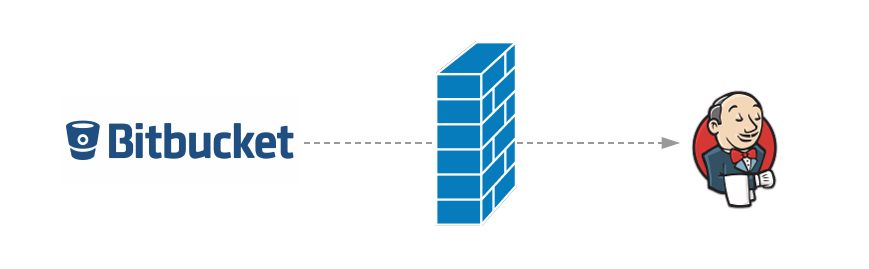
The Generic Webhook Trigger plugin is the most flexible way to start Jenkins jobs from webhooks. It accepts any JSON payload, extracts values with JSONPath, and can filter on branch or event type before it starts a build. Combined with Webhook Relay it also works when Jenkins runs on a private network with no public IP, which is the usual setup for corporate Jenkins servers.
The step most people get stuck on is the token. The plugin needs it to decide which job a webhook belongs to, and Bitbucket gives you no obvious place to put it. This tutorial shows where it goes, then builds a working pipeline with branch filtering and multi-repository routing.
Every example on this page was tested end to end against a real Jenkins 2.541.3 in Docker with Generic Webhook Trigger 2.4.3. Requests went through a Webhook Relay bucket and the relay agent, and the screenshots come from that run.
Using the Bitbucket plugin's
/bitbucket-hook/endpoint instead? See Jenkins and Bitbucket. For every provider's Jenkins webhook URL, see the complete Jenkins webhooks guide.
How the token reaches Jenkins
A Generic Webhook Trigger endpoint looks like this:
http://JENKINS_URL/generic-webhook-trigger/invoke?token=<job-token>
The plugin accepts the token in one of three places:
| Where | Example |
|---|---|
| Query parameter | /generic-webhook-trigger/invoke?token=billing-api |
token header | token: billing-api |
Authorization header | Authorization: Bearer billing-api |
Bitbucket Cloud webhooks can't send custom headers, so from Bitbucket's side the query string is the only option. Webhook Relay passes the incoming query string through to your destination:
Bitbucket  ──POST──▶  https://abc123.hooks.webhookrelay.com/?token=billing-api
                                         │
                                 relay agent (inside your network)
                                         │
Jenkins    ◀──POST──  http://localhost:8080/generic-webhook-trigger/invoke?token=billing-api
That gives you three ways to set the token. Pick one:
- Token in the Bitbucket URL. This is the quickest, and is shown in the main steps below.
- Token on the Webhook Relay output. Bitbucket never sees the token. See Option B.
- Token chosen by a function based on the repository, so one URL serves every repo. See Option C.
Prerequisites
- A Webhook Relay account (sign up) and an access key and secret from the tokens page.
- Jenkins with the Generic Webhook Trigger plugin installed (Manage Jenkins → Plugins → Available plugins).
- A machine on the same network as Jenkins to run the relay agent. This can be the Jenkins host itself.
- A Bitbucket repository you can add webhooks to.
Step 1: Create the forwarding bucket
On a machine that can reach Jenkins, install the relay CLI and log in:
relay login -k $RELAY_KEY -s $RELAY_SECRET
Create a bucket whose destination is the Generic Webhook Trigger endpoint. Leave the token off this URL, because it arrives on the incoming request:
relay forward --bucket bitbucket-jenkins \
  http://localhost:8080/generic-webhook-trigger/invoke --no-agent
The output includes your public endpoint:
Forwarding configuration created:
https://abc123.hooks.webhookrelay.com -> http://localhost:8080/generic-webhook-trigger/invoke
If the agent runs on a different machine from Jenkins, use Jenkins' internal address instead of localhost, such as http://jenkins.internal:8080/generic-webhook-trigger/invoke.
Step 2: Run the agent
For a quick test, run it in the foreground:
relay forward --bucket bitbucket-jenkins
For a permanent setup, run it as a container that restarts on its own:
docker run -d --name whr-jenkins --restart always --network host \
  -e RELAY_KEY=$RELAY_KEY \
  -e RELAY_SECRET=$RELAY_SECRET \
  -e BUCKETS=bitbucket-jenkins \
  webhookrelay/webhookrelayd:latest
--network host lets the container reach localhost:8080. Leave it out if the destination uses an internal hostname. To use a systemd service instead of Docker, see autostart on Linux.
Prefer not to run a separate process? The Webhook Relay Jenkins plugin runs inside Jenkins. Choose the Generic Webhook Trigger preset. It also passes the query string through, so everything below still applies.
Step 3: Create the Jenkins pipeline
Create a Pipeline job (here called billing-api) and use this Jenkinsfile. It reads the branch, commit and repository from the Bitbucket push payload and only builds pushes to main:
pipeline {
  agent any

  triggers {
    GenericTrigger(
      token: 'billing-api',

      genericVariables: [
        [key: 'BRANCH',     value: '$.push.changes[0].new.name'],
        [key: 'REF_TYPE',   value: '$.push.changes[0].new.type'],
        [key: 'COMMIT',     value: '$.push.changes[0].new.target.hash'],
        [key: 'REPO',       value: '$.repository.full_name'],
        [key: 'PUSHED_BY',  value: '$.actor.display_name'],
      ],
      genericHeaderVariables: [
        [key: 'X-Event-Key', regexpFilter: ''],
      ],

      // Only build branch pushes to main.
      regexpFilterText: '$x_event_key $REF_TYPE $BRANCH',
      regexpFilterExpression: '^repo:push branch main$',

      causeString: '$PUSHED_BY pushed $COMMIT to $REPO ($BRANCH)',
      printContributedVariables: true,
      printPostContent: false,
      silentResponse: false
    )
  }

  stages {
    stage('Checkout') {
      steps {
        git branch: env.BRANCH,
            url: "[email protected]:${env.REPO}.git",
            credentialsId: 'bitbucket-ssh'
      }
    }
    stage('Build') {
      steps {
        sh 'make test'
      }
    }
  }
}
The plugin stores header variables in lowercase, with dashes replaced by underscores, so the X-Event-Key header becomes $x_event_key.
The filter combines three values into one line, for example repo:push branch main, and only builds when that line matches. This skips tag pushes, other branches, and branch deletions (in a deletion, new is null).
Avoid @ in causeString. Jenkins HTML-escapes it, so the build cause shows @.
Run the job once by hand. When the trigger lives in a Jenkinsfile, Jenkins only registers it after the pipeline has run once. Until then, every webhook gets a 404 with "Did not find any jobs with GenericTrigger configured! A token was supplied." Click Build Now once. After that, pushes trigger the job.
For a Freestyle job, or if you don't want to keep the config in the Jenkinsfile, the same fields are under Build Triggers → Generic Webhook Trigger in the job configuration.
Step 4: Add the Bitbucket webhook
In Bitbucket go to Repository settings → Webhooks → Add webhook:
- Title:
Jenkins (via Webhook Relay) - URL: your public endpoint plus the job's token:
https://abc123.hooks.webhookrelay.com/?token=billing-api - Triggers: Repository push
Save it. When someone pushes to main, Bitbucket calls Webhook Relay, the agent forwards the request to /generic-webhook-trigger/invoke?token=billing-api, and Jenkins starts the billing-api job.
Step 5: Test without pushing
You can send a Bitbucket-shaped payload through the public URL yourself:
curl -X POST 'https://abc123.hooks.webhookrelay.com/?token=billing-api' \
  -H 'Content-Type: application/json' \
  -H 'X-Event-Key: repo:push' \
  -d '{
    "actor": {"display_name": "Jeff"},
    "repository": {"full_name": "acme/billing-api"},
    "push": {"changes": [{
      "new": {"type": "branch", "name": "main", "target": {"hash": "4f2c9e1"}}
    }]}
  }'
The agent logs every delivery with the final URL it called, so you can see the token arrive. This is the test run: the first request came before the job had ever run, then a push to main, a push to feature-x, and a request with the wrong token:
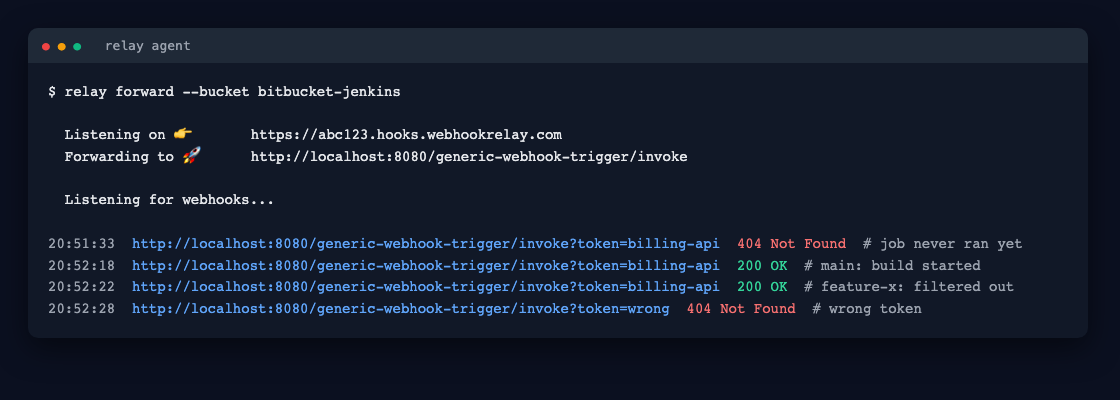
The bucket's page on the Webhook Relay dashboard shows the same deliveries, along with Jenkins' full response to each. When a job matches, the Generic Webhook Trigger replies with JSON that names it. This is the real response for the push to main:
{
  "jobs": {
    "billing-api": {
      "regexpFilterExpression": "^repo:push branch main$",
      "triggered": true,
      "resolvedVariables": {
        "BRANCH": "main",
        "COMMIT": "4f2c9e1",
        "PUSHED_BY": "Jeff",
        "REF_TYPE": "branch",
        "REPO": "acme/billing-api",
        "x_event_key": "repo:push",
        "x_event_key_0": "repo:push"
      },
      "regexpFilterText": "repo:push branch main",
      "id": 5,
      "url": "queue/item/5/"
    }
  },
  "message": "Triggered jobs."
}
The push to feature-x also returns 200, but with "triggered": false and "regexpFilterText": "repo:push branch feature-x". In the build itself, the console shows the cause string and every variable that was extracted:
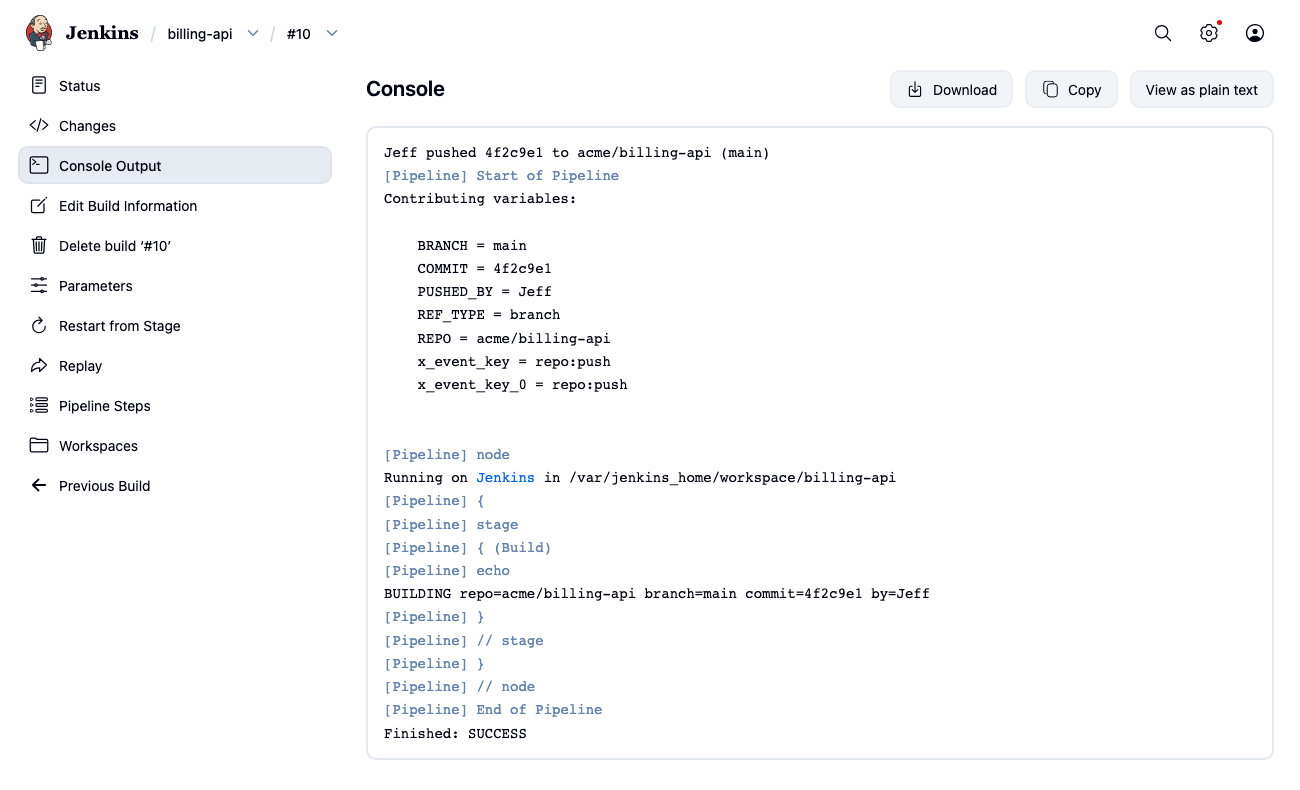
If triggered is false, the token matched but the filter didn't. Compare regexpFilterText with your expression. If you see "Did not find any jobs", the token didn't match any job. Check the query string in the log, then check that the job has run once.
Option B: Keep the token out of Bitbucket
The token in a URL is visible to anyone who can see the repository's webhook settings, and it appears in delivery logs. To keep it inside your own infrastructure, set it on the Webhook Relay output instead:
- In the Bitbucket webhook, use the plain URL:
https://abc123.hooks.webhookrelay.com/ - In the dashboard, open the bucket's output and add a header:
token: billing-api.Authorization: Bearer billing-apiworks too.
Webhook Relay adds the header to every request it forwards, so Jenkins gets the token and Bitbucket never sees it.
Another way is to append the token to the destination URL (…/invoke?token=billing-api). This only works while incoming requests have no query string of their own. In testing, a request to https://abc123.hooks.webhookrelay.com/?source=bitbucket was forwarded as …/invoke?token=billing-api?source=bitbucket, and Jenkins returned 404. Put the token in one place only: the Bitbucket URL, the output header, or the destination.
Option C: One URL for many repositories
With ten repositories and ten Jenkins jobs, you don't need ten buckets. There are two ways to share one.
Different tokens in the Bitbucket URL. Point every repository at the same public endpoint and give each webhook its own token: ?token=billing-api, ?token=web-frontend, ?token=payments. Each Jenkins job uses the matching token: value.
One URL, token chosen by a function. Use the same plain URL for every repository, and let a function on the output choose the token from the payload. Store the repository-to-token map as a function config variable, so the tokens aren't in the code:
// Config variable REPO_TOKENS, for example:
// {"acme/billing-api":"billing-api","acme/web-frontend":"web-frontend"}
const tokens = JSON.parse(cfg.get("REPO_TOKENS"))

const body = JSON.parse(r.body)
const repo = body.repository && body.repository.full_name
const token = tokens[repo]

if (!token) {
  // Unknown repository: log it, but don't forward it to Jenkins.
  r.stopForwarding()
} else {
  r.setHeader("token", token)
}
Attach the function to the bucket's output. When you add a repository, add it to REPO_TOKENS and point its webhook at the shared URL. You don't need to change any Bitbucket token or Jenkins URL.
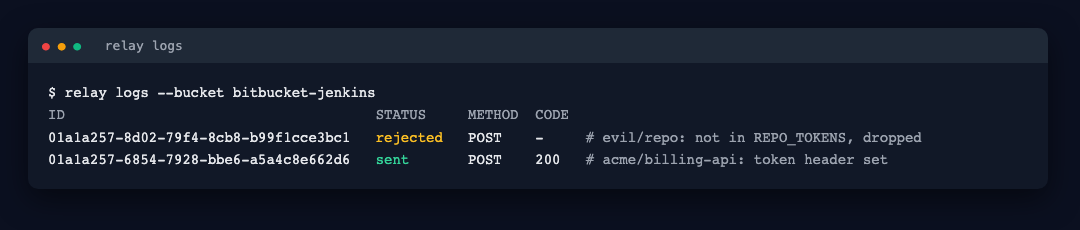
This has a security benefit as well. Webhooks from repositories that aren't in the map are dropped before they reach Jenkins, and they still appear in the bucket logs as rejected, so you can audit them:
Bitbucket Data Center payloads
Bitbucket Data Center (Server) sends a different payload, so change the JSONPath expressions to match:
genericVariables: [
  [key: 'BRANCH', value: '$.changes[0].ref.displayId'],
  [key: 'COMMIT', value: '$.changes[0].toHash'],
  [key: 'REPO',   value: '$.repository.slug'],
  [key: 'PROJECT', value: '$.repository.project.key'],
],
genericHeaderVariables: [
  [key: 'X-Event-Key', regexpFilter: ''],
],
regexpFilterText: '$x_event_key $BRANCH',
regexpFilterExpression: '^repo:refs_changed main$',
Data Center webhooks can send custom headers, but the query-string token works on both versions, so you can use the same Jenkins setup for both. These Data Center paths weren't part of the Docker test run, so check them against a real delivery with printPostContent: true before you rely on them.
Troubleshooting
| What you see | Likely cause |
|---|---|
| Bucket log shows the request as received but never delivered | The agent isn't running or isn't subscribed to this bucket. |
| Jenkins returns 404 with "Did not find any jobs with GenericTrigger configured" | The token is missing or wrong, or the Jenkinsfile job has never run. |
The agent log shows …?token=…?… (two ?) | The token is in the destination URL and the incoming request also has a query string. Put it in one place only. |
Jenkins returns 200 but "triggered": false | The token matched but the regexp filter didn't. Compare the regexpFilterText in the response with your expression. |
| Variables are empty in the build | The JSONPath doesn't match. Set printPostContent: true temporarily and check the payload in the build log. Bitbucket Cloud and Data Center use different field names. |
| Jenkins returns 403 | The request reached a path that isn't CSRF-exempt. Check that the destination is exactly /generic-webhook-trigger/invoke. |
For each delivery, the bucket log in Webhook Relay shows the full request and Jenkins' full response, and you can resend any request from there while you adjust the filter. You don't have to push a new commit for each test.
Frequently asked questions
How do I pass the token to the Jenkins Generic Webhook Trigger?
The plugin reads the token from a token query parameter, a token header, or an Authorization: Bearer header. Bitbucket Cloud cannot add custom headers to a webhook, so the simplest option is to append it to the URL you give Bitbucket, for example https://abc123.hooks.webhookrelay.com/?token=billing-api. Webhook Relay passes the query string through to /generic-webhook-trigger/invoke unchanged. If you would rather keep the token out of Bitbucket, set it as a header on the Webhook Relay output instead.
Why does Jenkins say 'Did not find any jobs with GenericTrigger configured'?
No job has a Generic Webhook Trigger whose token matches the request. Either the token is missing or different, or the job has never run. When the trigger is defined in a Jenkinsfile, Jenkins only registers it after the pipeline has run once, so start the first build by hand. After that, pushes trigger it.
Does Webhook Relay forward the query string to Jenkins?
Yes. The query string from the incoming request is added to the destination URL, so a request to the public URL with ?token=billing-api reaches Jenkins as /generic-webhook-trigger/invoke?token=billing-api. If the incoming request has a query string, keep the destination URL itself free of one: put the token in one place only, either in the Bitbucket URL or on the output.
Can one Bitbucket webhook URL trigger different Jenkins jobs?
Yes. Give each job its own token and give each repository's Bitbucket webhook a different ?token= value, all pointing at the same bucket. Or keep one URL for every repository and attach a small Webhook Relay function that reads repository.full_name from the payload and sets the matching token header.
Does this work with Bitbucket Data Center?
Yes. The setup is the same, but the payload looks different. The branch is at changes[0].ref.displayId, the repository is at repository.slug, and the X-Event-Key header for a push is repo:refs_changed rather than repo:push. Change the JSONPath expressions in genericVariables to match.
Do I need a publicly reachable Jenkins for this?
No. Run the relay agent, or the Webhook Relay Jenkins plugin, on the private network. It opens an outbound connection to Webhook Relay and sends each webhook to Jenkins locally, so you don't open any inbound ports.