
Signature verification
Verify Stripe, Standard Webhooks (Svix, Clerk, Resend), Slack, Shopify and GitHub webhook signatures on the input, and re-sign deliveries so retries and replays pass your server's timestamp check.
Open the input, go to Security → Signature verification, choose the provider, paste its signing secret and click Save. From then on, a webhook with a missing, invalid or expired signature gets a 401 and is never logged or forwarded. Step-by-step setup.
Optional: turn on re-sign on delivery so retries and replays of verified webhooks still pass your server's 5-minute timestamp check. Available on every plan.
Supported providers
| Provider | Header checked | Arrival tolerance |
|---|---|---|
| Stripe | Stripe-Signature | 5 min |
| Standard Webhooks / Svix (Clerk, Resend, …) | webhook-signature or svix-signature | 5 min |
| Slack | X-Slack-Signature | 5 min |
| Shopify | X-Shopify-Hmac-Sha256 | No signed timestamp |
| GitHub | X-Hub-Signature-256 | No signed timestamp |
Webhook Relay applies the tolerance when the request reaches your input. Your receiver applies its own timestamp check when the delivery reaches it. Re-sign on delivery refreshes the timestamp for verified webhooks.
Using a provider that isn't on this list? See other providers below.
Turn it on in the dashboard
- Open Buckets, then the bucket, then the input. The input settings open in a dialog.
- Under Security, select Signature verification.
- Pick the Provider.
- Paste the provider's Signing secret (see which secret to paste). It's encrypted at rest and never shown again.
- Optionally turn on Re-sign on delivery. Leave it off if nothing downstream checks the signature.
- Click Save. From now on, webhooks to this input need a valid signature.
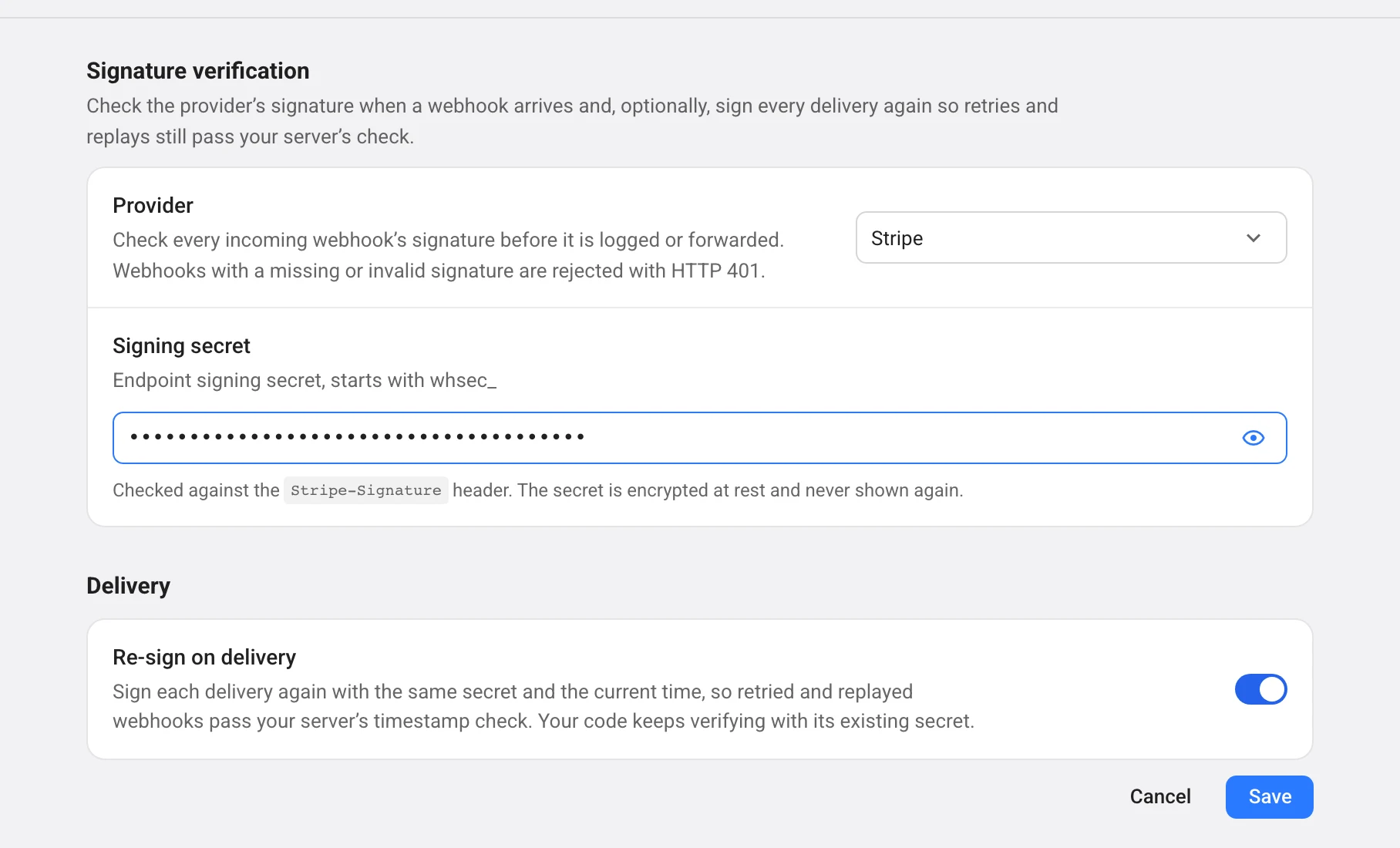
To test it, use a test input. Send an event from the provider and check that it appears in the bucket's logs. Save a deliberately wrong secret and send another: the sender gets a 401 and nothing new is logged. Then save the correct secret again and confirm the next event goes through.
To turn verification off, set the provider back to Off. To change the secret, paste a new one and save. Leaving the field empty keeps the stored secret.
Which secret to paste
- Stripe: the endpoint's signing secret,
whsec_…(Workbench → Webhooks → the endpoint → Click to reveal). - Standard Webhooks / Svix: the endpoint's signing secret,
whsec_…followed by base64. - Slack: the app's signing secret, on its Basic Information page.
- Shopify: the app's client secret. For a webhook created in the store admin, the signing secret shown there.
- GitHub: the secret set on the repository, organization or app webhook.
Re-sign on delivery
Stripe, Standard Webhooks and Slack put a timestamp inside the signature. Their SDKs refuse a webhook whose timestamp is more than 5 minutes old. For example, Stripe's constructEvent throws Timestamp outside the tolerance zone. That is a good defence against replay attacks, but it also rejects authentic webhooks that arrive late:
- a delivery that Webhook Relay retries after your server was down
- a webhook you replay from the logs
- a webhook queued for a relay agent that was offline, delivered when it reconnects
- a webhook held back by throttling
With re-sign on, each delivery attempt is signed again with the current time, the same secret and the body that is actually sent. Your server's existing verification code passes, with no change to the secret or the tolerance.
For Shopify and GitHub, which sign only the body, re-signing keeps the signature valid after an input or output function changes the payload.
Re-signing applies to deliveries to public URLs and to relay agents. If a delivery can't be signed, it goes out with the original headers rather than not at all, and the error is logged.
Same secret, end to end
Re-signing uses the same secret as verification, so your destination keeps verifying with the provider's secret. Only webhooks that passed verification on arrival are re-signed. A forged request can't be made to look authentic, and a webhook whose signature had already expired when it reached Webhook Relay is rejected, not rescued.
Set it through the API
Send a verification block when you create or update an input:
curl -X PUT \
  "https://my.webhookrelay.com/v1/buckets/$BUCKET_ID/inputs/$INPUT_ID" \
  -u "$RELAY_KEY:$RELAY_SECRET" \
  -H 'Content-Type: application/json' \
  -d '{
    "verification": {
      "provider": "stripe",
      "secret": "whsec_...",
      "resign": true
    }
  }'
| Field | Notes |
|---|---|
provider | stripe, standard_webhooks, slack, shopify or github. An empty string turns verification off. |
secret | Write-only. It's required when you turn verification on or change the provider. On an update with the same provider, leave it out to keep the stored secret. |
resign | true re-signs every delivery. Defaults to false. |
secret_set | Read-only. true when a secret is stored. The secret itself is never returned. |
The MCP server tools create_input, update_input and get_input take and return the same verification block, so an AI agent can turn it on for you: "Verify Stripe signatures on my billing bucket's input and re-sign deliveries."
What a rejected sender sees
| Status | Body | When |
|---|---|---|
401 | webhook signature verification failed: missing signature: no Stripe-Signature header | The signature header is missing |
401 | webhook signature verification failed: invalid signature: Stripe-Signature does not match | Wrong secret, or the body was changed |
401 | webhook signature verification failed: signature timestamp outside the tolerance window | The signed timestamp is more than 5 minutes off |
401 | signature verification is enabled but no signing secret is configured | Verification is on but no secret is stored |
503 | signature verification temporarily unavailable | The secret couldn't be loaded. The provider retries. |
Rejected requests don't create webhook logs, run functions or reach your outputs. Forged traffic can't fill your logs or leave payloads in your account.
Other providers: verify with a function
For providers that aren't built in, such as PagerDuty, Square, Twilio, Zendesk, DocuSign or your own systems, attach a function to the input. The function recomputes the HMAC and stops forwarding with a 401 when it doesn't match. Adapt it to your provider's format: which bytes it signs, the header name and prefix, hex or base64, and whether a timestamp is included.
local crypto = require('crypto')

-- The secret comes from the function's config variables
local secret = cfg:GetValue("WEBHOOK_SECRET")
local sig, err = crypto.hmac('sha256', r.RequestBody, secret)
if err then error(err) end

-- Change the header name and prefix to match your provider
if "v1=" .. sig ~= r.RequestHeader["X-PagerDuty-Signature"] then
  r:SetResponseStatusCode(401)
  r:SetResponseBody("invalid signature")
  r:StopForwarding()
  return
end
The HMAC guide walks through creating the function, storing the secret as a config variable and testing it in the function editor. Senders that use other schemes are covered by JWT and username and password authentication.
Not sure what a provider signs? Paste a captured request into the free webhook signature verifier. It covers Stripe, GitHub, Shopify, Slack, Twilio, Square, Zendesk and more.
Reference
What each scheme signs
Every built-in scheme uses HMAC-SHA256 and a constant-time comparison. The raw request body, exactly as it arrived, is always part of the signed message. Some schemes also sign a timestamp or message ID:
- Stripe:
t.body, the timestamp and the body. - Standard Webhooks / Svix:
id.timestamp.body. - Slack:
v0:timestamp:body. - Shopify and GitHub: the body only.
When a provider sends several signatures at once, which Stripe and Svix do while you roll a secret, any one that matches is accepted. Each input verifies one provider, so give each provider its own input. They can share the same outputs.
Notes
- Raw body. Verification runs on the bytes the provider sent, before any function runs. It isn't affected by how your destination parses JSON.
- Clock. The 5-minute window is measured against Webhook Relay's clock when the webhook arrives, the same tolerance as Stripe's and Svix's SDKs.
- Combine it with an IP allowlist. A signature proves the payload came from the provider. A source IP allowlist also blocks traffic from unknown networks. Use both for webhooks that reach private networks.
Frequently asked questions
Which webhook providers can Webhook Relay verify without a function?
Stripe, Standard Webhooks (Svix and the senders built on it, such as Clerk and Resend), Slack, Shopify and GitHub. Pick the provider in the input's Signature verification settings and paste the signing secret. For any other provider, verify the signature with a function on the input.
What is re-sign on delivery?
Webhook Relay signs each delivery again with the same signing secret, the current time and the body actually delivered. Stripe, Standard Webhooks and Slack sign a timestamp and SDKs reject signatures older than 5 minutes, so without re-signing a webhook that is retried, replayed or delivered to an agent that was offline fails verification on your server. Your code keeps verifying with its existing secret.
What happens to a webhook with an invalid signature?
It is rejected with HTTP 401 at the edge. No webhook log is written, no function runs and nothing is forwarded to your outputs or agents.
Is signature verification available on the free plan?
Yes. Built-in signature verification and re-signing are available on every plan.